 Skava
Skava


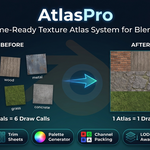
AtlasPro — Game-Ready Texture Atlas System for Blender
Atlasing for production scenes, not toy demos. AtlasPro merges materials across multi-material objects, deduplicates shared materials across the whole selection, repacks UVs, and writes engine-ready PBR atlases — in one click.
If you've ever exported a scene only to discover 200 draw calls where you expected 5, AtlasPro is the tool that catches it before it leaves Blender.
What It Does
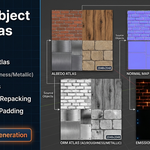
Select your meshes, pick a resolution, click Create PBR Atlas. AtlasPro walks every material slot of every selected object, dedupes identical materials, packs all source textures into a single unified atlas per map type (Albedo / Normal / ORM / Emission), rewrites the UVs of each face to fit its tile, builds a single Principled BSDF material, and assigns it to every object. The result: one draw call instead of fifty.
What It Handles
| Feature | Why it matters |
|---|---|
| Multi-material per object | Production assets (clothes, vehicles, characters) have 3-10 materials per object. v1.0 only read the active slot. v1.1 reads them all and emits a tile per material. |
| Material deduplication | 50 props sharing one material now produce one atlas tile, not 50. Tighter atlas, bigger draw-call saving. |
| Save to disk + naming template | Auto-write PNG to a folder with custom filenames like T_Atlas_albedo_2048 — drop straight into your studio's import pipeline. |
| Backup original materials | The UVs, material slots and face assignments are kept, and Restore Originals puts them back exactly — also after saving and reopening. |
| Reuse atlas material | A name that is already taken gets the next free one (Atlas_2 …) and the status bar says why; nothing of yours is overwritten. |
| Robust node-chain detection | Image Texture, Mix, Invert, Math, Separate / Combine Color and Normal Map are computed exactly, per pixel. A material whose look depends on anything else (Bump, Hue/Saturation, Color Ramp, a node group …) is left as it was and named, instead of getting a wrong tile. |
How It Works
- Select meshes in the viewport (one with many slots, or many sharing materials — both work).
- N-panel → AtlasPro → PBR Atlas panel.
- Set Resolution (2K or 4K), tick the maps you want, set Save to if you want PNGs on disk.
- Click Create PBR Atlas. A progress cursor shows percentage; on completion the status bar reports the atlas name, how many materials went in and on how many objects, how much the tiles were shrunk, and where the atlas went.
Key Features
PBR Atlas Builder
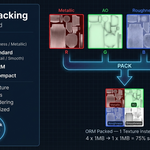
Single command. Reads Base Color, Normal (with Normal Map nodes), Roughness, Metallic, Alpha and Emission from every material slot. Builds packed atlases at 512 / 1K / 2K / 4K and an optional ORM combined map (R=AO, G=Roughness, B=Metallic). UVs are rewritten per-face so each material's faces land in the right tile.
Multi-Material per Object + Deduplication
Reads every material slot of each object (toggle off to revert to v1.0 active-only behaviour). Identical materials referenced multiple times across the selection are merged into one atlas tile.
Save to Disk + Naming Template
Set an output folder and every atlas image is written as PNG. The naming template supports {name}, {map}, {res} tokens — match Unity, Unreal, glTF, Godot, or any in-house convention.
Trim Sheets
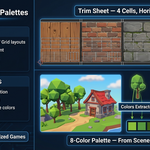
Build trim sheets from selected materials in horizontal, vertical, or grid layouts — perfect for hard-surface modular kits.
Palette Textures
Generate a tiny N×1 palette image from the dominant colours of selected materials (4, 8, 16, or 32 colours). Each face's UV is collapsed onto its colour pixel. A tiny texture for low-poly stylised assets.
LOD-Aware Atlas
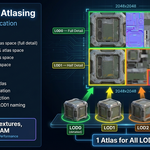
Allocate atlas space proportional to LOD level — full size for LOD0, ½ for LOD1, ¼ for LOD2, ⅛ for LOD3. Massive savings on heavy LOD chains.
Channel Pack
Standalone packer with built-in ORM, Unity Standard, Unreal ORM, and Mobile Compact presets. Drop in your AO/Rough/Metal/etc., pick a preset, get a packed RGBA image.
Who Is This For
- Game artists shipping to Unity / Unreal / Godot who care about draw-call counts
- Environment artists on open-world, mobile, or VR projects with tight performance budgets
- Hard-surface modellers using trim sheets for modular kits
- Indie developers who need a one-button atlas without writing custom Python
- Tech artists building automated content pipelines with predictable PBR output
Compatibility
- Blender 4.2 LTS and later, checked on 4.2.9, 5.1, 5.2, 5.2.1 and 5.2.2
- Works with any render engine (atlas data is engine-agnostic)
- No external dependencies — pure Python + numpy (numpy ships with Blender)
FAQ
Does it work on multi-material objects?
Yes, since v1.1.0. Each material slot becomes its own atlas tile and the faces using that slot are remapped to it.
Does it modify my originals?
Yes — UVs are rewritten and the unified atlas material replaces the original slots. If Backup original materials is enabled (default on), Restore Originals puts back the UVs, the material slots and which face used which slot.
What if my materials use Mix or Hue/Sat nodes between Image Texture and Principled BSDF?
Mix (Mix, Multiply, Add, Subtract, Screen), Invert, Math, Separate / Combine Color and Normal Map are computed exactly. Hue/Saturation, Bump, Color Ramp, Mapping or a node group make AtlasPro leave that material as it was and name it in the Info log — bake it to textures and run again.
Does it save the atlas images to disk?
Optionally. Set the Save to folder and PNGs are written automatically. Leave empty and the atlas images are packed into the .blend, so they survive saving and reopening.
Can I re-run it without piling up Atlas.001, Atlas.002…?
Building again on objects that already show the atlas is refused — press Restore Originals, change the settings and build again; the atlas keeps its name and replaces only its own files.
Which Blender versions?
4.2 LTS and later, checked on 4.2.9, 5.1, 5.2, 5.2.1 and 5.2.2.
Changelog
v1.2.1
- Maintenance release. The package ships the full GPL-3.0 licence text and a README with install, first-run and uninstall steps. Minimum Blender is 4.2 LTS. No changes to the tools.
v1.2.0
- Source textures as large as the atlas no longer stack on top of each other: every tile is shrunk by one common factor and the status bar says by how much
- Normal and ORM atlases no longer come out black; colours from 8-bit textures are no longer washed out
- Materials that cannot be reproduced exactly are left as they were and named, instead of getting the wrong image; the Principled BSDF connected to the output is used
- Restore Originals button: materials, UVs and slots come back exactly, also after saving and reopening
- An atlas kept inside the .blend is packed and survives reopening
- Names and files never collide: a second atlas gets its own name, existing files and same-named images and materials are left alone
- Channel Pack leaves AO white, because a Principled BSDF has no AO input
v1.1.0 — 2026-05-24
- Multi-material per object support
- Material deduplication across the selection
- Save atlases to disk (PNG) with naming template
- Backup original materials to custom property
- Reuse atlas material on re-run
- Progress feedback during long bakes
- Single-object atlasing supported
- Faster image reading and writing
- Recursive node-chain detection (from v1.0.1) for any shader graph
v1.0.0 — Initial release
- PBR Atlas, Trim Sheets, Palette Textures, LOD Atlas, Channel Pack
- Auto / manual mipmap-safe padding
- 512 / 1K / 2K / 4K atlas resolution