 Skava
Skava


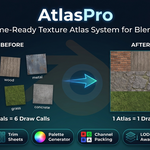
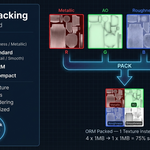
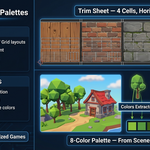

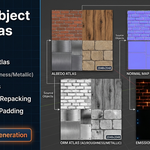
Maintenance release. The package now ships the full GPL-3.0 licence text and a README with install, first-run and uninstall steps.
Minimum Blender is now 4.2 LTS (earlier builds were tested on 3.x; 4.2 is what we test on).
No changes to the tools. Verified from the installed archive on Blender 4.2.9 and 5.2.0.
A correctness release. The atlas now shows what your materials show, and
when a material cannot be carried into an atlas exactly, AtlasPro leaves it as
it was and tells you why instead of putting the wrong image in its tile.
Fixed (reported by a customer):
- Source textures as large as the atlas (six 4K textures into a 4K atlas) were
stacked on top of each other, so only the last item survived. Tiles are now
shrunk by one common factor, and the status bar says by how much.
- The Normal and ORM atlases came out black, and colours from 8-bit textures
were washed out in the saved file.
Also fixed:
- Missing maps take the material's own values (a fabric with Metallic 0 no
longer turns into metal; a solid-colour material keeps its colour).
- Node chains are computed exactly: Mix, Invert, Math, Separate and Combine
Color, Normal Map strength. Packed ORM textures (glTF) read the right
channels. Materials that need Bump, Mapping, a node group, a Mix Shader or a
non-Principled shader are left as they were and named in the Info log.
- Restore Originals button: materials, UVs and slots come back exactly, also
after saving and reopening the file.
- An atlas kept inside the .blend is packed and survives reopening; the
original materials stay in the file.
- A second atlas gets its own name instead of replacing the first; files in
the Save to folder and same-named images or materials are never overwritten.
- Linked duplicates are remapped once; with "All material slots" off the
other slots keep their material; the render UV map is the one rewritten.
- Alpha is carried into the saved PNG and the material; Emission Strength is
carried.
- Sharper downscaling; the padding lines up with the UVs.
- Works from Edit Mode; settings that cannot work are refused before anything
changes, and a failure half-way puts everything back.
- Trim Sheet, LOD Atlas and Palette assign their material and can be restored;
Palette matches each material by the colour it shows; Channel Pack no
longer writes a black AO channel.
- A texture with alpha whose Alpha output is not connected keeps its look:
Blender multiplies such a colour by its alpha before shading, and the atlas
was 4.4× brighter than the source. It now shades back to the same colour.
- Normal Map Strength above 1 follows Blender's own formula again (it was 7.4°
off at 2.0, and at 5.0 the stored normal pointed into the surface).
- An image you keep with a fake user is never replaced; a UV Map node naming a
layer the mesh does not have no longer sets the material aside (Blender
ignores such a node too); with Backup off the message no longer sends you to
a button that is greyed out; Restore Originals names the materials added
after the atlas that it drops; the LOD report counts tiles and materials
apart; colours clipped at 1.0 and a wide spread of Emission Strength are
reported instead of passing in silence.
Have questions about this product?
Login to message
| Sales | 30+ |
| Published | 7 months ago |
| Blender Version | 3.2 - 5.1 |
| Extension Type | N/A |
| Render Engine Used | Arnold, Blender-Internal, Blender-Game-Engine, Cycles, Eevee, Freestyle, Luxrender, Mental-Ray, Octane, Vray, Yafaray |
| License | GPL |
Discover more products like this
palette-texture mobile optimization LOD PBR game-dev Trim Sheet game assets uv-tools draw-call-reduction Channel Packing texture atlas Texture packing