 Skava
Skava


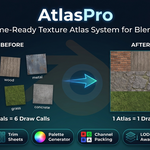
Download the zip and do not unpack it. In Blender open Edit > Preferences > Add-ons, click the drop-down arrow in the top-right corner and choose Install from Disk, then pick the zip. Tick the checkbox next to AtlasPro. Press N in the 3D Viewport and open the AtlasPro tab.
Blender 4.2 LTS and later. Checked on 4.2.9, 5.1, 5.2, 5.2.1 and 5.2.2.
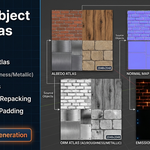
Select the objects (one object with several material slots works too), choose Resolution and the maps (Include Albedo, Include Normal, Include ORM, Include Emission) in the PBR Atlas panel and press Create PBR Atlas. Every material gets one tile, the faces using it are remapped to that tile on the UV map that renders, and the objects get one atlas material. 50 objects sharing one material get one tile. Other UV maps, such as a lightmap, are not touched.
It reads the Principled BSDF connected to the active Material Output, with plain values, Image Texture, Mix, Invert, Math, Separate and Combine Color, RGB, Value and tangent-space Normal Map computed per pixel. When a material's look cannot be reproduced exactly (a Mix Shader, a Bump, Mapping or Color Ramp node, a node group, a texture repeating across the faces, UDIM tiles), AtlasPro does not guess: that material keeps its own slot and UVs, and the Info log names it with the reason. Bake such a material to textures and run AtlasPro again. AtlasPro itself does not bake.
Yes. Ctrl+Z right after, or select the objects and press Restore Originals in the main AtlasPro panel at any later time, also after saving and reopening. It puts back the UVs of the render UV map, the material slots and which face used which slot. It needs Backup original materials (on by default) when the atlas was built, and refuses, changing nothing, if the mesh was edited after the atlas.
Each tile is as large as its largest texture. If they do not all fit, every tile is shrunk by one common factor, so a 4K and a 2K texture keep their 2:1 proportion, and the status bar reports the factor and the smallest tile. Six 4K textures in one 4K atlas come out at about 1,333 px each. To keep more detail, split the selection into several atlases. The atlas is 8-bit PNG.
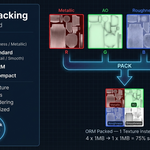
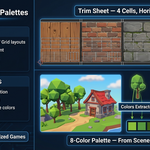
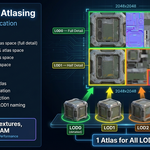
Trim Sheets (one cell per material in a strip or grid), Palette Texture (4 to 32 colours, each material collapsed onto its closest swatch), LOD Atlas (objects named _LOD0, _LOD1 and so on share one atlas with smaller tiles for lower levels) and Channel Packing with the ORM, Unity Standard, Unreal ORM and Mobile Compact presets.
No internet connection is needed: the add-on makes no network calls. It is licensed under GPL-3.0; the license covers the add-on code, and the atlases you produce are yours to use in commercial projects. Full documentation is on the Documentation & FAQ tab of this product page, and a README.txt is inside the zip.
Have questions about this product?
Login to message
| Sales | 30+ |
| Published | 7 months ago |
| Blender Version | 3.2 - 5.1 |
| Extension Type | N/A |
| Render Engine Used | Arnold, Blender-Internal, Blender-Game-Engine, Cycles, Eevee, Freestyle, Luxrender, Mental-Ray, Octane, Vray, Yafaray |
| License | GPL |
Discover more products like this
mobile optimization draw-call-reduction uv-tools palette-texture LOD Channel Packing Texture packing PBR game assets Trim Sheet game-dev texture atlas