Keyframe Pro Sync | Synchronize Blender With Keyframe Pro
 karlo pavicic ravlic
Keyframe Pro Sync Preferences
Preferences can be found under Preferences > Add-On's > KeyFrame Pro Sync
Keyframe Path - The path to where you have Keyframe installed. If none it will use a default
Keyframe Port - The port which Keyframe is listening to. Set to default, if you're not sure what port you need, check in Keyframe's (the software, not the extension) settings under Preferences > Network > Port
Autosave Keyframe Project File (.kpro) - This will save the project file open in keyframe whenever you save your .blend file. This is disabled by default.
The Interface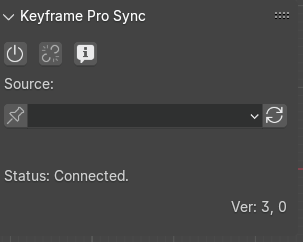
Power button - Open Keyframe and load a file associated with the current .blend (if any)
Link button - Establish connection with Keyframe and start syncing Blender's and Keyframe's timelines
Info button - Verbose error log, will display detailed info about which port is being used, if the frame rates are matching, etc. Errors will be displayed regardless of whether this option is toggled.
Pin - When working with multiple Actions Blender will associate each Action with the currently selected clip in Keyframe, so when you switch an action it will switch to the corresponding video. If the pin button is selected, this behavior will be overridden and Keyframe will keep displaying the video selected from the dropdown menu (to the right of the pin button) regardless of which Action is active
Dropdown Selector - Will display the name of the currently active video in Keyframe
Refresh Button - Will pull a list of all videos in Keyframe and populate the dropdown selector. It's recommended the user presses this immediately after pressing the link button.
Status - Let's the user know if there is a connection to Keyframe. If the status is anything other than Connected the sync can not work. Check port settings if the extension can't connect.
Version Check - Version number is displayed in the lower bottom right, if you're using an incompatible/untested version the version check will let you know. It still might work, but it will warn you that errors could occur
Internet Access - The extension needs internet access from Blender in order to do version checking, if you don't provide it, the version check won't work
Logging - If you have issues, there are .log files located in "\AppData\Roaming\Blender Foundation\Blender\(version)\extensions\user_default\Keyframe_Pro_Sync\logs" (on Windows). Please send me the log corresponding to the day when you were having issues/errors
Note: Always uncheck the link button before closing Keyframe
-
$18.99
Single Seat License for personal or professional work.
-
$150
License for up to 50 seats.
Have questions about this product?
Login to message
