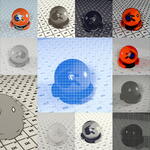
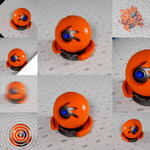
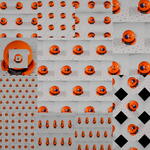
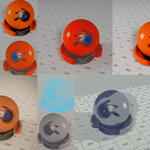
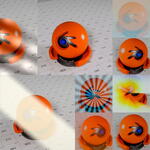
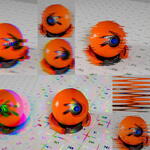
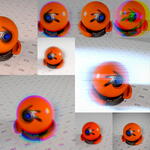
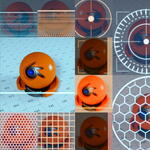
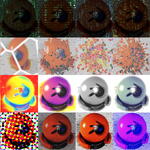
Compositorfx

kunemann in Compositing Presets


Launch offer — 20% off compositorFX.kunemannat checkout.
100 Effects · Blender 5.1 Native

Drop-in compositor presets for Blender.

A complete library of self-contained node-group effects for Blender 5.1's compositor. Link the .blend, drag one in, dial it — no add-on, no plugin, nothing to install.

➜

Dead simple to use

Drag one into your compositor, wire image in and out — live in seconds, nothing to configure.

☰

Endless customization

Nothing's baked in. Colors, scale, curves, dispersion — every constant rides on a socket you can keyframe.

►

Animation built in

Flicker, scroll and drift ship as ready-made sliders, and any other value keyframes just as easily.

▦

Map onto geometry

A UV pass wraps the look straight onto your 3D surfaces — perspective-correct, with zero re-rendering.

What's Inside

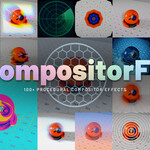
Nine categories. Every visual style.

From vintage analog screens to cinematic optics, glitch art to atmospheric simulation — there's an effect for every shot.

Monitors
CRT Monitor, Flip-Dot, LCD Panel, LED Board, Matrix Code, and more.
13 presets
CRT Monitor
Flip-Dot
LCD Panel
Matrix Code
Retro
Corrupt Scan, Daguerreotype, Dither, Old Film, Slide Projector, Super 8, and more.
7 presets
VHS Look
Daguerreotype
Dither
Slide Projector
Stylize
ASCII Art, Blueprint, Charcoal Sketch, CMYK Print, Comic Book, Cross Hatching, and more.
23 presets
ASCII Art
Blueprint
Charcoal Sketch
CMYK Print
Distort
Fisheye, Frosted Glass, Heat Distortion, Kaleidoscope, Mirror, Page Curl, and more.
18 presets
Fisheye
Frosted Glass
Heat Distortion
Kaleidoscope
Lens
Anamorphic, Chromatic Aberration, Focus Pull, Halation, Lens Ghosts, Long Exposure, and more.
13 presets
Chromatic Aberration
Focus Pull
Halation
Long Exposure
Glitch & Signal
Bit Crush, Chroma Strobe, Digital Glitch, Dot Crawl, Pixel Sort, Signal Dropout, and more.
7 presets
Bit Crush
Chroma Strobe
Digital Glitch
Dot Crawl
Light
Beam, Gobo Projection, Iridescent Sheen, Light Wrap, Spectrum Light, Stage Wash.
6 presets
Beam
Gobo Projection
Spectrum Light
Iridescent Sheen
HUD
Force Field, Holo Grid, Hologram, HUD Reticle, Schematic.
5 presets
HUD Reticle
Holo Grid
Hologram
Schematic
Tiling
Diamond Tile, Herringbone, Mandala, Pinwheel, Recursive Frame, Tile, and more.
8 presets
Tile
Diamond Tile
Mandala
Pinwheel
Usage

Easy as 1, 2, 3...

It's a standard Blender asset library — each effect is a self-contained node group. Nothing to install, nothing to configure.

1

Open Asset Browser

Link the .blend as an asset library — all 100 effects appear, sorted by category.

→
2

Drag to Compositor

Drag any effect into your compositor, wire Image in and out. Live instantly.

→
3

Dial it in

Dial the Amount slider for real strength. Add a Mask or Depth / UV passes for 3D-aware results.

See Them Move

Monitors — live demos

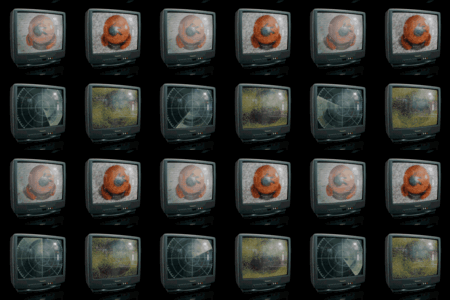
Scanlines flicker, pixels refresh, signals drift — all driven by scene time. And because the look rides on your screen's UVs, it drops into the composite without a single re-render.

CRT Monitor
CRT Monitor
Trinitron
Trinitron
LCD Panel
LCD Panel
LED Board
LED Board
Matrix Code
Matrix Code
Retro Console
Retro Console
NTSC Composite
NTSC Composite
Radar
Radar
Flip-Dot
Flip-Dot
Phosphor Monitor
Phosphor Monitor
Oscilloscope
Oscilloscope
Split-Flap
Split-Flap
Full Library

Browse all 100 presets

Pick any look, drag it straight into your compositor — that's the whole workflow.

CRT Monitor
CRT Monitor
Flip-Dot
Flip-Dot
Holo Display
Holo Display
LCD Panel
LCD Panel
LED Board
LED Board
Matrix Code
Matrix Code
NTSC Composite
NTSC Composite
Oscilloscope
Oscilloscope
Phosphor Monitor
Phosphor Monitor
Radar
Radar
Retro Console
Retro Console
Split-Flap
Split-Flap
Trinitron
Trinitron
Corrupt Scan
Corrupt Scan
Daguerreotype
Daguerreotype
Dither
Dither
Old Film
Old Film
Slide Projector
Slide Projector
Super 8
Super 8
VHS Look
VHS Look
ASCII Art
ASCII Art
Blueprint
Blueprint
Charcoal Sketch
Charcoal Sketch
CMYK Print
CMYK Print
Comic Book
Comic Book
Cross Hatching
Cross Hatching
E-Paper
E-Paper
Edge Light
Edge Light
Engraving
Engraving
Halftone
Halftone
Ink Wash
Ink Wash
Manga Pages
Manga Pages
Night Vision
Night Vision
Notan
Notan
Oil Painting
Oil Painting
Paper Cutout
Paper Cutout
Pencil Sketch
Pencil Sketch
Pop Art
Pop Art
Scratchboard
Scratchboard
Stipple
Stipple
Thermal
Thermal
Watercolor
Watercolor
X-Ray
X-Ray
Fisheye
Fisheye
Frosted Glass
Frosted Glass
Heat Distortion
Heat Distortion
Kaleidoscope
Kaleidoscope
Mirror
Mirror
Page Curl
Page Curl
Pinch & Bulge
Pinch & Bulge
Reeded Glass
Reeded Glass
Ripple
Ripple
Shattered Glass
Shattered Glass
Shockwave
Shockwave
Smear
Smear
Squeeze
Squeeze
Swirl Bokeh
Swirl Bokeh
Tunnel
Tunnel
Twirl
Twirl
Wave Warp
Wave Warp
Anamorphic
Anamorphic
Chromatic Aberration
Focus Pull
Focus Pull
Halation
Halation
Lens Ghosts
Lens Ghosts
Long Exposure
Long Exposure
Orton Effect
Orton Effect
Prism Dispersion
Prism Dispersion
Split Diopter
Split Diopter
Star Filter
Star Filter
Tilt-Shift
Tilt-Shift
Vignette
Vignette
Zoom Blur
Zoom Blur
Bit Crush
Bit Crush
Chroma Strobe
Chroma Strobe
Digital Glitch
Digital Glitch
Dot Crawl
Dot Crawl
Pixel Sort
Pixel Sort
Signal Dropout
Signal Dropout
Signal Warp
Signal Warp
Beam
Beam
Gobo Projection
Gobo Projection
Iridescent Sheen
Iridescent Sheen
Light Wrap
Light Wrap
Spectrum Light
Spectrum Light
Stage Wash
Stage Wash
Force Field
Force Field
Holo Grid
Holo Grid
Hologram
Hologram
HUD Reticle
HUD Reticle
Schematic
Schematic
Tile
Tile
Diamond Tile
Diamond Tile
Herringbone
Herringbone
Pinwheel
Pinwheel
Mandala
Mandala
Recursive Frame
Recursive Frame
Spiral Tile
Spiral Tile
Triangle Mirror
Triangle Mirror
Truchet
Truchet

Presets that live on your geometry — not the screen.

Feed a UV render pass into any effect and it wraps onto your geometry instead of the flat frame — perspective-correct, locked to the object, and composited straight in with no re-render.

1

Enable UV pass in your render layer

In your render layer settings, enable the UV pass. No geometry changes, no extra render time.

2

Pick your object with Cryptomatte

Use a Cryptomatte node to isolate a specific object — a TV screen, a billboard, a phone display. The matte clips the preset to that object's silhouette.

3

Plug UV → preset, Cryptomatte → Mask

Connect the UV pass to the preset's UV input. The preset now tiles and warps along the object's actual UV layout, not screen pixels.

4

Composite over beauty — done

Alpha-over the result onto your render. The preset is perfectly contained, perspective-correct, and follows object motion if animated.

UV-space preset demo
UV Space · No Re-render

Example: Place a CRT Monitor preset on a TV prop in your scene. The scanlines, phosphor grille, and flicker wrap the screen surface exactly — perspective-correct, masked to just the screen object, no re-rendering, no texture baking.

Anatomy of an Effect

Make it your own.

Each one is built the same way — collapsible panels of real sockets, nothing baked, no add-on. Here's CMYK Print, exactly as it appears in Blender.

▾FX CMYK Print
Image
🖼FX CMYK Print⌁
▾ Parameters
Dot Scale79.000
Cyan1.000
Magenta1.000
Yellow1.000
Black0.600
Ink Spread2.000
White Point1.000
▾ Use Depth
Use Depth
Depth
Depth Near0.000
Depth Far1.000
Invert Depth
▾ Use UV
Use UV
UV
▾ Adjust
Offset X0.000
Offset Y0.000
Scale1.000
Flip U
Flip V
▾ Master
Amount1.000
Mask1.000
Protect Edges
Edge Width0.060
Same node — six looks
Classic CMYK
Classic
Dots 79 · CMYK · Spread 2
Coarse rosette
Coarse
Dots 20 · big rosette
Fine print
Fine
Dots 240 · near-continuous
Heavy ink
Heavy Ink
Spread 3.5 · Black 1.0
Duotone
Duotone
Yellow 0 · Cyan + Magenta
Newsprint
Newsprint
White Pt 0.82 · sparse dots
Why it exists

Built in the compositor, for the compositor.

Every look in this library is one you'd build yourself anyway — except you don't have to. No rebuilding the same node trees from project to project. No round-tripping frames to After Effects for anything fancier than a grade. Just drag one in, dial the sliders, and render. Every constant rides on a socket, nothing is baked in, and every preset was pushed through real shots — depth passes, UV passes, animation — so it holds up on your footage, not just a demo sphere.

Stop rebuilding nodes. Start compositing.

100 presets. One drag each. Native Blender 5.1 — no add-on, no subscription, yours to keep.
Blender 5.1+ · One-time purchase · Free updates

$32

Have questions about this product?
Login to message

Details
Dev Fund Contributor
Published 3 months ago
Blender Version 5.1 - 5.2
Render Engine Used Arnold, Cycles, Eevee, Luxrender, Mental-Ray, Octane
License Creative Commons