 SuKing_1996
CoreDeck Pane
Your panels. Your workflow.
常用面板,按你的工作方式展开。
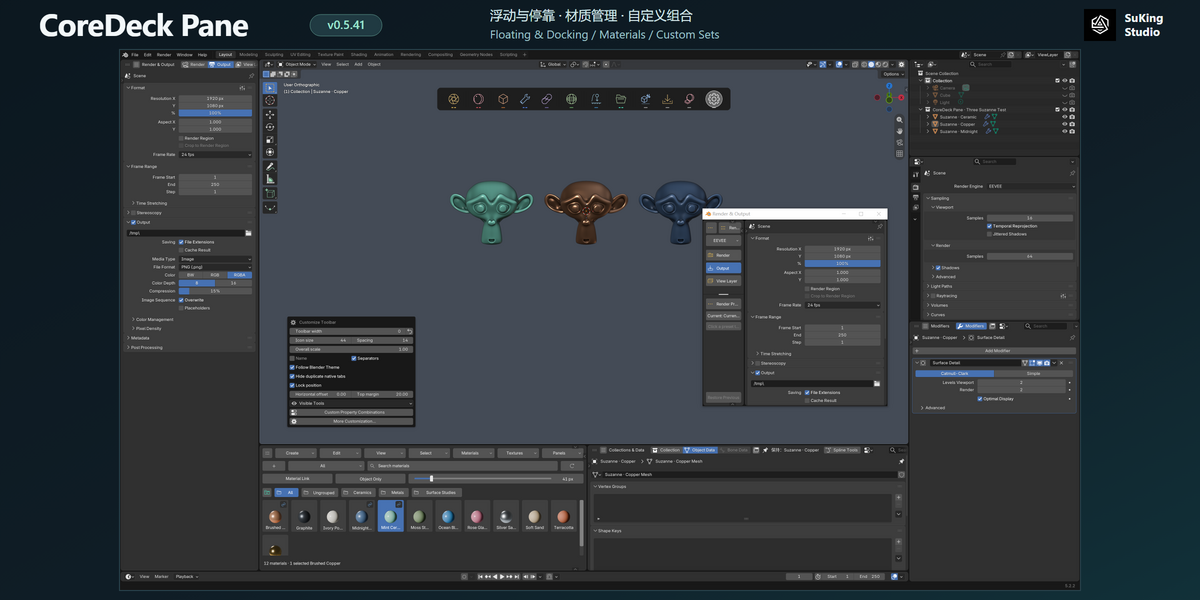
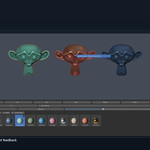
Keep native Blender properties close and your materials organized. CoreDeck Pane brings floating, dockable property panels and a dedicated material browser into your everyday scene workflow.
让常用原生属性留在手边,让材质管理保持清晰。CoreDeck Pane 将可浮动、停靠的属性面板与独立材质浏览器带入日常场景工作。
Current version: 0.5.44 · Windows x64 only · Minimum Blender version: 5.0. This patch was checked on Blender 5.3.0 build 02f0899d78e3 and Blender 5.2.2 LTS build d13f752e3b9c; targeted coverage, resource relocation limits and current third-party render results are explained below.
当前版本:0.5.44 · 仅支持 Windows x64 · 最低 Blender 版本:5.0。 本次补丁已在 Blender 5.3.0 构建 02f0899d78e3 与 Blender 5.2.2 LTS 构建 d13f752e3b9c 中针对性验证;具体覆盖、资源迁移限制及本次第三方出图记录见下文。
Build the workspace you need / 组织适合自己的工作界面
Remove a Property Combination in Preferences → CoreDeck Pane → Property Combinations: select its entry and click the trash button beside the list. Removed built-in combinations can be restored individually with Restore Built-in Combination. Close that combination’s floating and docked panels before changing its page structure or deleting it.
在「偏好设置 → CoreDeck Pane → 属性组合」中选中一项,点击列表旁的垃圾桶即可删除。移除的内置组合可用「恢复内置组合」逐项加回。修改页面结构或删除前,请先关闭该组合的浮窗和停靠页。
- Native property panels. Open render and output, object and transform, modifiers, constraints, scene and world, physics, and collection/data controls from a compact viewport toolbar. Continue using familiar Blender controls.
- 原生属性面板。 从紧凑的视口工具栏访问渲染与输出、对象与变换、修改器、约束、场景与环境、物理、集合与数据等属性,继续使用熟悉的 Blender 原生控件。
- Custom property combinations. Collect complete native Properties pages into your own sets. Customize their names, page order, colors and icons, and open different sets separately. Arrange a set around the controls you use for modeling, rendering or other tasks.
- 自定义属性组合。 将完整的原生属性页组织成自己的组合,管理名称、页面顺序、颜色和图标,不同组合可以分别打开。可按建模、渲染或其他任务所需的控件安排组合。
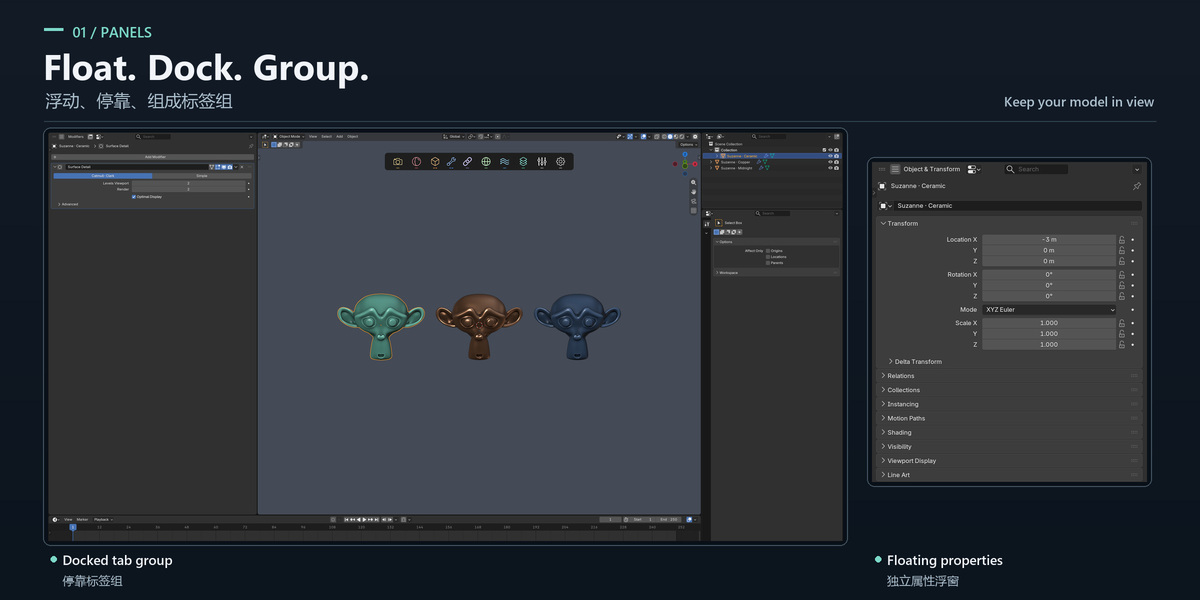
- Floating panels and reusable layouts. Place panels where you need them, dock them to editor edges or combine owned panels. Save and restore layouts; configuration is stored separately from the installed package.
- 浮窗、停靠与布局复用。 自由摆放面板,拖到编辑器边缘停靠,或组合插件自己的面板。布局可以保存与恢复,配置独立于安装目录保存。
- Clear context and navigation. Docked headers show available categories. Recent suitable targets can stay visible when the current selection does not apply, while manual pins remain authoritative. Camera and light properties use the appropriate native context.
- 清晰的上下文导航。 停靠顶部显示可用类别;当前选择不适用时,可保持本次会话中最近适用的目标,手动固定优先。摄像机和灯光属性按对应的原生上下文访问。
Organize materials in one place / 集中浏览与管理材质
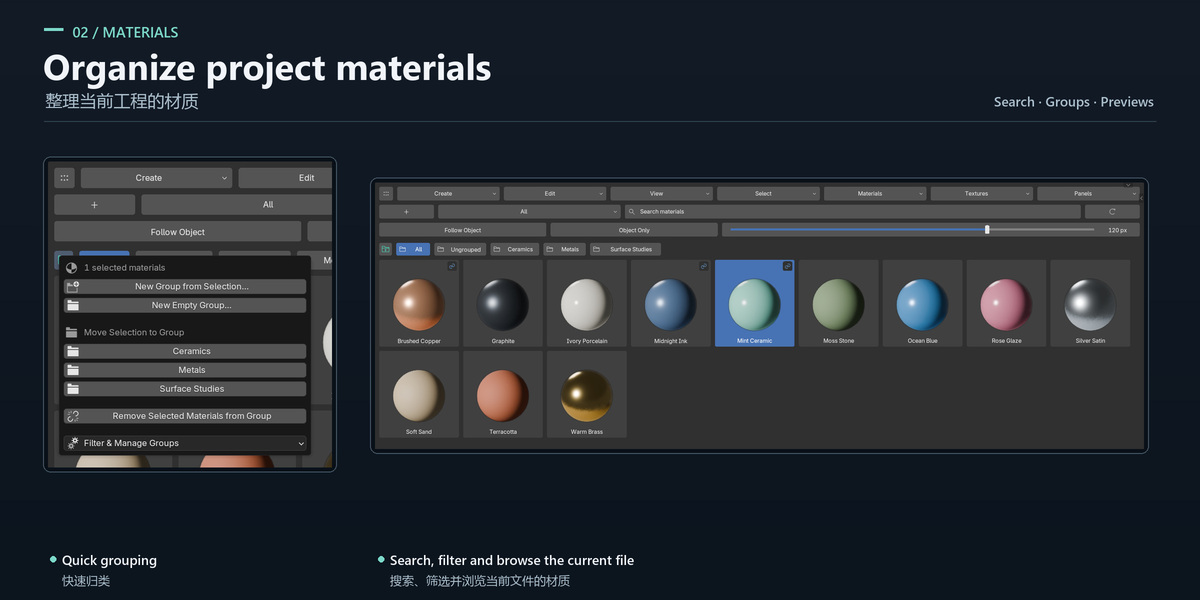
Create materials even when the browser is full: double-click the empty space after the group tabs or the gaps between cards to add a material to the current group. You can also right-click either space or any material card and choose New Material. Both floating and docked browsers support these actions. Double-clicking the material sphere itself still opens its nodes.
浏览器铺满后也能方便地新建材质:双击分组标签右侧空白或卡片间隙,即可在当前分组创建;也可在这些空白或任意材质卡片上右键,选择「新建材质」。浮窗与停靠浏览器均支持。双击材质球本身仍会打开节点。
- Browse, search and group. View materials from the current file with thumbnails, search, groups, ordering, renaming and node access. Double-click a sphere to open its nodes; double-click a label or use F2 to rename.
- 浏览、搜索与分组。 集中查看当前工程的材质缩略图,进行搜索、分组、排序、改名和节点访问。双击材质球打开节点,双击名称或按 F2 改名。
- Object/material linking. Follow object materials or browse another material manually, with distinct visual feedback. Related base-mesh surfaces can be highlighted without changing object selection or material assignments.
- 对象与材质联动。 跟随对象材质,也可手动浏览其他材质,并用不同的视觉提示区分。关联对象的基础网格表面可高亮显示,不改变对象选择或材质分配。
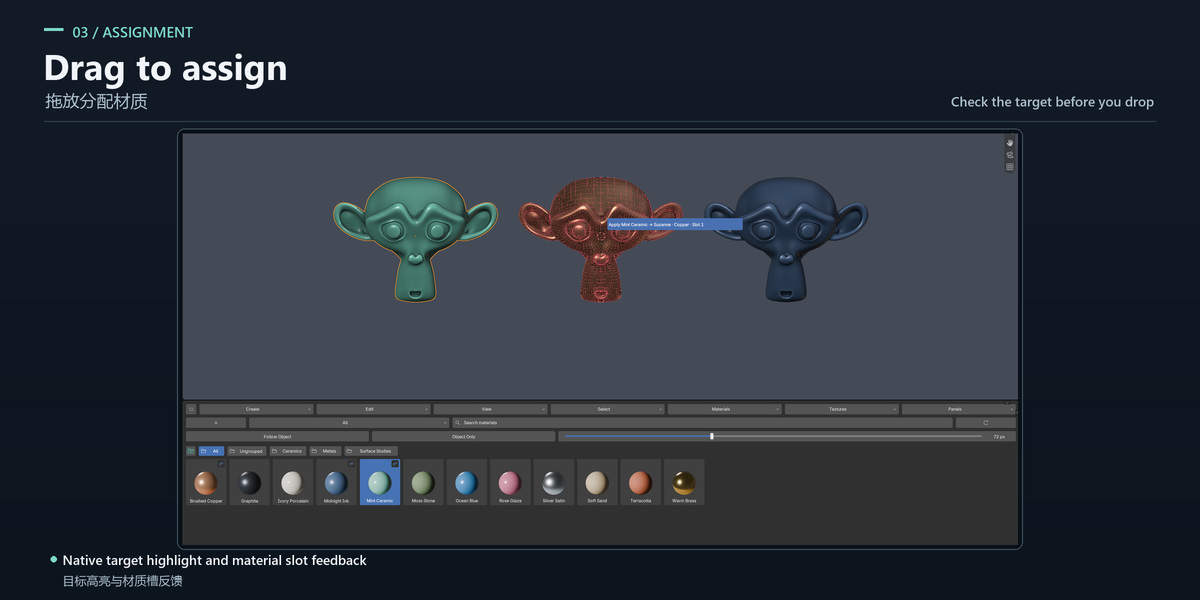
- Drag assignment, replacement and ordering. Drop a material on a viewport object to assign it. Drop onto the center of another material card to replace its references, or at card edges to reorder. Esc cancels; completed actions support Undo/Redo.
- 拖放分配、替换与排序。 拖到视口对象上分配材质;拖到其他材质卡片中央替换其使用关系,拖到卡片边缘调整顺序。Esc 取消,已完成的操作支持撤销与重做。
- Independent Ctrl-drag copies. On a valid drop, create a new material with supported independent nested node groups and ordinary image data. Drop in the browser to create the copy, or onto an object to create and assign it. Cancelling does not leave a temporary copy.
- Ctrl 拖动独立复制。 在有效落点创建新材质及受支持的独立嵌套节点组和普通图像数据。拖回浏览器创建副本,拖到对象上则创建并分配;取消不会遗留临时副本。
Presets and appearance / 预设与外观
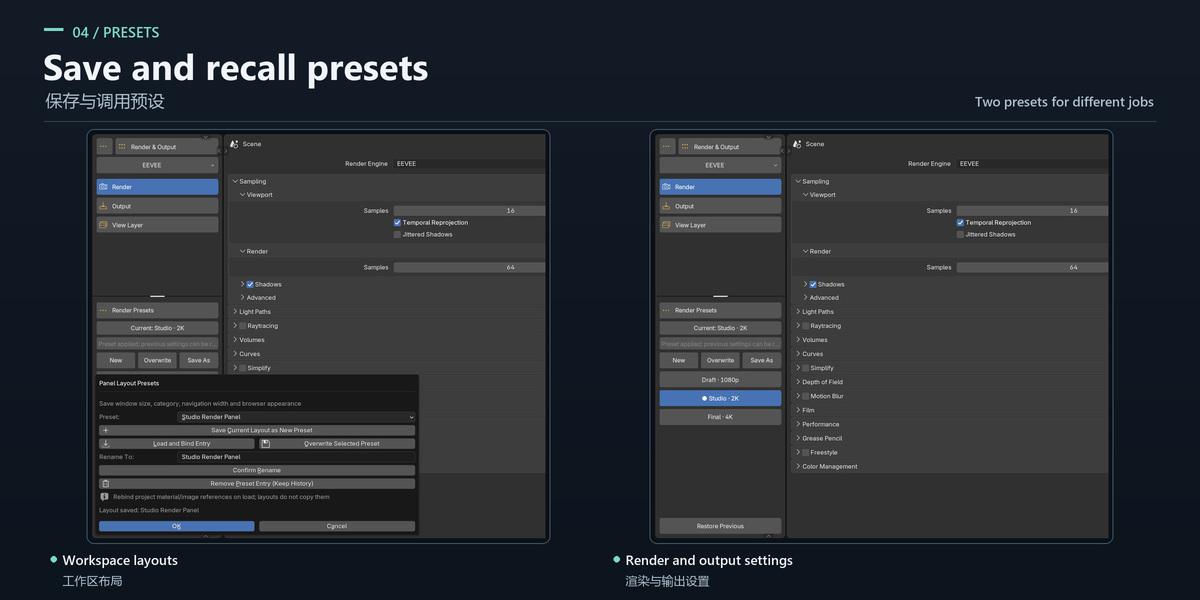
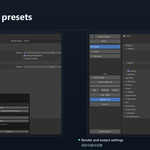
Manage render settings separately from interface layouts. The Render & Output panel provides a preset drawer for creating, overwriting, saving as and restoring prior values. Customize toolbar names, order, scale, position, colors and icons. The presets-v1 icon library contains 32 original symbols in three color sets, totaling 96 presets.
渲染设置与界面布局分别管理。渲染与输出面板提供独立预设抽屉,支持新建、覆盖、另存为和恢复前值。工具栏支持名称、顺序、缩放、位置、颜色和图标设置;presets-v1 图标库包含 32 个原创符号、三套配色,共 96 项预设。
What's new in 0.5.44 / 0.5.44 更新
CoreDeck Pane 0.5.44 expands independent material copying to external resources and Pane-managed Octane/Cycles pairs. Ctrl-drag to create a copy in the browser or create and assign it to an object. UDIM tiles, numbered sequences, movies and resolvable native Blender OSL/IES dependencies can now travel with supported copies.
CoreDeck Pane 0.5.44 扩展独立材质复制的外部资源与 Pane 管理的 Octane/Cycles 配对支持。按住 Ctrl 拖回浏览器创建副本,或拖到物体创建并分配;支持的副本现在可带上 UDIM、编号序列、影片与可解析的 Blender 原生 OSL/IES 依赖。
If the project is already saved when copying, external copies that must remain on disk are stored in CoreDeck Material Assets beside it. Copy that folder with the project when moving it. Copies made before the first save use Blender’s user data directory; do not assume the first save automatically moves those earlier copies. Ordinary OSL file-input sockets can use project-relative paths. Texture paths hardcoded inside OSL source or compiled files remain absolute and must be relocated after a move; compiled-only shaders may require the source code or restoration of their original private paths.
只有复制时工程已经保存,需要保留在磁盘上的外部副本才写入工程旁的 CoreDeck Material Assets 文件夹;搬移工程时请一并复制该文件夹。首次保存之前产生的副本使用 Blender 用户数据目录,不能假设首次保存会自动搬移这些旧副本。普通 OSL 文件输入槽可使用工程相对路径;直接写入 OSL 源码或编译文件的纹理绝对路径在搬家后须重新定位。只有编译文件时,可能需要源代码或恢复原来的私有路径。
This native Blender OSL support does not imply support for Octane’s own OSL nodes: unresolved external paths in Octane or other renderer-owned nodes are reported with the node and field before assignment. Missing files, unresolved dynamic paths, driver references to scene data, independently stored multiview media and other dependencies that cannot be isolated are reported before commit. Direct copying of unsaved UDIM painting is verified for 8-bit RGBA PNG; save or pack other unsaved edits first. Linked/read-only data and arbitrary third-party resources are not universally covered. Older copy/paste commands retain their own documented behavior.
这里的 Blender 原生 OSL 支持不等于支持 Octane 自有 OSL 节点;Octane 或其他渲染器自有节点中未解析的外部路径,会在分配前指出节点和字段。缺失文件、未解析的动态路径、驱动对场景数据的引用、独立多视图媒体及其他无法分离的依赖,也会在提交前提示具体问题。未保存的 UDIM 绘制直接复制以已验证的 8 位 RGBA PNG 为范围,其他未保存编辑请先保存或打包。链接/只读数据与任意第三方资源不作通用保证;原有复制/粘贴入口保留各自行为。
The original 0.5.44 ZIP passed targeted installation, enabling, floating-panel opening, disabling, Reload Scripts, direct uninstall, reinstall and cold-start checks in separate Windows x64 Blender 5.2.2 LTS and 5.3.0 configurations. Resource checks covered source-offline and relocation cases, image/movie frame rendering, independent material pairs, copy failure rollback and save/reopen regressions. These results do not cover every Blender build, production scene or third-party combination.
原始 0.5.44 ZIP 已在独立的 Windows x64 Blender 5.2.2 LTS 与 5.3.0 配置中通过针对性的安装、启用、打开浮窗、停用、脚本重载、直接卸载、重装和冷启动检查。资源验证覆盖源离线与工程迁移、图像/影片逐帧出图、独立材质配对、复制失败回滚及保存重开回归;不代表全部 Blender 构建、生产工程或第三方组合均已验证。
Screenshots show the existing 0.5.41 interface layout; the current download is 0.5.44.
配图展示既有 0.5.41 界面布局,当前下载版本为 0.5.44。
Install and get started / 安装与开始使用
- Save your current Blender project before installing or upgrading.
- In Preferences → Add-ons → Install from Disk, select
CoreDeck-Pane-0.5.44.zip, then enable CoreDeck Pane. Restart Blender normally after upgrading. - Click a viewport-toolbar category to navigate an existing main Properties editor. Shift-click opens or focuses the corresponding panel. Open settings from the gear button or the CoreDeck → Pane sidebar.
- Drag panel grips to dock or combine owned panels. Close a custom combination's open panels before changing its page structure. Existing settings, layouts and presets continue to use the same extension ID.
- 安装或升级前,先保存当前 Blender 工程。
- 在偏好设置 → 插件 → 从磁盘安装中选择
CoreDeck-Pane-0.5.44.zip,然后启用 CoreDeck Pane。升级后正常重启 Blender。 - 普通点击视口工具栏分类可切换已有主属性编辑器;Shift 点击打开或聚焦对应面板。通过齿轮按钮或 CoreDeck → Pane 侧栏进入设置。
- 拖动面板手柄停靠或组合自有面板。修改自定义组合的页面结构前,请先关闭该组合已打开的面板。原有设置、布局和预设继续使用同一个扩展 ID。
Requirements and feature limits / 运行要求与功能范围
Windows x64 only. The manifest minimum is Blender 5.0. Current 0.5.44 targeted checks used Blender 5.2.2 LTS build d13f752e3b9c and Blender 5.3.0 build 02f0899d78e3; they are not a full retest of every Blender version. CoreDeck Pane works independently of CoreDeck Form and Zen Dock.
仅支持 Windows x64,扩展清单最低 Blender 5.0。本次 0.5.44 针对性验证使用 Blender 5.2.2 LTS 构建 d13f752e3b9c 与 Blender 5.3.0 构建 02f0899d78e3,不代表全部 Blender 版本均已完整重测。CoreDeck Pane 可独立使用,不依赖 CoreDeck Form 或 Zen Dock。
Outliner object-row drops and non-selecting material-user highlights remain limited to those two verified Windows x64 builds in View Layer mode. Other 5.3.x builds require separate verification; unmatched builds do not enable the native bridge, while supported builds retain the core material browser and viewport assignment.
Outliner 对象行拖放与不改变选择的材质使用对象高亮,仍限定于这两个已验证的 Windows x64 构建及 View Layer 显示模式。其他 5.3.x 构建需分别验证;不匹配的构建不启用原生桥接,受支持构建仍保留基础材质浏览与视口分配。
Ctrl-drag a material back into the browser to create an independent copy, or onto a valid object target to create and assign the copy. Ordinary dragging keeps the original material. A copy commits only on a valid drop; cancellation or a failed copy leaves the source intact.
按住 Ctrl 将材质拖回浏览器可创建独立副本,拖到有效物体目标则创建并分配副本。普通拖动继续使用原材质;只有有效落点才提交,取消或复制失败不会改动源材质。
Independent copying supports editable local materials, supported nested node groups, ordinary images, UDIM tiles, numbered image sequences, movies, native Blender IES profiles and native Blender OSL shaders whose dependencies can be resolved. Sequences retain their original frame numbers and playback settings. Image or Text data shared by several nodes uses one corresponding duplicate inside the new material. Copying a Pane-managed Octane/Cycles pair creates a new pair that switches together and can be edited independently of the original.
独立复制支持可编辑的本地材质、已适配的嵌套节点组、普通图像、UDIM 瓦片、编号图片序列、影片、Blender 原生 IES,以及能够解析依赖的 Blender 原生 OSL。图片序列保留原来的帧号和播放设置。多个节点共享的 Image 或 Text 数据在新材质中复用同一份对应副本;复制 Pane 已配对的 Octane/Cycles 材质,会生成可独立于原材质改色、并随引擎一起切换的新材质对。
If the project is already saved when copying, external copies that must remain on disk are stored in CoreDeck Material Assets beside it. Copy that folder with the project when moving it. Copies made before the first save use Blender’s user data directory; do not assume the first save automatically moves those earlier copies. Ordinary OSL file-input sockets can use project-relative paths. Texture paths hardcoded inside OSL source or compiled files remain absolute and must be relocated after a move; compiled-only shaders may require the source code or restoration of their original private paths.
只有复制时工程已经保存,需要保留在磁盘上的外部副本才写入工程旁的 CoreDeck Material Assets 文件夹;搬移工程时请一并复制该文件夹。首次保存之前产生的副本使用 Blender 用户数据目录,不能假设首次保存会自动搬移这些旧副本。普通 OSL 文件输入槽可使用工程相对路径;直接写入 OSL 源码或编译文件的纹理绝对路径在搬家后须重新定位。只有编译文件时,可能需要源代码或恢复原来的私有路径。
This native Blender OSL support does not imply support for Octane’s own OSL nodes: unresolved external paths in Octane or other renderer-owned nodes are reported with the node and field before assignment. Missing files, unresolved dynamic paths, driver references to scene data, independently stored multiview media and other dependencies that cannot be isolated are reported before commit. Direct copying of unsaved UDIM painting is verified for 8-bit RGBA PNG; save or pack other unsaved edits first. Linked/read-only data and arbitrary third-party resources are not universally covered. Older copy/paste commands retain their own documented behavior.
这里的 Blender 原生 OSL 支持不等于支持 Octane 自有 OSL 节点;Octane 或其他渲染器自有节点中未解析的外部路径,会在分配前指出节点和字段。缺失文件、未解析的动态路径、驱动对场景数据的引用、独立多视图媒体及其他无法分离的依赖,也会在提交前提示具体问题。未保存的 UDIM 绘制直接复制以已验证的 8 位 RGBA PNG 为范围,其他未保存编辑请先保存或打包。链接/只读数据与任意第三方资源不作通用保证;原有复制/粘贴入口保留各自行为。
The original 0.5.44 ZIP was tested with actual renders on Blender 5.2.2 LTS + Octane 31.13 GPU and Blender 5.3.0 + Mitsuba 3.9.0 CPU (scalar_rgb, adapter revision 4aac7f3ce7b7). Octane tests included two-way material pairing and copied image-sequence results after the source changed; its own OSL node’s unresolved external path produced a specific warning. These isolated tests do not certify Octane on Blender 5.3, Mitsuba GPU, other adapter revisions, production scenes or every third-party node. Renderers and their licenses must be obtained separately and are not bundled.
原始 0.5.44 ZIP 已完成 Blender 5.2.2 LTS + Octane 31.13 GPU 与 Blender 5.3.0 + Mitsuba 3.9.0 CPU 的实际出图(scalar_rgb,适配器修订 4aac7f3ce7b7)。Octane 检查包含材质双向配对及源文件改色后的副本序列出图,其自有 OSL 节点未解析的外部路径会给出具体提示。这些独立配置测试不代表 Octane 在 Blender 5.3、Mitsuba GPU、其他适配器修订、生产工程或全部第三方节点均已验证;渲染器及其许可须另行获取,本产品不包含。
Complex graphs, arbitrary graph conversion, identical final rendering and third-party engine presets are not universally supported. Native Cycles/EEVEE workflows remain available; the engine menu includes Workbench when available.
复杂节点图、任意节点图转换、最终渲染外观一致与第三方专用预设不在通用承诺内。保留原生 Cycles/EEVEE 工作流,菜单列出当前可用的 Workbench。
Optional Zen Dock compatibility / Zen Dock 可选兼容
Zen Dock is a separately sold third-party add-on. Users who want its features must purchase and install it through its official distribution channel. CoreDeck Pane includes neither Zen Dock nor its license and works independently without it. This independent compatibility feature is not endorsed by Zen Dock's developer.
Zen Dock 是另行销售的第三方付费插件。 如需使用它的功能,请通过其官方渠道另行购买并安装。CoreDeck Pane 不包含 Zen Dock 或其授权,未购买也不影响 Pane 独立使用。这一独立兼容实现没有 Zen Dock 开发者的背书。
The compatibility preference stays off unless the user explicitly enables it with a supported dependency available. When enabled, it temporarily wraps BL_UI_Button.draw, BL_UI_Button.mouse_up and ZWB_OT_EventMove.invoke, and reads widget state for Pane-owned floating-window controls. It does not edit Zen Dock's installed files, saved preferences or keymaps.
兼容保持关闭,直到受支持的依赖可用且用户明确开启。开启后会临时包装 BL_UI_Button.draw、BL_UI_Button.mouse_up 和 ZWB_OT_EventMove.invoke,并读取控件状态,为 Pane 自有浮窗提供控件适配;不修改 Zen Dock 安装文件、保存的偏好或快捷键。
Turning it off cancels queued compatibility actions and restores only methods still owned by the adapter, preserving later integrations. Pane's core panels and material browser remain available without Zen Dock.
关闭兼容会取消待执行的适配动作,并恢复仍由适配器拥有的方法,保留后来其他集成的替换。没有 Zen Dock 也可以使用 Pane 的核心面板与材质浏览器。
The creator is a paying Zen Dock user and has not contacted its developer or obtained their endorsement.
作者是 Zen Dock 的付费用户,尚未联系其开发者,也未获得其背书。
Windows window handling / Windows 窗口处理
While preparing its own floating panels, CoreDeck Pane uses a temporary same-thread Windows CBT hook and child-window WndProc subclassing. These operations are limited to verified owned child windows in the current Blender process; they are not system-wide hooks and do not target other applications.
准备自有浮窗时,CoreDeck Pane 临时使用同线程 Windows CBT 挂钩和子窗口 WndProc 接管。范围限定于当前 Blender 进程内已确认的自有子窗,不是系统全局挂钩,也不针对其他应用。
Disabling the add-on closes still-owned floating panels while retaining unrelated windows. A callback still referenced by a later native window procedure remains passive until owned-window destruction releases that reference. The bilingual guide explains the tested scope and cleanup behavior.
停用插件会关闭仍由其拥有的浮窗,并保留无关窗口。如果后接原生窗口过程仍引用回调,回调会被动保留,直至自有窗口销毁后释放引用。具体已测范围与清理行为见双语指南。
Static icon assets and licenses / 静态图标素材与许可
The bundled generated-v1 toolbar icon family was created using OpenAI's image-generation tool. These are static image assets; the installed add-on does not connect to OpenAI or call an AI service at runtime.
随包的 generated-v1 工具栏图标使用 OpenAI 图像生成工具制作,属于静态图像素材;已安装的插件运行时不连接 OpenAI,也不调用 AI 服务。
Python source is licensed under GPL-3.0-or-later. The original presets-v1 icon family is CC0-1.0. Other assets retain their separate provenance; see the bundled assets/SOURCES.md and license files.
Python 源码采用 GPL-3.0-or-later;原创 presets-v1 图标采用 CC0-1.0。其他素材按各自来源说明处理,详见包内 assets/SOURCES.md 与许可文件。
Purchase options / 购买档位
All four options currently include the same complete CoreDeck Pane add-on. Studio-specific features are not included in the current release. These options organize individual and team purchases; they do not change the rights granted by GPL-3.0-or-later. Support and updates follow the product's stated policy.
目前四档均提供同一套完整 CoreDeck Pane,当前版本不包含额外工作室专属功能。档位用于区分个人与团队购买,不改变 GPL-3.0-or-later 已授予的权利;支持和更新遵循本商品已说明的政策。
| Option / 档位 | Team / 人数 | USD / 美元 |
|---|---|---|
| STANDARD — Single User | 1 | $16.88 |
| SMALL TEAM — 3–5 Users | 3–5 | $46.66 |
| STUDIO — 6–14 Users | 6–14 | $89.88 |
| LARGE STUDIO — 15–50 Users | 15–50 | $199.88 |
Included / 下载包含
The installable CoreDeck Pane extension ZIP, bilingual user guide and release notes. Created by SuKing_1996.
CoreDeck Pane 插件安装 ZIP、中英文使用指南和版本更新说明。作者:SuKing_1996。