ExplodeFlow - Exploded Views & Assembly Animation
 sharoleslam


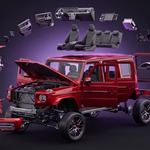
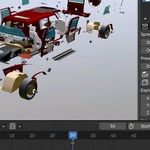

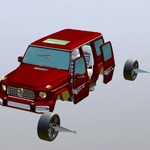
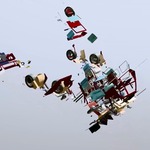
What it does
ExplodeFlow builds exploded views and blast animations from a panel in the sidebar. You add a row, point it at an object or a collection, and drag a value. Nothing is applied to your geometry, and every setting keyframes.
A fuller version of this page, illustrated, ships as a Quick Start PDF in the download.
Install
- Drag explodeflow-1.0.0.zip onto an open Blender window and confirm, or use Edit > Preferences > Get Extensions > Install from Disk.
- Open the sidebar in the 3D viewport with N and pick the ExplodeFlow tab.
Blender 4.2 and later, tested up to 5.2. Works in Eevee and Cycles, on Windows, macOS and Linux.
Your first explosion
- Select the objects you want to blow apart, or highlight a collection in the Outliner.
- Press + in the panel. The row takes what you picked and remembers where everything rests.
- Drag the X, Y or Z value under Explode.
Drag back to zero and everything returns exactly where it started.
Five kinds of row
- A collection: its objects move apart as whole objects.
- A mesh: that object's own geometry is broken into pieces inside a Geometry Nodes modifier the addon builds for you.
- A text object: every letter is a piece, and the text stays editable. Retype it and the row picks up the new letters.
- A curve: spline by spline, written onto the control points, so bevel and taper survive.
- An armature: bone by bone, with whatever is bound to those bones following them. Best for rigs whose parts each ride one bone. A character skinned across many bones stretches, so give a character made of several objects a collection row, and one that is a single mesh a mesh row, which shatters it while the rig keeps animating it.
The controls
Explode
Each axis has its own value and its own direction. Both Ways keeps every piece on its own side of the centre and moves it outward. One Way sends the whole row the way the value points. A negative value fans the row the other way rather than folding it up.
Spread
How the value is shared out between the pieces.
- Even Spacing: equal steps in the order the pieces already sit. The clean look of a technical exploded view. The value is the whole spread, not a gap per piece, so it feels the same on five parts or five hundred.
- By Distance: travel grows with how far out a piece already sits, so the outer shell pulls away while the core stays tight.
- Along Curve: the pieces ride a curve you pick.
Along a curve
Pick any curve object. Growth is how far the run has travelled: at 0 the row stands where it rests, and as it climbs the leading piece sets off for the far end with the rest following one after another, until at 1 the whole row is laid out along the line. Amount blends between resting and riding. Grow From says which end leads: first half, second half, middle out or both ends in, and every piece gets a spot of its own.
Tab into the curve and drag a control point and the run follows as you drag. A bevelled or tapered curve is sampled through its own control points, so the pieces follow the line rather than the tube, and shape keys count too.
The rest of the row
- Strength: one multiplier over the whole row, for trimming a look without touching three values.
- Outer Lead: makes the outer pieces travel faster than the inner ones, so nothing has to pass through anything else.
- Offset, Rotation, Scale: applied to the pieces on top of the explode.
- Pivot: Individual turns and grows each piece on its own spot, Center swings the blast as one. It never changes how far anything is thrown.
- Origin: what the spread measures out from, the median of the pieces or the 3D cursor.
- Random and Seed: give each piece its own share of the rotation and scale instead of moving them as one. The variation comes from the piece and the seed, so it never shimmers as you scrub and every render of a frame is identical.
Effect region
Put an empty in the Effect slot and it becomes a spherical falloff. Pieces inside are thrown in full, pieces at the rim ease off, everything outside holds still. Scale the empty to set the reach and move it through the model to sweep the blast across.
Driver empty
Add a driver and you get a box empty around the target. Move it and the row explodes, rotate or scale it and the pieces follow. It reads back both ways, so nudging the sliders moves the empty to match.
Pinning
Whatever must hold still, holds still. Select objects and press Pin Selected. On a shattered mesh, Tab into Edit Mode and pin faces. On a curve, pin single control points. On a rig, pin bones in Pose Mode. Each kind has a Clear that removes the lot.
Presets and animation
Six presets, each a finished shot: Explode, Blow Up, Forward, Scatter, Shockwave and Tornado. Set a Duration in frames and press Disassemble. The addon sets every axis, the throw and the tumble, then lays the keys that play it, eased out so the blast is fastest as it goes off. Assemble writes the same shot backwards. Each button has its own clear.
Every distance in a preset is a multiple of what the row drives, so the same preset reads the same on a 2 cm bolt and a 20 m building.
You can also key by hand: right-click any value and insert a keyframe, exactly as on a modifier. Each row keeps its keys on its own empty, so the Timeline shows the row you have selected and hides the rest.
Park, Reset and Bake
The tick box on a row parks it: the objects return to rest and every setting is kept. Reset returns the row to its rest pose. Bake commits what you see and steps out of the way, for handing the result on without the addon.
Things worth knowing
- Move an object, a curve point or a bone yourself and the row takes that as the new rest rather than overwriting it on the next update.
- Objects with keys of their own, or hung off an animated parent, keep moving while they explode. A rig keeps its own action playing with the blast on top.
- A row filters out anything another row already drives, so two rows can never fight over the same object.
- Delete an object or a collection and its row cleans itself up.
Support
Questions, bugs or a scene that does not behave the way this page says it should: message me through Superhive or mail [email protected].
Does it change my meshes?No. Every object a row touches has its rest transform remembered the moment the row claims it, so a value back at zero lands exactly where it started. A shattered mesh is broken inside a Geometry Nodes modifier: set the values to zero or press Reset and the modifier comes off, leaving the original mesh. Nothing is written into your geometry unless you choose to Bake.
Is this a simulation? Do I have to bake anything?No simulation, no cell fracture and no cache. Everything is a transform driven by values you set, so it updates as you drag and scrubs on the timeline straight away. Bake exists, but only for when you want to commit the result and remove the addon from the scene.
Can I animate it?Yes. Every value keys: the explode values, Growth along a curve, Rotation, Scale, Strength, Random, the driver empty and the Effect region. The viewport updates as the frame changes. There are also six one-click presets that write a whole keyed shot over a Duration you set, with Disassemble and Assemble buttons.
Does it work on rigged characters and armatures?Yes, for rigs where each part is its own mesh bound to one bone, such as vehicles, robots and machinery. Those come apart bone by bone, the rig keeps playing its own action while the blast rides on top, and single bones can be pinned in Pose Mode. A character whose skin is weighted across many bones will stretch rather than separate if you pull its bones apart, because the skin follows several bones at once. Characters work through the rows that match what they are made of. A character built from several objects: put them in a collection and use a collection row, and the parts come apart whole while the rig keeps posing them. A character that is one skinned mesh: point a mesh row at the mesh, and it shatters into pieces while the rig keeps animating it, since the shatter runs after the Armature modifier. The panel points this out when you add a rig with skinned meshes.
Can I keep some parts from moving?Yes, at four levels: whole objects with Pin Selected, single faces of a shattered mesh picked in Edit Mode, single control points of a curve, and single bones of a rig in Pose Mode. A pin outranks every other setting on the row, so a pinned piece stays where it rests however hard the rest explodes.
Which Blender versions does it support?Blender 4.2 and later, tested up to 5.2. It ships as an extension, so you can drag the zip onto a Blender window to install it. Eevee and Cycles, on Windows, macOS and Linux.
How is this different from Cell Fracture or a Rigid Body sim?Those blow something apart their way and hand you a simulation to bake and fight. ExplodeFlow gives you a layout you dial in: you choose how the pieces spread, how far they travel and which ones lead, and you can change your mind at any point without re-running anything. It is built for exploded views and assembly shots first, and blasts second.
Does it work on text and curves as well as meshes?Yes. A text object comes apart letter by letter and stays editable text, so retyping it picks up the new letters. A curve comes apart spline by spline, written onto its control points, so it stays a curve with its bevel and taper.
Can several explosions run in one scene?Yes. Add as many rows as you like, each driving one object or one collection with its own settings, so a housing lifting straight up while the fasteners fan out sideways is two rows. Each row keeps its keys on its own empty, so the Timeline shows only the row you have selected.
Can I hand the controls to someone else?Add a driver and the row gets a box empty wrapped around the target. Moving, rotating or scaling that empty drives the explosion, and it reads back both ways, so the empty and the panel never disagree. An animator can direct the whole shot without opening the sidebar.
Is there documentation?This page covers the controls, and an illustrated Quick Start PDF comes in the download. If something does not behave the way it says it should, message me through Superhive or mail [email protected].

Discover more products like this
armature exploded view geometry nodes mechanical motion graphics assembly animation rigging disassemble explode shatter technical animation product-visualization