ANIMATED EXPLOSIONS
Blow apart a collection, a single mesh, text, a curve or a rig, then keyframe all of it from one non-destructive panel.
Version 1.0: one price, all future updates free
WHAT EXPLODEFLOW DOES
ONE ROW PER EXPLOSION
Add a row for an object or a collection, then dial it. Every kind of row uses the same controls, every value keyframes, and nothing is applied until you say so.
- Per-axis explode: X, Y and Z, each both ways or one way
- Three spread styles: Even Spacing, By Distance or Along a Curve
- Shatter a single mesh: broken up in Geometry Nodes instead of a simulation
- Text, curves and rigs: letters, splines and bones come apart too
- Six presets: a whole keyed shot in one click
- Effect region: only what an empty covers is thrown
- Random: vary rotation and scale piece by piece
- Pinning: hold objects, faces, curve points or bones still
- Driver empty: one handle in the viewport instead of sliders
THE GOAL OF EXPLODEFLOW
An exploded view is one of the most useful shots you can hand a client, and one of the most tedious to build. Rigid Body and Cell Fracture give you a simulation to fight; ExplodeFlow gives you values to dial and keyframe.
HERO
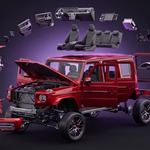
FROM ASSEMBLED TO EXPLODED
Select your parts, hit + and drag one value. Drag back to zero and everything returns exactly where it started.
OBJECTS OR COLLECTIONS
THE ROW LIST
AS MANY EXPLOSIONS AS YOU LIKE
The + button adds the selected objects or the highlighted collection, and every row is independent. A tick box parks a row at rest while keeping its settings.
THREE WAYS TO SPREAD
Spread decides how the value is shared out between the pieces, and every mode stays a live slider.
SPREAD
EVEN SPACING
Equal steps along the axis, the clean look of a technical exploded view.
BY DISTANCE
The outer shell pulls away while the core stays tight, for a blast look.
ALONG A CURVE
The pieces travel onto any curve one after another, like a train, and follow it live as you edit the curve. Growth, Amount and Grow From control the run.
PRESETS, AND IT ALL ANIMATES
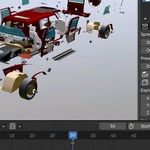
Pick a preset, set a Duration and press Disassemble or Assemble, and the whole shot is keyed for you.
PRESETS & ANIMATION
SIX SHOTS
Explode, Blow Up, Forward, Scatter, Shockwave and Tornado. Each one scales to the row, so it reads the same on a bolt and on a building.
You can also key any value yourself, and each row keeps its keys on its own empty, so the Timeline shows only the row you have selected.
SHATTER A SINGLE MESH
SHATTER
NO CELL FRACTURE, NO SIMS
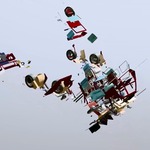
Point a row at one object and it breaks the mesh into pieces inside a Geometry Nodes modifier. The mesh underneath is untouched, and the result renders and scrubs without baking.
TEXT, CURVES AND RIGS
A row works out what the pieces are, whatever you point it at.
MORE THAN MESHES
EVERY LETTER A PIECE
Each letter of a text object becomes a piece, and the text stays editable underneath.
SPLINE BY SPLINE
A curve object comes apart spline by spline and stays a curve, bevel and all.
BONE BY BONE
An armature row explodes the rig, whatever is skinned to it follows, and the bones keep their own animation.
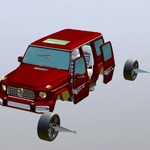
Built for rigs where each part is its own mesh on its own bone: vehicles, robots, machinery. A character skinned across many bones stretches rather than separating when its bones are pulled apart, so treat a character by what it is made of. Several objects: put them in a collection and use a collection row. One skinned mesh: point a mesh row at it, and it shatters while the rig keeps animating it.
LIMIT IT TO A REGION
EFFECT REGION
A BLAST WITH EDGES
The Effect slot turns an empty into a spherical falloff: pieces inside are thrown and pieces outside stay still. Move or keyframe the empty and the blast travels with it.
SAME ROW, EVERY PIECE
RANDOM
RANDOM, NOT UNIFORM
Raise Random and each piece takes its own rotation and scale, with a Seed to shuffle. It never shimmers as you scrub.
PIN WHAT MUST HOLD STILL
PINNING
OBJECTS, OR SINGLE FACES
Select what should stay put and hit Pin Selected. It works on objects, on the faces of a shattered mesh, on curve points and on bones.
DRIVE IT WITH AN EMPTY
DRIVER EMPTY
ONE HANDLE IN THE VIEW
Add a driver and a box empty wraps the target. Move, rotate or scale it and the row follows, and nudging the sliders moves the empty to match.
NOTHING IS DESTROYED
Every rest transform is remembered, so zero always means zero and Reset gives back an untouched scene. When the look is right, Bake makes it permanent.
WHO MADE THIS

I'm Amir, a mechanical engineer and 3D artist. I have been making art since I was 16, and I still get the same kick when a product comes apart on screen and you can finally see how every piece fits inside.
Most days I make 3D visuals for founders and inventors, and an exploded view is often the shot that explains their product best. ExplodeFlow is the tool I wanted on those jobs, made with the same care I put into every shot. You can see my work at amirsharoleslam.com.
MORE FROM THIS DESK
ExplodeFlow is one of four Blender add-ons I have released for technical and product visualisation. Each one works on its own.
All three are on Superhive, with the same 30-day guarantee as this one.
WHAT YOU GET
- ExplodeFlow 1.0 extension (.zip), drag and drop onto Blender to install
-
Quick Start PDF, included in the download, 13 illustrated pages taking every control in turn
- 30-day refund guarantee via Superhive
- Personal and commercial use: one price, no separate studio licence
- All future updates free
 sharoleslam