Flowkeys Pro — Shortcut Reference Panel For Blender | All 11 Modes & Editors | Instant Search | Personal Notes
 NovaStrikes


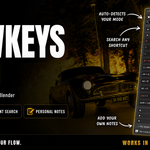
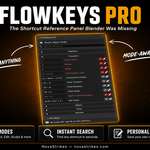
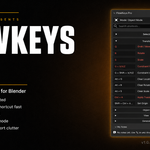
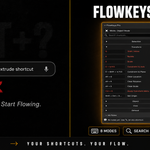

FlowKeys Pro — Clean Shortcut Reference. Right inside Blender.
Tired of distracting keyboard overlays taking up precious viewport space? FlowKeys Pro is a lightweight, searchable shortcut reference panel that lives entirely in Blender's sidebar. It automatically detects your active interaction mode or editor — Object, Edit, Sculpt, Pose, Weight Paint, Vertex Paint, Texture Paint, Grease Pencil, Video Sequencer, Timeline, and Dope Sheet — and displays the most relevant shortcuts instantly. No viewport clutter, no visual noise — just a clean, lightning-fast lookup whenever you need it.
Key Features
Dynamic Mode & Editor Detection — Auto-updates categories and shortcut listings in real time as you switch between all 8 3D Viewport interaction modes, plus the Video Sequencer, Timeline, and Dope Sheet editors.
Instant Search & Filter — Type keys or descriptions in the search bar to instantly filter through every shortcut in the current mode.
Hidden Hotkeys Filter — Toggle a per-mode filter to show only the shortcuts that aren't reachable from any pulldown menu, so you can find the ones you'd never stumble onto by browsing. Available in every supported mode and editor.
Favorites — Star any shortcut to pin it. Stored globally, favorites follow you across every project.
Global Personal Notes — Add custom notes to any shortcut using the inline pencil icon (✏). Notes are stored in a single file on your machine and are available in every project automatically — no retyping per file.
Notes Export — Export your full notes library to a clean TXT or structured JSON file at any time.
One-Click Clipboard Copy — Click the copy button next to any shortcut to copy its key combination directly to your clipboard.
Viewport HUD Overlay — Optional live, context-aware overlay for shortcuts directly in the 3D viewport. Currently covers the 8 3D Viewport modes; Sequencer/Timeline/Dope Sheet HUD support is planned as a follow-up.
What's Inside the ZIP?
blender_manifest.toml — Extension metadata (extension zip only)
__init__.py — Addon registration and class listing
constants.py — Curated database of 380+ shortcuts across all 11 modes/editors, including Hidden-hotkey tagging
data.py — Live keymap lookup for custom keybinding detection
keymap_resolver.py — Matches Blender operators to their real, currently-bound keys
key_hints.py — Formats and displays key-combo hint strings in the UI
properties.py & utils.py — Property declarations, mode/editor detection, and search/filter logic
operators.py & panels.py — Sidebar draw logic and user actions, across the 3D Viewport, Sequencer, and Dope Sheet/Timeline
favorites.py & favorites_store.py — Global favorites logic and persistence
notes_store.py — Global notes persistence
export.py — Notes export to TXT/JSON
operator_state.py — Tracks active modal operator state for the HUD
hud.py — Viewport HUD overlay rendering
preferences.py — Styling & layout settings (line spacing, accent colors, HUD position/scale/opacity)
Installation Guide
FlowKeys Pro is provided as two separate downloads — use whichever matches your setup. Both contain the same features for a given release.
Extension zip (Blender 4.2+, recommended)
- In Blender, go to Edit → Preferences → Get Extensions.
- Click the dropdown arrow (top-right) and select Install from Disk....
- Choose the FlowKeys Pro extension zip and click Install.
Legacy zip (Blender 4.0–4.1, or classic installer)
- In Blender, go to Edit → Preferences → Add-ons.
- Click Install... and choose the FlowKeys Pro legacy zip.
- Enable the checkbox next to FlowKeys Pro.
Once installed, open the sidebar (press N) in the 3D Viewport, Video Sequencer, Timeline, or Dope Sheet and look for the FlowKeys tab.
Discover more products like this
reference hotkey reference shortcut panel 3D Productivity Blender 3D shortcuts Blender hotkeys shortcuts Workflow