Game Asset Pipeline Pro
 Skava
Skava






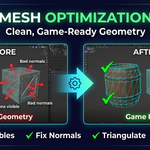
Optimize Mesh now does what it says.
It used to report "Optimized 1 objects" and leave the mesh untouched. The merge
step asked Blender's mesh operation for a result it does not return, which threw
an error on the very first step; the error was swallowed, so nothing else in the
optimisation ran either — no degenerate-face cleanup, no loose-geometry removal,
no normal recalculation — and the mesh was never written back. The button
reported success regardless, because the operator never looked at whether the
work had actually succeeded.
Both are fixed. On a model with every vertex duplicated on top of itself, the
count now goes from 1014 to 505 with 509 vertices merged; before this release it
stayed at 1014. The button also tells you what it did — how many vertices were
merged, or that nothing needed merging, or which objects could not be processed
and why — instead of claiming success either way.
Checked on Blender 4.2.9 LTS, 5.1 and 5.2: enabling and disabling the add-on,
every operator run on a real scene, and the repair measured before and after.
Nothing else in the add-on is changed.
Have questions about this product?
Login to message
| Sales | 20+ |
| Published | 10 months ago |
| Blender Version | 4.0 - 5.0 |
| Extension Type | N/A |
| Render Engine Used | Cycles, Eevee |
| License | Mit |