Lim – Unofficial Animation Toolkit For Human Generator & Blender
 LIM - Life in Motion.


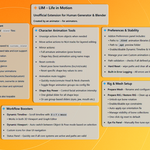
📄 LIM – Life in Motion
1. Overview
Bring your Human Generator characters to life faster than ever.
LIM is a Blender add-on focused on streamlining animation workflows and giving you instant access to a large animation library, fully compatible with Human Generator rigs (Rigify)
With an intuitive Animation Browser, powerful mirroring tools, and workflow boosters like the Dynamic Timeline, LIM makes Blender character animation faster, simpler, and more fun.
Key Features:
✔ Fully compatible with Human Generator Addon
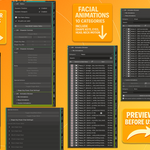
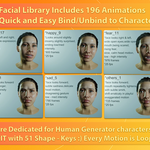
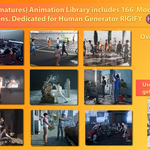
✔ 360+ Animations (plug & play) - 166 Body animations / 196 Facial Animations (includes Head/Neck/Eyes/Shape Keys)
✔ Load body and facial animations from external .blend libraries, and save your own custom animations for global use across all projects.
✔ Quickly preview (.mp4), sort, and apply animations using the built-in Animation Browser.
✔ Finally mirror full animation actions for both armatures and shape keys.
✔ Boost your workflow with Dynamic Timeline & Dynamic Viewport
✔ Super fast & intuitive control of full facial animation clip intensity
✔ Built-in error logging system
2. Animation Library
✔ 196 Facial Animations (Shape Keys, Eyes, Head, Neck) – 10 categories (happy, sad, angry, etc.)
✔ 166 Body Animations – 9 categories (idle, walk, talk, forge, workout, etc.)
✔ Stored in external .blend files for global use across all projects.
✔ Save your own custom animations (including objects and mesh actions).
✔ Create custom categories.
✔ Preview animations (with optional .mp4), sort by name or duration.
✅ (Facial animations are fully loopable, and more than half of the Body Animations categories support seamless loops.)
🎞️ Animation Packs Previews
▶ Facial Animations Pack (196 actions)
▶ Body Animations Pack (166 actions)
✔ All animations are categorized and optimized for Human Generator Rigify.
3. Main Features
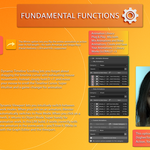
🔹 Animation Browser
Load, preview, sort, and apply animations.
Supports Human Generator rigs out-of-the-box.
-
Preview without applying to the rig.
Unlike Blender’s default Asset Browser libraries, where you must open each library file to add new assets, LIM lets you save your custom animations straight from any project — no need to open the library file. Just save and go.
🔹 Workflow Boosters
Dynamic Timeline:
Hold D + F and move your mouse to scroll the timeline in the 3D Viewport and Graph Editor.
This is a game changer for animators tired of manually dragging the timeline cursor — it lets you control the animation flow intuitively with your hand movement, making scrubbing through keyframes feel natural and fast.
Dynamic Viewport:
Automatically switches between Pose Mode and Object Mode based on what you select.
Just click the rig or mesh — LIM does the reset
🔹 Character Animation Tools
Mirror Full Animation Actions for armatures and shape keys.
Action Detach – clear current actions from Armature or Mesh.
Shape Key Reset / Transform Reset – zero out poses or shape keys.
Quick Send to NLA – push actions to NLA editor.
-
Shape Key Power – scale intensity of shape key animations globally or per key (over the full length of the action)
🔹 Extra Options
Toggle Head/Neck channels. (Quickly mute or unmute Head/Neck animation channels for easier mixing in NLA)
Toggle Finger channels. (Instantly mute/unmute Finger bones (IK/FK) to customize finger poses — very handy)
-
Eye bone regeneration & fine-tuning. (Regenerate eye bones when animating eyes manually, and fine-tune their rotation for precise control.)
🔹 Error Logging System
All key functions log errors to JSON files for easier debugging.
4. Tutorials & Workarounds
📚 Tutorials:
(This section is focused on how to use the add-on itself — installation, functions, and smart fixes for special cases.)
Tutorial Part 1 Getting Started – Install & Use the Addon (basics)
Tutorial Part 2 How to Extend Existing Walk CYCLE
Tutorial Part 3 Fixing Head/Neck Follow Offsets in NLA when COMBINE Mix + Body actions.
(abt part 3 - everything works out of the box — you don’t need to tweak anything for LIM to function properly.
But if you know what’s going on under the hood, you can fine-tune things even further for cleaner results.It’s more of a workaround than a full tutorial, but it shows you why head/neck motion might seem misaligned when combining facial and full-body animations — even though technically, nothing is broken. This is one of the very few edge-cases where NLA mixing may look off in preview, but export/render will still behave correctly. I’m planning to find a smarter workaround for this in future updates — and I’m open to cool suggestions from the community.
If you’ve got a trick, I’d love to hear it.
🛠️ Rigify Workarounds:
(These workarounds cover small differences between Human Generator rigs and HG after RIGIFY rigs based setup.
They’re minor — but useful when you notice awkward translations, offsets or limb behavior.)
Workaround Part 1 Universal Fix for most case.
Workaround Part 2 Fixing IK Behavior Deadlift Animation Example Bad IK Translation
Workaround Part 3 Universal FIX , push-ups example, 2 ways to fix.
Workaround Part 4 Universal Fix bad rotations and translations , example Crunches
Workaround Part 5 FIX for FK type, Mesh Intersection, Bad Translations, crouch example
5. License
📁 Animation License (Asset Library)
All included animations are royalty-free for use in your personal and commercial Blender projects (renders, games, cinematics, videos, etc.).
You are free to bake them into your characters, modify them, and include them in your exported scenes.
❌ However, reselling, sharing, or distributing the raw animation files as an asset pack, library, or individual files is strictly prohibited.
This includes marketplaces like Unreal Marketplace, Unity Asset Store, Gumroad, etc.
➡ The full LIM – Life in Motion Asset License.pdf is available in the Downloads section and included inside the animation library file.
6. Future Plans
🔜 UI improvements
🔜 Auto-duration for custom clips
🔜 More animation packs
🔜 Multi-rig Dynamic Viewport support
🔜 Improved Head/Neck sync
🔜 2026 - Face Library Animations Optizmization.
🔜 31.12.2025 - Body Library Animations Optimization (Huge performance boost! I've reduced keyframes by 80%-95%, making viewport playback several times faster and nearly instantaneous. A total game-changer! (Before: 50k–2M vs. Now: 3k ~ 30k) Enjoy!!!)
Change Log
2025-12-31 Important Update: Body library Optimization is DONE
Hello everyone!
Please read the following instructions carefully to ensure a smooth transition to the new system.
What’s New?
The old BODY animation libraries and the previous armature_cat.blend file are now obsolete. You can choose to archive or delete them. The new armature_cat.blend features 100% optimized body animation files.
Key Improvements:
Performance
: Files have been optimized by 80–95%, significantly reducing the load on the Viewport and animation playback.
Clean Data: Original raw files often contained between 50k and 2M keyframes. The new versions typically range from 3k to 15k keyframes (with a maximum of 30k for very long clips of 800+ frames).
Quality Control:
There is virtually no loss in quality. I have also manually fixed errors found in the original raw source files.
Workflow:
The speed and fluidity of using this new library are incomparable to the original.
I am thrilled to finally release this update. Happy animating!
🛠 Installation Instructions
-Follow these simple steps to update your library:1- Remove: Delete your old
armature_cat.blend file.2- In download section find file "replace_body_optizmized_library" download and Unzip the
replace_body_optizmized_library.zip archive.
3- Replace: Copy the new armature_cat.blend and paste it into your directory (usually C:\blends\).
4- Done: Everything is ready to use!
2025-12-21 — Version 1.0.1
Confirmed full compatibility with Blender 5.0
Minor optimizations and cleanup.
Important note: Do NOT use the same customs_.blend file for Blender 5.x and older versions. For example, create a separate path like c/blends/blender5_0/customs_.blend. Otherwise, it won't work correctly, and you may encounter unexpected errors.
WIP: I am developing a fully optimized BODY animation library, scheduled for release by the end of 2025. This library drastically reduces keyframe counts—compressing raw mocap data from as much as 400k keys down to just 3.5k–5k. This optimization provides a massive performance boost for Blender and game engines. While current actions range from 50k to 2M keys, the final versions will be lightweight (3k–30k keys ). The 30k limit applies only to the longest clips, such as 800+ frames; however, most stay within the 3k–5k range. Assigning these to an armature is now practically instant, with no perceptible loss in visual quality.
2025-07-26 — Version 1.0.1
Confirmed full compatibility with Blender 4.4 – 4.5.
Minor optimizations and cleanup.
Discover more products like this
mirror animations pack Facial Animation iphone mocap Human Generator human generator pose MOCAP ANIMATION Animations Tools animation facemocap facial-expressions fast Animation