 Skava
Skava


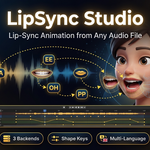
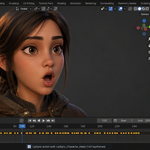
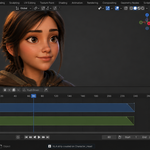
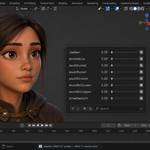
LipSync Studio — Audio-Driven Mouth Animation for Blender
Three analysis engines plus an optional offline Vosk aligner, six viseme rig presets (ARKit 52 / FACEIT / Preston Blair / MetaHuman / CC4 / Generic), multi-mesh characters, jaw-bone rigs, a baked mouth-openness driver, auto blink and idle, loudness intensity, range punch-in, push-to-NLA, emotion overlay and one-click Rhubarb download.
New in v1.4.4: load the dialog line from a .txt file — a button next to the Dialog field reads UTF-8 (with or without BOM), UTF-16 and Windows-1252 and keeps every line, which pasting cannot do: Blender text fields keep only the first line of the clipboard. The panel now shows the engine next to the text and warns when that engine ignores it — only Rhubarb and Vosk read Dialog Text, Built-in and Whisper do not — and every analysis reports which engine ran and whether the text was used. Also new: an optional offline Vosk engine that places every word of your text on the audio. On our test recordings it closed the lips on time on 99.1–100 % of words starting with B, M or P, against 83.6–84.8 % for Rhubarb with the same text. The test recordings are synthesized voices with known word timings; we have no recordings of live speech with such a reference, so treat these figures as a test result, not a promise for every take. It is off by default and installs with one button into its own folder, with every download listed before you press it.
In v1.4.3: visemes are matched by rig family first. On an ARKit set of 52 shapes — the set Faceit bakes — matching a viseme code anywhere inside a shape name sent EE to a cheek, OO to an eyelid and RR to the nose, so only the jaw ever opened. The add-on now recognises the family of your rig and uses its own table, and a viseme can no longer land on an eye, a brow, a cheek or a nose. Measured on a Faceit character: 17 of 17 visemes correct, 20 shapes moving instead of 14.
In v1.4.1: auto blinks and the micro idle now work on control rigs. Drivers and constraints are evaluated after the F-curves, so inserted keys were being overwritten every frame; blinks now mute the drivers on their own shapes, and the idle plays through an additive NLA strip.
From v1.4.0: six new tools that take the result from "the mouth moves" to "the shot is animated". Bake a mouth-openness value you can drive any shader or object with, add natural eye blinks and a subtle idle, drive a jaw bone for rigs with no mouth shape keys, copy one analysis onto every selected character at once, scale the mouth by how loud the speech is, and re-bake just one phrase inside a frame range without touching the rest.
From v1.3.0: multi-mesh characters animate as one — when a Faceit or ARKit face is split across several meshes that share the same blendshapes (head, beard, eyebrows, tongue, teeth), LipSync Studio drives the mouth on every one of them in sync. Building on v1.2.0: full ARKit / Faceit / MetaHuman support with split left and right shape keys, the FACEIT preset mapped to the ARKit blendshapes modern Faceit bakes, and a fully reversible Push-to-NLA workflow.
Why LipSync Studio
Mouth animation is one of the most expensive things in character work — and the existing Blender addons either ship a 30 MB download no marketplace allows, or leave you to install extra tools by hand. LipSync Studio takes the middle path: a tiny addon that downloads only the binary you need on first run, picks a viseme preset that matches your existing rig, and bakes the result into an NLA strip you can blend with the rest of the performance.
Features
Analysis engines
- Built-in — energy analysis. Fast, language-agnostic, less precise.
- Rhubarb Lip Sync — phoneme-accurate, text-aided. One-click download.
- OpenAI Whisper — speech to text plus phonemes (English only).
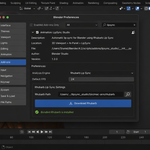
- Vosk (optional) — offline word-by-word alignment of your dialog text, English. Off by default; one button downloads libvosk, a 39 MB English model and the CMUdict dictionary into its own folder. No pip, no account, no key, no cloud.
One-click Rhubarb download
Auto-detects your platform (Windows, macOS Intel, macOS Apple Silicon, Linux), fetches the official release, and sets it up automatically. About 8 MB instead of bundling 30 MB in the download.
Six viseme rig presets
One-click mapping that fills all 17 viseme slots with the shape-key names your rig already uses:
- Generic — Blender default viseme naming
- ARKit 52 — Apple ARKit / Live Link Face / iPhone capture
- FACEIT — the FACEIT Blender addon
- Preston Blair — classic 9-shape animator set
- MetaHuman — Epic MetaHuman / Live Link Face control rig
- CC4 — Reallusion Character Creator 4 / iClone 8
Auto-Detect scans your shape-key names and matches them automatically when no preset fits.
Multi-mesh characters
Faceit and ARKit characters often split one face across several meshes that all carry the same blendshapes — a separate head, beard, eyebrows, tongue or teeth. LipSync Studio applies the same viseme animation to every character mesh that has matching shape keys, so the whole face speaks together. Each mesh resolves its own shape-key names (left and right halves included) and its control-rig drivers are handled per mesh, so the mouth opens reliably even when facial hair covers it. A single checkbox in Settings turns this on or off; when off, only the selected mesh animates. Clear removes the animation from every mesh it touched and restores the drivers it muted.
Baked mouth-openness driver (new)
Bake a keyframed 0 to 1 mouth-openness value onto the character as a custom property, tracking how far the mouth is open on every frame (open vowels read high, closed and pressed-lip shapes read near zero). Add a driver from it to a shader input, a jaw bone, a jiggle, a corrective, or a second character — one honest speech signal you can wire anywhere. Runs on its own or automatically on Build.
Auto blink and micro-idle (new)
Adds natural eye blinks on the eyeBlink shape keys (ARKit left and right, or a single blink shape) at slightly randomised intervals, each a quick close and open. An optional micro-idle adds a gentle head sway so the character never sits perfectly still — kept conservative so it never fights the lip-sync. The timing is reproducible, so a rebuild gives the same performance.
Jaw-bone rigs (new)
For rigs whose mouth is a bone rather than shape keys: choose the Jaw Bone rig type, pick the armature and the jaw bone, and LipSync Studio rotates the jaw open and closed in time with the speech — wide for open vowels, closed on pressed-lip and rest shapes — with a pickable open axis and maximum angle.
Copy to other characters (new)
Analyse one audio track, select any number of other character meshes, and build the same lip-sync on all of them in one click. Each character resolves its own shape-key names through its preset, so a crowd or a dialogue partner can share a single analysis.
Loudness intensity (new)
Scale every viseme keyframe by how loud the speech is at that moment: shouting opens the mouth wide, a whisper keeps it small. A strength slider blends between a flat performance and a fully loudness-driven one.
Range re-bake / punch-in (new)
Iterate on a single phrase. Turn on Limit to Range, set a start and end frame, and re-bake only that window — every keyframe outside it is left exactly as it was. Tweak the intensity or blend on one line without disturbing the rest of the take.
Push to NLA
After build, push the lip-sync action down into a dedicated NLA strip on each animated mesh's shape-key track so it blends with other actions (idle breathing, expression layers). Fully reversible.
Emotion overlay
Additive Happy / Sad / Angry / Surprised expression keyframed on top of the speech, with an adjustable strength slider. Uses named emotion shape keys — rename to fit your rig.
Modal threaded analysis
Whisper, Rhubarb and Vosk run in worker threads driven by a modal timer — Blender's UI stays responsive during long audio analysis.
Auto blend
Configurable ease-in and ease-out per viseme keyframe, adjustable intensity multiplier.
Clean, editable result
Re-runs overwrite the existing lip-sync action instead of leaking numbered duplicate copies that bloat the scene file.
Plain-English audio errors
Corrupted audio, missing file, or unsupported codec now report a clear cause instead of a Python error.
Export — FBX / glTF / JSON
Ship the result to Unity (FBX with shape-key animation), Unreal (FBX), or any custom pipeline (JSON viseme timeline).
Compatibility
- Blender: 4.2 LTS and later (tested on 4.2, 5.1 and 5.2)
- OS: Windows / macOS (Intel and Apple Silicon) / Linux
- Rhubarb: version 1.13.0, downloaded from the preferences panel
- Whisper: the OpenAI Whisper package in Blender's Python (English only)
- Vosk (optional): Windows x64, macOS (Apple Silicon and Intel), Linux x64; English
What you get
- LipSync Studio add-on (Python only, no binary in the download)
- Six viseme presets out of the box
- One-click Rhubarb downloader
- README with full quick-start guide
- Free updates for v1.x
- Support through marketplace messaging
Install
Edit → Preferences → Add-ons, arrow button in the top right corner → Install from Disk, pick the downloaded ZIP, enable. The LipSync sidebar tab appears in the 3D Viewport (press N).
For Rhubarb analysis: open the addon preferences and click Download Rhubarb. The right binary for your platform is fetched (about 8 MB).
License
GPL-3.0. Standard for Blender add-ons. Rhubarb itself is MIT — you can ship the resulting animation in any commercial project.