MCrack
 MNC Development


MCrack — Documentation
Requires Blender 5.2 or later.
1. In Blender, open Edit > Preferences > Get Extensions.
2. Click the dropdown arrow at the top right of the window and choose Install from Disk…
3. Select MCrack-1.0.0.zip. Blender asks you to confirm one permission — Files, because the add-on reads its fracture setups from a blend library on disk.
4. The extension installs and enables itself. Press N in the 3D Viewport and the MCrack tab is there, in the sidebar.
To update later, install the newer zip the same way; it replaces the previous version. To remove it, find MCrack in the Add-ons list and uninstall it.
In the 3D viewport, press N to open the sidebar and pick the MCrack tab. The panel has three parts, top to bottom.
| Setups | Clicking one adds it to the active object. |
| Layers | The fracture layers already on the object, top of the list evaluated first. |
| Settings | Every parameter of the selected layer. |
MCrack works on the active mesh object. With anything else selected the panel says so and the buttons are greyed out.
Select a mesh object and click Crack or Cut. The setup is added as a Geometry Nodes modifier and becomes the selected layer.
Clicking again always adds another layer — nothing is ever replaced. The same setup can be added as many times as you like; each copy keeps its own settings and shares a single node group, so the file does not grow with every layer.
A new layer is not a copy of the one before it: its Cutter Seed and Cutter Noise Seed are drawn at random, so a second Crack gives a different break instead of the same one twice.
Each layer is one row, six controls from left to right.
| Dot | Selects the layer. The settings below always belong to the selected one. |
| Name field | Rename the layer. |
| Screen | Turns the layer off in the viewport. |
| Numbers | Draws this layer's island ids in the viewport. |
| Arrow | Resets that layer to the setup defaults, and gives it a fresh attribute name if the old one is taken. |
| X | Deletes the layer. |
Under the list, the two arrows move the selected layer up or down the stack. Order matters: a layer only ever works on the result of the layers above it.
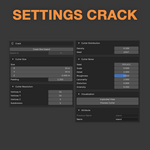
Shatters the geometry into islands, or shatters one island alone.
| Crack One Island | Breaks a single island instead of the whole geometry. |
| Island id | Which island is broken. Only used when the toggle above is on. |
| CUTTER SIZE | |
| Size | Side length of the cutter along each axis. |
| Padding | How far the cutter reaches past the geometry, from 1 upwards. Values near 1 can leave part of the mesh uncut and produce fewer fragments. |
| CUTTER RESOLUTION | |
| Vertices X · Y · Z | Number of vertices on each side of the cutter shape. More vertices carry finer noise. |
| Subdivision | Extra subdivision of the cutter. |
| CUTTER DISTRIBUTION | |
| Density | How densely the break points are scattered — the main control over how many fragments you get. |
| Seed | Shuffles the scatter. Drawn at random on every new layer. |
| CUTTER NOISE | |
| Seed | Shuffles the noise pattern. Drawn at random on every new layer. |
| Scale | Scale of the base noise octave. Small values give long wavy breaks, large values give busy ones. |
| Detail | Number of noise octaves. Higher values give more detailed noise but cost time. |
| Roughness | Blend factor between an octave and the previous one. Zero means no detail at all. |
| Lacunarity | Scale difference between two consecutive octaves. |
| Distortion | Amount of distortion applied to the noise. |
| Intensity | How strongly the noise deforms the cutter. At zero the break is a clean straight edge. |
| VISUALIZATION | |
| Exploded View | Shrinks every fragment around its own centre so you can see where the breaks landed. |
| Preview Cutter | Show the cutter itself, so you can see the surface doing the cutting. |
| ATTRIBUTE | |
| Previous Name | Island attribute this layer reads — the one written by the layer above. |
| Name | Island attribute this layer writes, and the one its id preview shows. |
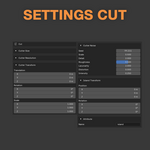
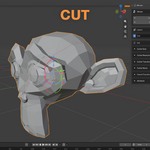
Splits the geometry with one cutter you place yourself. Size, resolution and noise behave as they do on Crack.
| CUTTER SIZE · CUTTER RESOLUTION · CUTTER NOISE | |
| Same as Crack | Cutter Size has no Padding here: the cutter is placed by hand rather than fitted to the geometry. |
| CUTTER TRANSFORM | |
| Translation | Moves the cutter. This is how you choose where the mesh is split. |
| Rotation | Angles the cut. |
| Scale | Scales the cutter on top of its size. |
| ISLAND TRANSFORM | |
| Position | Offsets the island the cut separates — pull the piece away from the rest. |
| Rotation | Turns that island in place. |
| ATTRIBUTE | |
| Name | Island attribute this layer writes, and the one its id preview shows. |
To break one fragment out of forty you need to know its number. Click the numbers icon on a layer row and every fragment of that layer gets its id drawn at its centre, straight in the viewport.
Read the number, then on a Crack layer turn on Crack One Island and type it into Island id. That shard is the one that breaks.
Each layer shows the ids of its own attribute, so the numbers change as you move the preview down the stack. They also follow the geometry: change a seed, move the object, and the labels move with it.
Layers hand their fragments to the layer below through a named attribute. Name is the attribute a layer writes; Previous Name is the one it reads from above. Two layers writing the same name would collide, so each new layer takes the next free one:
island · island2 · island3
Delete a layer and its number goes back into circulation for the next one you add. Type a name yourself and nothing ever overwrites it — the numbering only fills names it chose.
The two seed parameters are drawn at random when a layer is added. Reset puts them back to the setup defaults rather than drawing new ones, so to try another break, type a different Cutter Seed or add a fresh layer.
| The panel says Select a mesh object | MCrack works on the active mesh. Select one in the viewport. |
| A Crack layer produces nothing | Some scatter seeds leave the geometry with nothing to break. Type another Cutter Seed, or raise Cutter Density. |
| The fracture didn't split the mesh in two | Increase the value of the Cutter Padding. |
| The ids preview shows nothing | The panel says No island attribute on this layer when that layer's attribute is not on the final mesh — usually because a later layer consumed it. Preview the last layer of the stack instead. |
| A layer changes nothing | Check the screen icon on its row, and check its position: a layer only works on the result of the layers above it. |
MCrack · Requires Blender 5.2 or later
Have questions about this product?
Login to message
| Blender Extension Compatible | Yes |
| Published | about 2 months ago |
| Blender Version | 5.2 |
| Extension Type | Add-on |
| Render Engine Used | Cycles |
| License | GPL |
Discover more products like this
Workflow mesh fracturing modeling fracture 3d modeling workflow