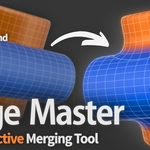
Merge Master

miccoli3d in Modeling


Item Rating

This item has an average rating of 5 from 7 ratings by the community.

58%
43%
0%
0%
0%

Purchase this item to leave a review!

  • Soger
    about 1 month ago

    I’ve been using Merge Master on some of my projects, and it has made the process of connecting separate meshes much quicker and easier. I really like how simple it is to set up and adjust the merge effect without having to modify the geometry.

    The controls are easy to understand, and I’ve found it especially useful when I want different parts of a model to look naturally connected while keeping my workflow fast.

    Definitely a great addition to a Blender workflow for achieving quick results in your models. The topology in the merged areas could be improved, but overall, it’s a really handy tool that makes this process much faster.

    • Mattia Miccoli

      about 1 month ago

      Thank you Soger! I'm really glad Merge Master helps your workflow. I appreciate your feedbacks, thanks again.

  • Marc Rühl
    4 months ago

    The addon is really great. The way modifiers get stacked up to get such a great result is really smart. At least for me it never resulted in glitches. The addon itself is also soooo well made. The UI is simple and pretty much self explanatory, while still offers pretty much every setting you need.
    Something which should be considered: It's already mentioned in the IMPORTANT section of the description, that all modifiers on both objects will be applied. That means that you can't use it with deforming meshes (that includes rigged meshes and meshes using geometry nodes) (06.2026, maybe this has changed, if you read this review in the future)
    Also the creator answered my questions really fast and detailed.
    If you don't plan to use it with deforming meshes I would highly reccomend it (and somehow wish more addons I bought here were like this)

    • Mattia Miccoli

      4 months ago

      Thank you, Marc, this means a lot! So happy Merge Master is working well for you. Always here if you need anything :)

  • thomas
    4 months ago

    Love it, easy to use, and works great even with more complex geometry! :- )

    • Mattia Miccoli

      4 months ago

      Thanks for the review Thomas! Glad you like it :)

  • Sam
    5 months ago

    While the add-on doesn't do anything blender isn't already capable off, it saves a lot of time and that's what matters to me, the results are just as good as if I'd done it manually with a lot less headaches. Great Job and I'm looking forward to see more of your work in the future!

    • Mattia Miccoli

      5 months ago

      Thank you Sam, really appreciate it! Glad Merge Master fits your workflow. Plenty of updates and new features still to come!

  • biswa
    about 2 months ago

    Great addon, I've only just started using it and it's proving really good in making concept meshes super quick. I can do a lookdev in minutes and if am happy, go for a cleaner mesh build, instead of starting and struggling with subd from the beginning. Thanks for creating this, and am looking forward to more updates in the future.

    And dont mind the 4 stars, it's just that the mesh is not usable for game-dev right now, so it's not the perfect product for me yet, hoping that some solutions are thought of in the futture, cheers!

    • Mattia Miccoli

      about 2 months ago

      Thanks for the kind words, really glad it's speeding up your workflow. That's exactly the stage it was built for. And no problem about the 4 stars, the game-dev limitation is a fair call and it's something I'm keeping in mind. Cheers!

  • yan
    4 months ago

    I like it. Its cool. The ONLY BASIC issue I see so far,
    is what happens to the INSIDE GEOMETRY for GEOMETRY A.
    The INSIDE of GEOMETRY A refers to "the hidden geometry section" that interacts with GEOMETRY B.

    The INSIDE of GEOMETRY A, either NEEDS to:

    1. Align to GEOMETRY B or SURFACE B.
    --- The VERTEX or EDGES of "GEOMETRY A" NEEDS to FLATTEN to the surface of "GEOMETRY B."
    2. OPTION to "Extract INSIDE GEOMETRY" to its OWN MESH,
    --- or some ability for "SEPARATE SELECTION," for easy selection and clean-up.
    --- color or extract to new mesh
    3. CHOICE to simply DELETE INSIDE GEOMETRY.

    ALSO I NOTICED THAT if I go into EDIT MODE to add more edges to the GEOMETRY A for more support edges to help with the SMOOTH transition layer; the "GEOMETRY A" would Cancel the Visual Appearance of the Connection with GEOMETRY B.

    The GEOMETRY A also goes back to its original state.

    --- Maybe add a GHOST LAYER to the EDIT MODE and an AUTO RESET + RECONNECTION to show that the Additional added edges updates correctly.

    • Mattia Miccoli

      4 months ago

      Hey Yan, thank you for the feedback.

      On the hidden interior of Geometry A, a couple of things are worth clarifying. The boundary of A already conforms to the surface of B, so the visible edge where the two meet sits cleanly on B rather than floating above it. For the interior geometry that ends up enclosed, version 1.1.0 added a Boolean Union option that removes it, which covers your third point directly. Extracting that interior into its own separate mesh is an interesting thought, and I've noted it for the future.

      The Edit Mode behavior is actually intentional, and it's the heart of what makes Merge Master non-destructive. When you go into Edit Mode you're working on the original, untouched Geometry A, which is why the connection preview steps aside for a moment. Nothing is lost, though. Add all the support loops you need, and as soon as you leave Edit Mode the connection rebuilds itself automatically and picks up your new edges. So the workflow you described does work, you just see the result once you exit rather than live while editing. A live ghost preview inside Edit Mode is something I'd genuinely love to explore further down the line, since I can see how handy it would be.

      Thanks again for the great review. If anything else comes up, feel free to reach out anytime.

  • Andrew
    5 months ago

    The add-on works and lets you quickly connect objects. The thumbnail suggests a simple topology and a perfect connection, but in practice, a Subdivision Surface is used in the background to achieve this effect— after baking, the mesh is denser. Great for renders, less practical for game development.

    • Mattia Miccoli

      5 months ago

      Hello Andrew, and thanks for the review.

      It’s genuinely helpful for the community ! A bit of context for anyone reading: while you're working everything stays light and fully adjustable, and the density you see is just the final baked result, locked in once you're happy with the look. So it's very comfortable in a render pipeline, though you're right that a low-poly game workflow has different needs.

      You also raise a fair point on expectations, and I'm taking it on board, I'll make the result clearer in the marketing so people know exactly what they're getting before buying.

      Thanks again for your feedback!

  • Displaying 7 ratings
  • 1 seat

    $60
  • up to 5 seats

    $250
  • up to 10 seats

    $400
$60

Support Period Included

Includes 12 months of

Extend this product’s Support Period +12 months: 50% of product price

Have questions before purchasing?
Login to message

Details
Sales 500+
Rating
7 ratings
Published 5 months ago
Blender Version 5.0 - 5.2
Extension Type N/A
Render Engine Used Cycles, Eevee
License GPL
Discover more products like this

addon modeling retopology Merge hardsurface blend non-destructive