 Skava
Skava


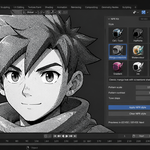
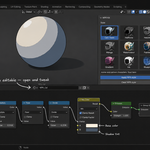
NPR Shader Kit — Documentation
v1.2.2 · Blender 4.2 LTS and later (tested up to 5.2) · Windows / macOS / Linux · EEVEE / EEVEE Next recommended
1. Install
- Download the zip and leave it zipped. In Blender open Edit → Preferences → Add-ons, press the arrow button in the top right corner, choose Install from Disk, pick the zip and tick the checkbox next to NPR Shader Kit.
- Press N in the 3D Viewport → NPR Kit tab.
2. Quick start
- Switch the viewport to EEVEE (or enable auto-switch in preferences).
- Select objects with materials.
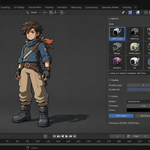
- In the NPR Style panel, pick a style (e.g. Cel / Toon) and set its parameters.
- Click Apply NPR style.
- Switch the viewport shading to Rendered to see the effect.
3. Styles
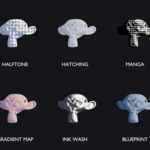
| Style | Look | Key parameter |
|---|---|---|
| Cel / Toon | Hard stepped light bands | Shading steps (2–8), shadow tint |
| Halftone | Comic dot shading | Pattern scale |
| Hatching | Cross-hatch lines | Line density |
| Manga screentone | Black-dot manga shadows | Pattern scale |
| Watercolour | Light-driven wash with a ragged edge | Edge darkening |
| Painterly | Posterised light, broken bands | Colour levels |
| Gradient map | Lighting remapped through a three-stop ramp | Shadow / Mid / Light, Tint strength |
| Ink wash | Sumi-e: two ink values, dark silhouette | Threshold, Softness, Edge ink |
| Blueprint | Technical drawing, light edges on a flat field | Edge width, Shading |
4. How styles are applied
Each style is a shader node group built on first use (named NPR_Cel, NPR_Halftone, …). Applying a style:
- Builds / fetches the node group.
- Inserts a group node into each material on the selected objects.
- Feeds the material's existing Base Color into the group.
- Routes the group's Shader output into the Material Output, replacing the previous surface link.
The node that previously fed the Material Output is kept (just disconnected) and remembered. Clear NPR style removes the group node and reconnects that exact shader — Principled or not — so the operation is fully reversible. Objects with no material at all get one automatically on apply.
5. EEVEE vs Cycles
All nine styles use the Shader to RGB node, which only works in EEVEE / EEVEE Next. In Cycles they render flat. The outline is geometry and renders in either engine. Enable Auto-switch to EEVEE in preferences to flip the engine automatically on apply.
6. Outlines
Inverted hull (default, recommended): adds a Solidify modifier with negative thickness and flipped normals, plus a dedicated emission outline material with backface culling. The shell pokes out behind the silhouette → a clean outline. Works in EEVEE and Cycles, viewport and render.
- Thickness — outline width in metres. 0.01–0.03 suits most assets.
- Outline color — usually black, but coloured outlines look great on stylised assets.
Freestyle: toggles Blender's Freestyle line renderer on the scene. Render-only (not visible in the viewport), but gives art-directable line styles. Use for final renders where you want variable line weight.
7. Tuning
Cel bands look muddy — increase Shading steps for finer gradation, or reduce for a starker 2-tone look.
Halftone dots too big / small — adjust Pattern scale (higher = finer dots). Screen-space patterns are anchored to the angle of view, so a long lens enlarges them along with everything else: on a 100 mm lens or longer, raise Pattern scale to keep the same dot size.
A style looks washed out or barely shaded — the styles read the lit value of the surface as 0 to 1, and diffuse lighting divides lamp energy by pi: a sun at strength 1 only ever reaches about a quarter of that range. Raise the lamp until the lit side is close to white and the shadow boundary crosses the subject — that boundary is where bands, dots and hatch lines live.
Manga tone is too heavy — it quantises the light into four fixed densities by design, the way screentone is applied by hand. Light the subject brighter for cleaner highlights, or use Halftone instead, which follows the shading smoothly.
Outline disappears on thin parts — reduce thickness; very thick outlines on thin geometry self-intersect.
Outline looks doubled — you applied it twice. Click Remove outline once, then re-add.
8. Troubleshooting
"Style looks flat / no effect" — you're in Cycles (or Solid viewport). Switch to EEVEE and set viewport shading to Rendered. Every style reads the lit value through Shader to RGB, which is EEVEE-only.
"Apply did nothing" — since v1.1 the style reads Base Color from the Principled BSDF, or from any node with a colour input, or falls back to the viewport colour — and objects without materials get one created. If you still see no change, make sure viewport shading is set to Rendered in EEVEE.
"Clear style left my material disconnected" — since v1.1 Clear reconnects the exact shader that was active before Apply. If you deleted that node afterwards, Clear falls back to a Principled BSDF if one exists; otherwise reconnect your shader manually.
"Outline material shows on the front faces too" — the outline material relies on backface culling; make sure your material settings didn't override Backface Culling off. Re-run Add outline to refresh.
"Freestyle does nothing in the viewport" — Freestyle is render-only by design. Press F12 to render and you'll see the lines.
9. Limitations
- All nine styles are EEVEE-only (Shader to RGB). Documented above. The outline is real geometry and renders in Cycles too.
- Halftone / manga / hatching patterns default to screen space — they don't "stick" to the surface when the camera moves. This is the standard comic look; switch Pattern space to UV for surface-locked patterns. Screen-space cells stay square whatever the frame shape is, so dots never come out as ellipses on a wide render; they are anchored to the angle of view, so a longer lens enlarges the pattern along with everything else — raise Pattern scale to compensate.
- Inverted-hull outlines don't show interior lines (only silhouette + material borders). For interior detail lines, use Freestyle.
- Outlines are made by inverted hull or Freestyle; there is no Geometry Nodes or compositor outline method.
10. Changelog
v1.2.2 — maintenance release. The package ships the full licence text and an updated README (install, first run, uninstall). No changes to the tools.
v1.2.1
Normal maps are carried through the stylisation. Each style reads its lighting from a Diffuse shader whose normal input used to be left empty, so applying a style flattened a normal-mapped surface; the material's normal map or bump node is now connected automatically in all nine styles. Measured on a normal-mapped sphere, 63–72 % of the object's pixels change once the map is connected. A material without a map renders exactly as before, and Keep Normal Map switches the behaviour off for a deliberately flat, poster-like surface.
v1.2.0
- New: three more styles — Gradient map, Ink wash and Blueprint. Nine in total.
- New: the style picker is a grid of icons with a one-line note on what each style is for, instead of a nine-item dropdown.
- New: Gradient map, Ink wash and Blueprint have their own panel controls — colours, threshold, edge width — so they no longer need the node group opening to adjust.
- Fixed: Halftone drew no dots at all. The distance to the centre of a pattern cell was measured in three dimensions while the pattern lives in two, which added half a cell to every distance — more than the dot could ever grow. Manga screentone was built on the same chain and had the same fault.
- Fixed: Watercolour and Painterly ignored the lighting and painted the object one flat colour. Both now follow the light, with the boundary broken up by noise locked to the surface.
- Fixed: Manga screentone came out too dark — its four tone steps never reached full brightness, so even a fully lit surface kept a screen of dots.
- Fixed: a bright lamp flattened any style, because the lit value was used unclamped and went past 1. It is now clamped to 0–1 once, for every style.
- Changed: screen-space patterns keep square cells on any frame shape — dots no longer come out as ellipses on a wide render.
- Changed: hatching lines run diagonally, the way pen strokes are drawn.
- Changed: node groups carry a build number. A file saved with an older version has its groups rebuilt in place on apply, so fixes reach existing scenes instead of being skipped by the cached name.
v1.1.0
- Verified on Blender 5.1 (EEVEE and Cycles), clean register/unregister.
- Fixed: materials without a Principled BSDF turned black on apply — Base Color now falls back to any colour input, then the viewport colour.
- Fixed: Clear NPR style left the material disconnected (black) when the original shader wasn't a Principled BSDF — the previous shader is now remembered and restored exactly.
- Fixed: re-adding an outline after appending other materials pointed the Solidify modifier at the wrong material slot.
- New: applying a style to an object with no material now creates one automatically — the result is always visible.
- New: status reports name the preset/style applied ("Applied 'Anime' preset (Cel / Toon) to 3 material(s) on 2 object(s)") and warn plainly when nothing changed.
- New: node groups ship with sensible socket defaults, and Pattern space participates in Live update.
v1.0.0 — initial release.
11. Support & License
Through marketplace messaging. GPL-3.0.
Have questions about this product?
Login to message
| Sales | 20+ |
| Published | about 2 months ago |
| Blender Version | 4.2 - 5.2 |
| Extension Type | N/A |
| Render Engine Used | Arnold, Blender-Internal, Blender-Game-Engine, Cycles, Eevee, Freestyle, Luxrender, Mental-Ray, Octane, Vray, Yafaray |
| License | GPL |