Polydome - The Ultimate Hdri Dome
 Jonas Noell










Does it work with any HDRI?
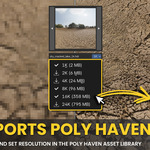
Yes. POLYDOME works with any HDRI, though Poly Haven HDRIs offer built-in resolution toggles.
Do I need the Poly Haven add-on?
No. You can use HDRIs from the Asset Browser or directly from your system.
Does it support both EEVEE and Cycles?
Absolutely. Both engines are fully supported, with nearly identical results in EEVEE.
Can I set up in EEVEE and render in Cycles?
Yes, that’s the recommended workflow for speed and quality.
What floor effects are included?
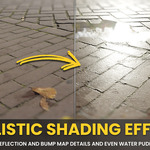
POLYDOME supports reflections, roughness, bump mapping, and dynamic water puddles.
What is Automatic Floor Matching?
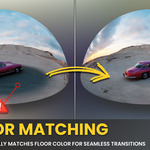
Most HDRI plugins struggle with mismatched floor planes. POLYDOME automatically matches the floor to the dome, creating seamless transitions without color shifts.
Can I adjust the puddles?
Yes, you can fully control size, depth, and roughness.
Can I change the background in Invisible Mode?
Yes, you can set a custom background color and even add a vignette effect.
Are there built-in color adjustments?
Yes, you can tweak exposure, gamma, saturation, warmth, or even fully desaturate the HDRI for studio-style lighting.
Do I get free updates?
Yes, bug fixes and updates are free.
Can I use PolyDome commercially?
Yes, you can use POLYDOME in both personal and commercial Blender projects.
-
$24.99
Single-user lifetime license. Unlimited use on any projects. Future updates are included.
-
$99
Up to 5 users. Unlimited use on any projects. Future updates are included.
-
$199
Up to 25 users. Unlimited use on any projects. Future updates are included.
Have questions about this product?
Login to message
| Blender Extension Compatible | Yes |
| Sales | 400+ |
| Rating | 13 ratings |
| Dev Fund Contributor | |
| Published | 10 months ago |
| Blender Version | 4.2 - 5.2 |
| Extension Type | Add-on |
| Render Engine Used | Cycles, Eevee |
| License | GPL |

Discover more products like this
easy lighting setup hdri 360 environment polyhaven hdri hdr 3d-lighting poly haven 3d lighting hdri Blender 3D plugins polyhaven puddles dome