Polydome - The Ultimate Hdri Dome
 Jonas Noell









Bug Fixes:
- Preview Failure: Fixed a broken Preview rendering that can occur on Macs or computers that don't use a NVIDIA GPU
- Keyframes in UI: Fixed not working keyframes when added directly onto PolyDome's UI
New Features:
- Live Preview: Your preview panel now shows a real render of your dome, complete with preview spheres so you can immediately see how your setup looks. Change the HDRI, brightness, gamma, saturation, rotation, look, or color management, and the preview updates live. The key part: it renders in a separate background process. No freezing, no waiting. Blender stays responsive the whole time.
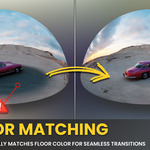
- Floor Calibration: Now runs entirely in the background and is automatic by default. Whenever your HDRI or any of its adjustments change, the floor recalibrates on its own, no extra steps needed.
- HDRI Adjustments: Two new sliders, HDRI Brightness and HDRI Gamma, sit right next to HDRI Saturation. Both affect the world and dome shaders together, and any change triggers automatic recalibration, so you always see the final result instantly.
- Preview Settings: New preferences let you choose your preview render engine (Cycles for maximum accuracy, EEVEE for speed) plus the GPU device/backend for Cycles. Set it up once so the preview matches your hardware and your workflow.
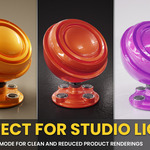
- New Transparent Mode: One click renders your dome on a transparent background (Cycles only for now), perfect for compositing over your own backplates. Look out for the full backplate system landing in PolyDome 2.1.
Bug Fixes:
- Calibration: Fixed calibration failing when output format is set to a video type (e.g. FFmpeg)
Bug Fixes:
- Libary Import Settings: Fixed broken World Shader in Blender 5.0+ when using Drag+Drop from Asset Library with Import Settings set to "Pack" after reopening saved files
- Grain Effects: Fixed non-tiling Grain Texture in Blender 5.0+ which may appear in higher output resolutions
Bug Fixes:
- Preview Failure: Fixed a broken Preview rendering that can occur on Macs or computers that don't use a NVIDIA GPU
- Keyframes in UI: Fixed not working keyframes when added directly onto PolyDome's UI
New Features:
- Live Preview: Your preview panel now shows a real render of your dome, complete with preview spheres so you can immediately see how your setup looks. Change the HDRI, brightness, gamma, saturation, rotation, look, or color management, and the preview updates live. The key part: it renders in a separate background process. No freezing, no waiting. Blender stays responsive the whole time.
- Floor Calibration: Now runs entirely in the background and is automatic by default. Whenever your HDRI or any of its adjustments change, the floor recalibrates on its own, no extra steps needed.
- HDRI Adjustments: Two new sliders, HDRI Brightness and HDRI Gamma, sit right next to HDRI Saturation. Both affect the world and dome shaders together, and any change triggers automatic recalibration, so you always see the final result instantly.
- Preview Settings: New preferences let you choose your preview render engine (Cycles for maximum accuracy, EEVEE for speed) plus the GPU device/backend for Cycles. Set it up once so the preview matches your hardware and your workflow.
- New Transparent Mode: One click renders your dome on a transparent background (Cycles only for now), perfect for compositing over your own backplates. Look out for the full backplate system landing in PolyDome 2.1.
Bug Fixes:
- Calibration: Fixed calibration failing when output format is set to a video type (e.g. FFmpeg)
Bug Fixes:
- Libary Import Settings: Fixed broken World Shader in Blender 5.0+ when using Drag+Drop from Asset Library with Import Settings set to "Pack" after reopening saved files
- Grain Effects: Fixed non-tiling Grain Texture in Blender 5.0+ which may appear in higher output resolutions
Bug Fixes:
- Preview Failure: Fixed a broken Preview rendering that can occur on Macs or computers that don't use a NVIDIA GPU
- Keyframes in UI: Fixed not working keyframes when added directly onto PolyDome's UI
New Features:
- Live Preview: Your preview panel now shows a real render of your dome, complete with preview spheres so you can immediately see how your setup looks. Change the HDRI, brightness, gamma, saturation, rotation, look, or color management, and the preview updates live. The key part: it renders in a separate background process. No freezing, no waiting. Blender stays responsive the whole time.
- Floor Calibration: Now runs entirely in the background and is automatic by default. Whenever your HDRI or any of its adjustments change, the floor recalibrates on its own, no extra steps needed.
- HDRI Adjustments: Two new sliders, HDRI Brightness and HDRI Gamma, sit right next to HDRI Saturation. Both affect the world and dome shaders together, and any change triggers automatic recalibration, so you always see the final result instantly.
- Preview Settings: New preferences let you choose your preview render engine (Cycles for maximum accuracy, EEVEE for speed) plus the GPU device/backend for Cycles. Set it up once so the preview matches your hardware and your workflow.
- New Transparent Mode: One click renders your dome on a transparent background (Cycles only for now), perfect for compositing over your own backplates. Look out for the full backplate system landing in PolyDome 2.1.
Bug Fixes:
- Calibration: Fixed calibration failing when output format is set to a video type (e.g. FFmpeg)
Bug Fixes:
- Libary Import Settings: Fixed broken World Shader in Blender 5.0+ when using Drag+Drop from Asset Library with Import Settings set to "Pack" after reopening saved files
- Grain Effects: Fixed non-tiling Grain Texture in Blender 5.0+ which may appear in higher output resolutions
-
$24.99
Single-user lifetime license. Unlimited use on any projects. Future updates are included.
-
$99
Up to 5 users. Unlimited use on any projects. Future updates are included.
-
$199
Up to 25 users. Unlimited use on any projects. Future updates are included.
Have questions about this product?
Login to message
| Blender Extension Compatible | Yes |
| Sales | 400+ |
| Rating | 13 ratings |
| Dev Fund Contributor | |
| Published | 10 months ago |
| Blender Version | 4.2 - 5.2 |
| Extension Type | Add-on |
| Render Engine Used | Cycles, Eevee |
| License | GPL |

Discover more products like this
dome poly haven 360 environment 3d-lighting 3d lighting hdri hdri polyhaven hdri puddles hdr easy lighting setup Blender 3D plugins polyhaven