





Pro Particles Studio - Unified GPU Simulation & Procedural FX

CG_Flow in Animation


Item Rating

This item has an average rating of 5 from 20 ratings by the community.

90%
5%
0%
5%
0%

Purchase this item to leave a review!

  • Chuck DeGroot
    over 1 year ago

    WOW. I've tried numerous particle addons to try and make setup as quick and straight-forward as possible, and this one is BY FAR the best I've tried. Incredibly intuitive and powerful. I installed it, and within 15 minutes I had the exact setup I needed without even looking at any tutorials or documentation. This one is a real gem. Great work!

  • Marc
    over 1 year ago

    This addon is awesome

    I'd personnally say it's not for beginners because you'll have to understand quite well how Blender works before using this as it's geo-node based. Some other addons are more user-friendly but it's not what I was searching about. I was searching for a versatile solution I can tweek pretty much how I want.

    Not having necessarily a n-menu addon to adjust my things doesn't bother me as long as the code is well made. There are a lot of combinations you can do for each effect so it's not just 4-5 different effect , it's different modifiers doing many things each. If you find the price a bit high, it is frequently cut during some events of the year. There is generally one each season.

    Just wanted some sci-fi effects which are as possible lightweight on the PC ressources and it's good at it. I like the idea I can create myself a lot of possible effects using the modifiers given with the pro version. I must admit I still don't understand everything like how to make effects from scratch with the modifiers in Blender 4.3 but I'm sure I'll find.

    Maybe the only thing I'd change is explain a bit better the way we work and present more videos on how to build from scratch many types of effects. I saw one video but ... I was a bit messed up because the version changed and now we have modifiers that seems more complex, included in the Assets menu so ... not sure exactly how I manage all that but I'm sure I'll find out.

    Sincerely for the price, it's a fair nice solution. This pack will help me for special effects I'll use in documentaries as I produce some.

    As by now, Canada is attacked by the new president of USA, we have to check each $$ we invest in USD because the goofy is making our dollar crazy each time he opens his mouth and we can't support terrorism techniques to invade Canada. I don't like to encourage any creator that is pro-Trump so I asked some if they were before to buy. One of them answered me as a pro-Trump would clearly do so I remembered I already bought a pack of special effects I didn't have time to tweek and learn. I bought almost all Blendermarket addons even if I'm poor because I wanted to contribute. Now that I'll suffer from the Trump's political terrorism techniques ... I'll have to spend less and more strategically.

    I was surprised as ... with some months more on Blender, I took experience and became able to use geo-nodes more nicely. Finally, I saved 30$ CAD on another addon from a Trump fan because here , his 20$ represents my monthly cellphone bill.

    As a Canadian, I consider each USD money I don't spend with this bad exchange rate and bad president is more money for my grocery. As Trump tries to put our country in failure to then invade it like a crapulous criminal and steal our water, our ressources etc , almost all canadians make efforts to cut every $$ spent in this country. Other countries are following. Even electronic sellings are affected. The reality is we have no choices in some cases like mine for some things like addons. It is in USD. That said , if you hesitate because you too , you are against the government of USA , know that this pack is very useful and worth it.

    I may sound a bit impolite but I think this is the worst time USA and CANADA will ever have since last world war. This is serious and while I like to discourage buying from any creator supporting this terrorism technique to invade Canada , I still can see a very well made piece of art. I want to think this has been created by a lovely person that disapprove all that is made to us Canadians. I mean : Regular taunting , regular intimidation , unacceptable talk about our politicians, insults, propositions to use force to take Groenland ... so on for Canada , we understand it. It's unacceptable and it's political terrorism.

    I and all my friends from Canada consider this is an attack against us and we are already entered in a war but I'm sad punishing good creators so I hope I gave this nice review to other than a fanatic. :) I know some of the guys here are almost working for free and are putting a lot of efforts and love in their work . I don't want to just use this to propagate political views ... but I ask to other Canadians to be fair and not stop completely to buy. I think by now , these products are not a lot affected but for what is to come ... it may arrive and I don't want Blender Open Source unique project to be hurt because of Donald Trump.

    Let's be fair. We can ask to the creator if he is a Trump supporter and make our choices but punishing each one would be an error as anyways , a lot of them live elsewhere but sell in USD .

  • Paul
    over 1 year ago

    Easy to use and much better than the standard outdated particles. Please continue supporting and developing these nodes.

    P.S. How do you assign groups?

    • Florian

      over 1 year ago

      Thanks for the great review!
      In the 'Input' node you can plug emitters into the sockets 'Emitter 1' to 'Emitter 10'. These numbers are the groups, and if you use the 'Wind' node for example, you can uncheck 'all' and choose a number in 'only group' to apply this wind effect only to a specific group or emitter.

  • Justin Stephenson
    almost 2 years ago

    This is a super useful modular toolkit for particles in geometry nodes. I was half way into doing something like this for myself. This toolkit is well organized and works well. If you know a bit about geometry nodes, it's quite easy to tweak these nodes and to add your own weird and wonderful nodes into the workflow. Highly recommended. I look forward to the ongoing development.

  • Lee
    over 2 years ago

    This is an excellent node-based particle system that can be modularly assembled. It's easy to get started with if you have some basic knowledge of nodes. The developer's support is also very quick. Thanks again!

  • Eduard
    over 2 years ago

    Great product! More tutorial videos will be cool!

  • manuel
    over 2 years ago

    Coool! glad i purchase this super worth it nodegroups <3 Documentation is easy to follow and lots of demo files

  • Amr Tahtawi
    over 2 years ago

    I recommend this product for anyone who wants to produce advanced and beautiful particle animation or stills. The node use guidelines are very clear in the Documentation section and the author's support is friendly, prompt and professional. I hope this product keeps getting a lot of updates and upgrades.

  • novarc
    over 2 years ago

    The file “Pro_Particles_V1.3_Pyro_EA.blender” does not work in versions 4.1 and above

  • Jarek Dudziński
    2 months ago

    Bought the addon because I was tired of importing VDBs from EmberGen I was using. Wanted full-Blender workflow.
    Tested the addon on two computers: linux machine with RTX 5090 (Ubuntu, newest nVidia drivers) and on Mac (M4 Max, 48GB RAM). The simulation speeds of demo scenes are crawling (not even close to the realtime, as claimed on product page). Some are below 10 fps (even on RTX 5090).
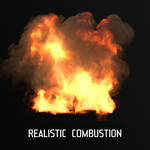
    Also tested the fire examples (I needed those the most for the new project I'm working on) - and even tried to adjust shader settings - didn't found a way to make it look even semi-realistic (like on the previews shown). More over, the smoke / flames had square block artifacts on them after rendering and lack of detail. When increased the resolution, got even worse fps and it didn't helped a lot.
    To sum things up: wasted money. Do not buy, if you want to switch from professional software (EmberGen, Houdini, ...).

    • Florian

      2 months ago

      Thanks for the detailed feedback. The square artifacts you describe are a known Blender volume rendering issue and can be fixed by enabling Biased under Render Properties > Volumes.

      The performance you are seeing on an RTX 5090 is not what I would expect based on my own testing, but I would need to see the actual scene and settings to understand what is happening. The realtime demonstrations were recorded directly in Blender using the Dense solver and GPU preview.

      Please feel free to contact me through Superhive support and send me the scene or your settings. I’d be happy to take a closer look and help figure out what is going wrong.

  • Commercial & personal use - 1 user per seat - All updates included

    $99
$99

Have questions about this product?
Login to message

Details
Blender Extension Compatible Yes
Sales 400+
Rating
20 ratings
Published almost 3 years ago
Blender Version 4.3 - 5.2
Extension Type Add-on
License GPL