 GPolygon Design


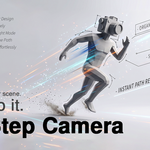
Don't just render your scene. Step into it.
Tired of robotic camera movements, complex keyframing, and accidentally flying through walls? RealStep Camera introduces intuitive, first-person physical navigation directly to your Blender viewport. Move through your 3D space with flawless collision and true-to-life human ergonomics.
Built for Your Workflow:
✦ For Environment & Scene Artists Stop guessing the scale of your worlds. RealStep allows you to physically walk, sprint, and crouch through your terrains and scattered props. Feel the atmosphere, find the perfect composition angles organically, and explore your custom environments exactly as a viewer would.

✦ For ArchViz & Game Designers Test your designs from a true human perspective. Navigate massive complexes, check corridor proportions, and climb stairs with realistic auto-stepping geometry. Ensure your architectural layouts and level designs flow perfectly before the final presentation or engine export.
✦ For Animators & Directors Say goodbye to stiff, robotic camera paths. Bake natural, math-driven head bobbing and heavy cinematic mouse smoothing into your timeline in real-time. Block out your shots, simulate handheld Steadicam movement, and record immersive walkthroughs in seconds—not hours.
Key Features:
Smart Collision & Dimensions: Never clip through a wall again. Adjust your Body Radius and Max Step Height to match your scene. Slide along walls smoothly and navigate tight corridors flawlessly.
Dynamic Cinematics & Focus: Bring life to your camera. Built-in, math-driven head bobbing and heavy mouse smoothing simulate a realistic Steadicam experience. Enable Dynamic Auto-Focus to keep your subject sharp while walking, and use the scroll wheel for real-time FOV zooming!
On-the-Fly Drone Mode: Need a bird's-eye view? Press 'V' to instantly toggle Drone Mode and fly over your architecture with cinematic inertia, right in the middle of your walk.
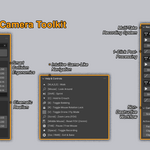
Interactive Path Recording: Press SPACE at any time during your walkthrough to start or pause recording. When you exit, your movement is automatically baked into camera keyframes.
Total Control: Pause the simulation to free your mouse, toggle rotation locks, crouch under obstacles, or mute the head-bobbing with a single keystroke.
- Non-Destructive Editing & Multi-Take: Record multiple variations of your walkthrough safely. Use the 1-click Smooth tool to iron out mouse jitters, or the Simplify tool to optimize your keyframe density, all without losing your original RAW recordings.