 Skava
Skava
Rig Inspector — Documentation (v1.2.0)
Reads an armature and everything attached to it, and reports what is broken, what is risky and what the rig is made of. Nothing in the rig is changed.
1. Install
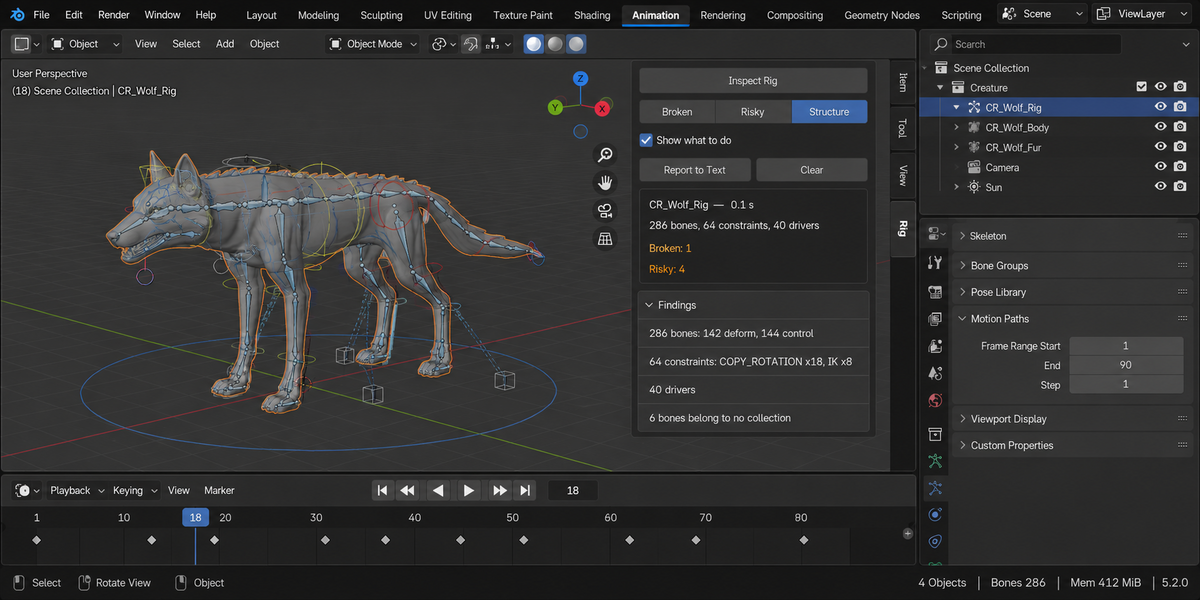
Download the zip and leave it zipped. In Blender open Edit, then Preferences, then Add-ons. Use the arrow button in the top right corner of that window and choose Install from Disk, then pick the zip. On Blender 4.0 and 4.1 the same button is called Install. Tick the checkbox next to the add-on name. Press N in the 3D Viewport and the Rig tab appears in the sidebar.
2. Quick start
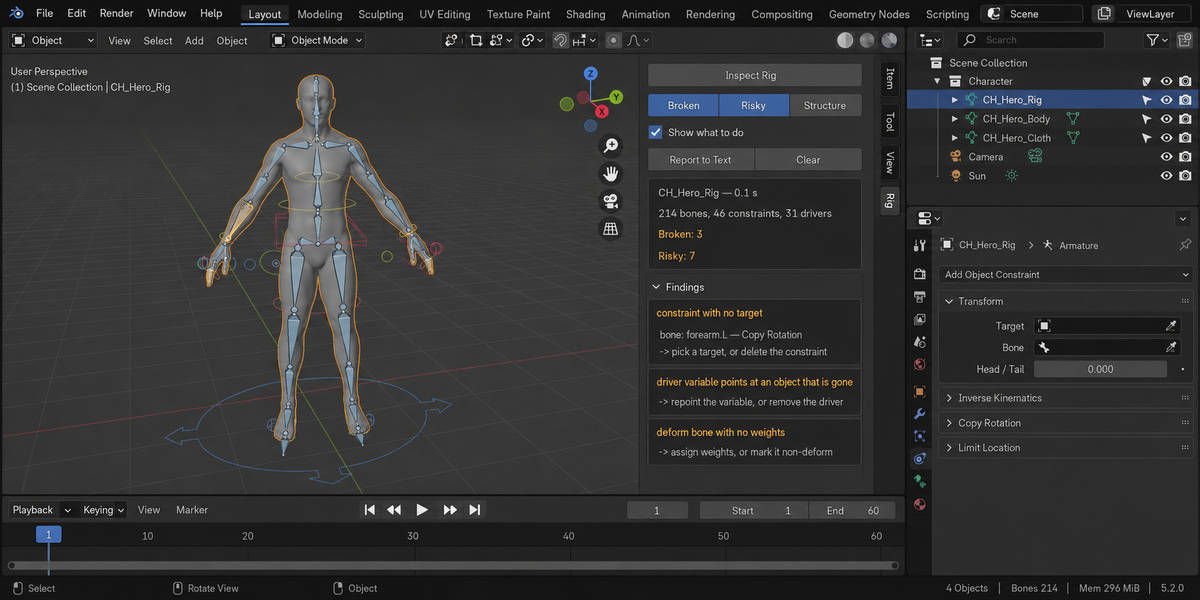
- Select the armature. Several at once is fine — findings are then prefixed with the rig name.
- Press Inspect Rig.
- Read the list. Click the bone button on a finding to jump to it in pose mode.
- Press Report to Text if you want the whole thing as text to send on.
3. The three levels
Broken is what cannot work: a constraint with nothing to follow, a driver Blender refuses to evaluate, a dependency loop. Risky is what almost always turns out to be a mistake, but could be deliberate: a deform bone nobody weighted, a bone locked on every axis, an unapplied scale. Structure is not a problem at all — it is the shape of the rig in numbers, and it is what you read first on a rig you did not build.
The three toggles at the top of the panel filter the list. Show what to do adds the one-line advice under each finding.
4. What each finding means
Constraint with no target — the constraint is there and does nothing at all.
Constraint: bone not found — it points at a bone name that no longer exists. This is what renaming bones leaves behind, and it is the single most common breakage in a rig that changed hands.
Constraint with no bone chosen — the target is the armature but no bone is picked, so the constraint follows the object origin instead of a bone. Blender also leaves this state behind if a bone is pointed at itself: it clears the field and marks the constraint invalid.
Constraints run in a circle — bone A follows B and B follows A. Blender cannot evaluate that; one of the links has to go.
Driver findings — a variable whose source object was deleted; a variable reading a bone that no longer exists, because renaming a bone does not rename it inside drivers; a driver reading the very property it drives; and, when no more precise cause is found, the fact that Blender itself marks the driver invalid. Drivers are read from the armature, from the armature data and from the shape keys of every bound mesh — face rigs live in the last one.
Custom shape not in scene — the widget object exists in the file but is in no collection, so the bone draws as nothing.
Deform bone, no weights and Vertex group: all weights zero — the bone deforms nothing. The second case is the sneaky one: the group is there, the skinning looks done, and every weight in it is zero.
Weights on a non-deform bone — vertices are weighted to a bone with Deform switched off, so the weights do nothing.
Bone hidden by its collections and Bone is hidden — the two reasons a bone cannot be seen or picked.
Bone cannot move at all — every channel is locked and no constraint drives it.
Bone has no length — shorter than a thousandth of the rig, which is nothing at any scale. The threshold is a fraction of the armature, not a number of metres, so it behaves the same on a 1.8 metre character and on a 40 metre machine.
Scale is not applied — the armature object carries a scale. Export and retargeting both go wrong on that.
Constraint or driver: outside object — the rig depends on something that is not part of it. Fine inside one file, a broken rig the moment it travels without that object.
5. Jumping to a bone
The bone button on a finding makes the rig active, switches to pose mode and selects that one bone. It is the only change the add-on ever makes to your scene, and only because you clicked it. If the bone is hidden, it says so — unhiding is left to you.
6. Report to Text
Writes the full report, hints included, into a text block called RigInspector Report inside the current .blend. Open it in the Text Editor. Nothing is written to your file system; the report travels inside the file, which is usually exactly what you want when sending a rig back with comments.
7. Several rigs at once
Select as many armatures as you like. Counts are summed and every finding is prefixed with the name of the rig it belongs to.
8. Troubleshooting
The button is greyed out. Nothing selected is an armature. Select the rig, not the mesh.
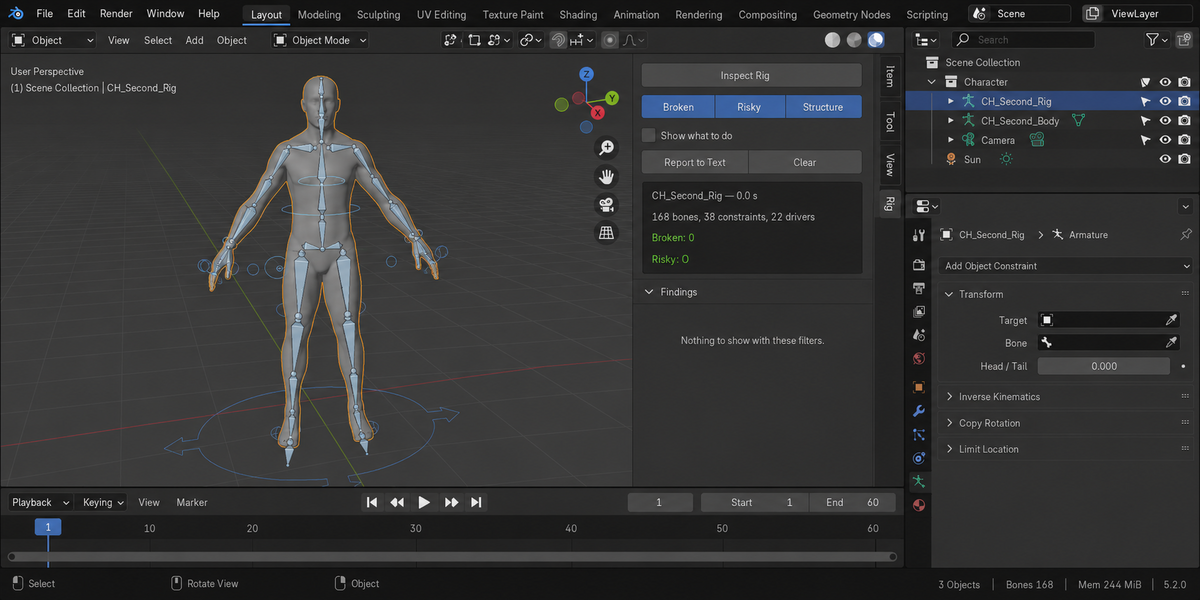
It found nothing. Then the rig is clean at this level of checking, and the panel says so in words rather than showing an empty list. Zero findings on a healthy rig is a tested property, not a coincidence.
It reports weights that are all zero, but the character deforms. Other bones are doing the work. A group full of zeros usually means a skinning pass that half finished.
Part of the rig could not be read. Shown as a risky finding naming the mesh and the reason, rather than silently reporting fewer problems than there are.
9. Limitations
- It reads and reports. It never fixes anything.
- Weights are read from meshes bound to the armature by an Armature modifier or by armature parenting. A mesh driven some other way is not counted.
- Driver cycles are detected between drivers and within a single driver; a loop that also passes through constraints is reported as its two halves.
10. Changelog
v1.0.0 — first release.
11. Support and license
GPL-3.0. Questions and bug reports through the product page; a .blend that reproduces the problem gets it fixed fastest.
Checking a whole folder
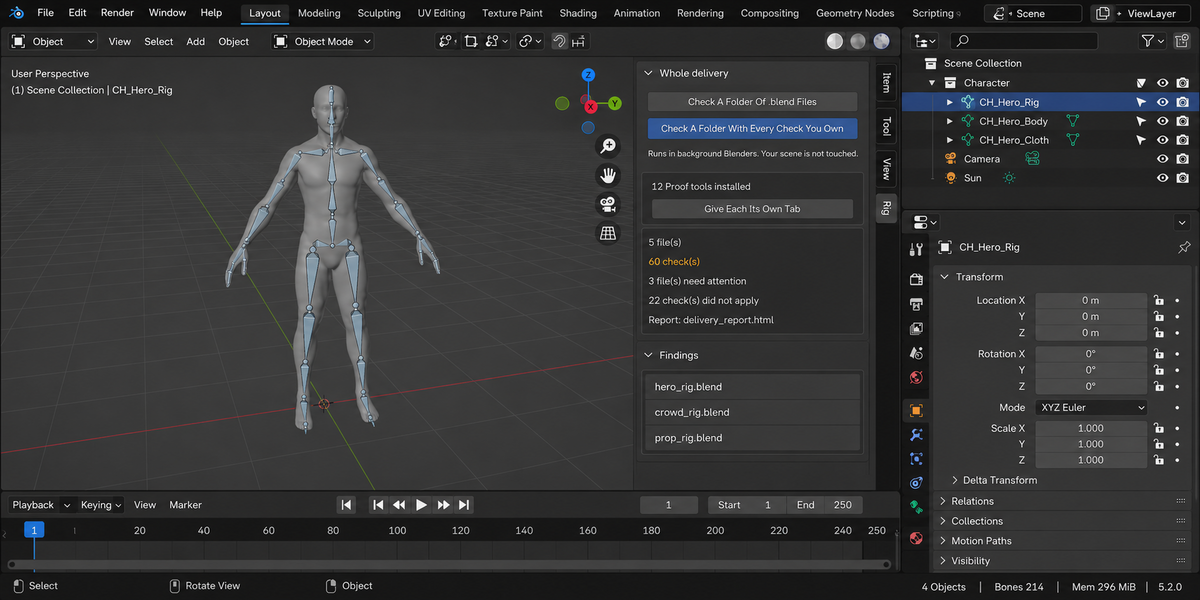
The sidebar has a Whole Delivery panel. It has two buttons.
Check A Folder Of .blend Files runs this product over every.blend in the folder you pick. Check A Folder With Every Check YouOwn runs every tool from this line that you have installed, over thesame files, in one pass — one report, one verdict.
Each file is opened in its own background Blender. Your open scene is nevertouched: not opened over, not saved, not modified in any way. This is also why afile that will not open costs you only that file — the rest of the delivery isstill checked. Press Escape to stop; nothing partial is written, because areport covering half a delivery is a report nobody should trust.
When it finishes you get an HTML report next to the folder. It is one filewith nothing loaded from the internet, so it can be attached to an email, put inthe delivery folder, or opened years later on a machine that has never seen thisadd-on.
Running it from a pipeline
The same check runs headless, with no interface and no person, and finisheswith a code your build system can read: one code for clean, another whensomething blocking was found, and a third when a file could not be checked atall. Those last two are deliberately different. A check that did not run has notpassed, and a gate that treats silence as success will one day wave through thedelivery it existed to stop. The exact command line is in the add-onpreferences.
Comparing against last week
Any run can be saved as a baseline. A later run then reports what changed:which numbers moved and in which direction, which findings are new, and whichones you have fixed since. Direction matters and is not guessed — eachmeasurement carries its own sense of which way is worse, so rising coveragereads as better and rising drift reads as worse.
Signing a file off
When a file is clean you can sign it off. The record lives inside the .blenditself, not in a folder next to it, so it travels with the file: open it nextmonth and it tells you when it was checked, by which version, and how it cameout. If the file is saved after that, the record says plainly that it is out ofdate — a sign-off that survives an edit it never saw would be worse than nosign-off at all.
One tab instead of twelve
Every tool in this line can put its panel under a single shared sidebar tabinstead of its own. One button does it for all of them at once, and each panelarrives collapsed, so twelve tools cost you one tab and no scrolling. Yourchoice is remembered, and a tool that you later use on its own can be given itsown tab back the same way.
What is deliberately not claimed
A check that could not run is reported as exactly that, never as a pass. If atool from this line is not installed, or is an older version that predates thecombined run, the report names it in a list of checks that did not take part,so the gap is visible rather than quietly absent.
Have questions about this product?
Login to message
| Published | 14 days ago |
| Blender Version | 4.2 - 5.2 |
| Extension Type | N/A |
| Render Engine Used | Cycles, Eevee |
| License | GPL |