 BlendR6


3.0 Update:
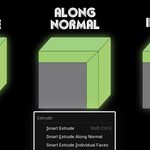
- Added Smart Extrude along group normal, and when group normal is 0 or the Extrude direction would cause an error, it will switch to Along Normal, and set as the default for Smart Extrude (same as Blender). The Extrude control method is also the same as in Blender. If you want to change it, you can right-click directly in the Extrude menu to modify.
- Added reload nodes in the Add-on menu; it is necessary to reload when updating versions or changing Blender versions.
- Completely rewritten Python code to significantly reduce crashes and errors.
- For versions 4.5+ and above, added X-ray preview; X-ray preview has better performance but cannot preview or inspect effects.
- Added color settings for X-ray Mode in the menu.
- In version 4.5, handling of overlapping objects in Preview, and overlapping performance has been greatly increased (about 5-10 times).
- For versions 4.2-4.4, added the default preview mode from version 4.4+, used for result viewing.
- Added removal of residual lines after Extrude, and options in the Add-on menu to set automatic wiring and remove extrude line (4.5+).
- Significantly improved performance and speed in versions 4.2-4.4, and fixed extrude error situations. However, 4.5+ still has better effects, fewer errors, and faster speed (about 2 times).
- Significantly optimized overall performance and speed in versions 4.5+ (completion speed about 5-6 times, Preview about 2-3 times).
- Added to the Extrude menu: Smart Extrude (extrude along group normal), Smart Extrude Along Normal, Smart Extrude individual faces.
- Changed the Smart Extrude along Axis shortcut to X/Y/Z, and it will not cause shortcut conflicts.
- Reset all required Vertex groups before Extrude to prevent extrude errors.
- Optimized calculation area range and accuracy.
- Fixed crash when switching modes with F9 key (can switch modes but still cannot redo effects).
- Fixed that enabling Snap when reversing extrude direction would cause distance positive/negative not to update.
- During Extrude, you can directly observe the object's Edges, making it more convenient to observe Extrude effects.
- When the object is extremely large, it will intelligently scale down before using Smart Extrude and then proceed, avoiding turning the object into non-manifold.
- Fixed that marked Edges will remain in retained edges (not yet perfected).
- Added shortcut key modifications in the Add-on menu.
- Fixed the wiring effect in Smart Extrude, aiming for ease of subsequent editing; when Face is greater than 12 during Extrude, automatic wiring will be canceled to avoid adding too many lines.
- Fixed errors caused by pressing the wrong key.
- Fixed multiple extrude errors, added multiple detection effects and repairs.
$12
Have questions about this product?
Login to message