 BlendR6


What is Smart Extrude?
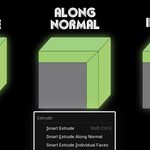
Smart Extrude is a third-party Blender add-on designed to enhance the built-in Extrude tool. It automatically detects user intent, ignores mesh constraints, and performs direct extrusions, reducing extra steps and making modeling simpler and faster. The add-on supports multiple modes, including Smart Extrude (intelligent mode that can automatically select Along Normal or Group Normal), Along Normal (extrusion along normals, supporting overlap handling), and Individual (individual extrusion). The default mode is Group Normal, and Along Axis mode can be activated by pressing X/Y/Z.
What is the difference between Smart Extrude and Blender's built-in Extrude?
Blender's built-in Extrude is often limited by mesh constraints, requiring extra steps to handle connections, overlaps, or deletions. However, Smart Extrude changes this by allowing extrusions that ignore the mesh, making operations simpler and faster. The add-on follows native operation methods (such as mouse control, keyboard input, snap, and point-to-point control), with no learning curve, and it accelerates modeling speed. You can even use it to repair model geometry.
What tricks or advanced features does Smart Extrude support?
The add-on supports addition and subtraction extrusions, with addition being particularly suitable for connections and quickly repairing complex recesses or models (can be paired with Limited Dissolve). You can perform move, scale, and alignment operations during extrusion, utilizing different Pivot Points for alignment.
Why is the preview different from the result?
The preview uses a faster calculation method, while the result provides a more precise calculation outcome.
What to do if undo encounters issues?
In most cases, undoing requires only one step (Ctrl+Z), but if based on axes or Snap Mode, you need to undo one more time to avoid residual faces or vertices causing non-manifold geometry. You need to undo back to the originally selected face.
How to activate and switch modes?
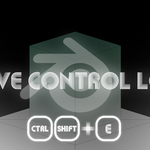
You can press Ctrl+Shift+E to quickly activate Smart Extrude, or select modes through the Alt+E menu. During extrusion, press F9 to pop up the menu and switch modes (such as Smart Extrude, Along Normal, or Individual). The default is Group Normal mode, and pressing X/Y/Z allows movement along axes. The add-on has comprehensive features and extrusion data in the modify panel, making adjustments easy.
$12
Have questions about this product?
Login to message