 CodeXpert


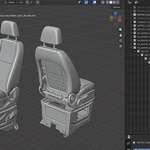
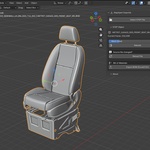
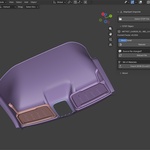
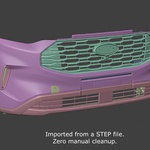
Import STEP. Edit in Blender. Export STEP.
StepXpert 1.2 closes the loop. Bring CAD parts and assemblies into Blender with clean, CAD-accurate meshes, real part names and the full assembly tree. Arrange them, build your scene, model around them, then send the result back out as a real STEP file that your CAD software can open. Works on Blender 4.2 through 5.2.
★ NEW: STEP Export
Blender is no longer a one-way street for CAD.
- Parametric where it counts. Parts imported from STEP that you only moved, rotated or uniformly scaled are written back as their original parametric B-rep: true curves and surfaces, not triangles, exactly where you placed them in the scene.
- Polygonal for everything else. Edited parts, IGES imports and anything you model in Blender are exported as polygonal STEP. Closed meshes become solids and flat areas merge into single faces, so the file stays clean and light.
- Repeated parts stay instances. A bolt used 50 times is written once and placed 50 times.
- Colors go with it. Material colors are written into the STEP file.
- Original CAD size. Automatic units bring StepXpert imports back at their original dimensions.
- No surprises. The export report lists every object written as polygonal, and why.
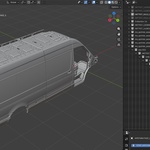
Typical round trip: import a machine assembly → lay out a production line, a fixture or a product shot in Blender → export the new arrangement as STEP → open it in your CAD software with every part in its new place.
New in 1.2.1: Split Bodies
One part file, several bodies? Now they come in separately. CATIA and other CAD tools often keep several bodies inside one part (for example Body.3 and Body.9). With Split Bodies (on by default), Separate, As Collections and As Empty Hierarchy bring in one object per body, named from the STEP file and with its own color, not only for assemblies. Untick it to keep each part as one object. Mesh quality is unchanged.
Also new in 1.2.0
- Sharper, more reliable meshes. Curved and freeform surfaces are subdivided properly. Tested on 18 real and synthetic models with zero broken faces.
- Repeated parts share one mesh. Faster imports, less memory.
- IGES import (.igs, .iges) with colors and names.
- Empty Hierarchy mode. Parts parented to empties placed like the CAD assemblies.
- Rebuild that stays put. Position, rotation and parenting are kept, and you can rebuild all selected objects at once.
- Accurate BOM. Total quantities through nested sub-assemblies, Unicode names.
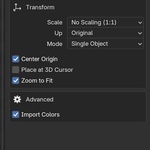
- Real-world size by default (meters), or millimetres 1:1.
- Fully offline. Nothing is downloaded or installed at runtime.
Features
- CAD-accurate tessellation with per-corner shading: sharp where the CAD has edges, smooth across curved transitions.
- Real part names from the STEP data, full Unicode support.
- Four import modes: Single Object · Separate Objects · As Collections · As Empty Hierarchy.
- Split Bodies: multi-body parts come in as one object per body.
- CAD colors as materials, one shared material per color.
- Live Mesh Detail: rebuild at any quality without re-importing, with a face-count preview.
- Reload & Relink: source file changed or moved? One click.
- BOM export (.xlsx / .csv) from the STEP structure or from the scene.
- STEP export: parametric for untouched STEP parts, polygonal for everything else.
- Drag & Drop .step, .stp, .p21, .iges, .igs onto the viewport.
Formats: STEP (AP203, AP214, AP242) and IGES import · STEP export
Installation
- Download the zip.
- In Blender: Edit → Preferences → Get Extensions → ⌄ menu (top right) → Install from Disk.
- Select the downloaded zip.
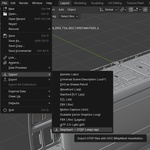
- Import: File → Import → StepXpert — STEP / IGES. Export: File → Export → StepXpert — STEP.
Updating from 1.1? Install the new zip, then restart Blender once. Everything is included in the package, no additional setup needed.
FAQ
Is the exported STEP parametric? Yes, for parts imported from STEP that you only moved, rotated or uniformly scaled: they keep their original B-rep. Edited parts and Blender-modelled meshes are exported as polygonal STEP.
Does it support large assemblies? Yes, tested on 330 MB files with 86 products and 118 bodies.
Unicode part names (German, Turkish, Chinese, Japanese)? Fully supported end-to-end.
Are updates free? All v1.x releases are free for existing customers.
Can I install it on multiple computers? Yes, install on all your own machines (personal or work). Team licensing available on request.
About
I'm Seftin Güler — an R&D engineer working across CAD, thermoform and rotational plastic manufacturing, 3D scanning, reverse engineering and Class-A surface design. StepXpert Importer is one of the tools I build under the CodeXpert brand.
Email: [email protected]
Feedback, suggestions or complaints — email me anytime. I read every message.
One-time purchase · Lifetime v1.x updates