StepXpert Importer V1.2.1 — Professional Step Importer & Exporter for Blender
 CodeXpert




Installation
- Download the zip.
- In Blender: Edit → Preferences → Get Extensions → ⌄ menu (top right) → Install from Disk.
- Select the downloaded zip.
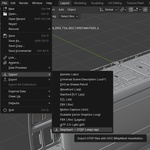
- Import: File → Import → StepXpert — STEP / IGES. Export: File → Export → StepXpert — STEP.
Updating from 1.1? Install the new zip, then restart Blender once. Everything is included in the package, no additional setup needed.
Split Bodies
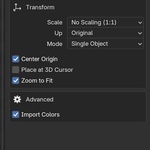
In the import dialog, Split Bodies (on by default) brings each body of a multi-body part in as its own object in Separate, As Collections and As Empty Hierarchy modes. Untick it to keep each part as one object. Single Object ignores it. Rebuild, Reload and STEP export follow the setting.
Exporting STEP
File → Export → StepXpert — STEP, or Export STEP (Selected) in the StepXpert sidebar (N key).
- Objects imported from STEP whose geometry was not edited (only moved, rotated or uniformly scaled) are exported as the original parametric B-rep, exactly where they are in the scene.
- Everything else (edited StepXpert objects, IGES imports, objects with modifiers, Blender-modelled meshes) is exported as polygonal STEP. Closed meshes become solids, flat areas are merged into single faces.
- The export report lists every object written as polygonal, and why.
- Units: Automatic writes StepXpert imports at their original CAD size.
Mesh Detail
Every imported object gets a Mesh Detail slider in the StepXpert sidebar. Change it and press Rebuild. Typical values: 50 fast preview · 100 default · 250 fine close-ups · 500+ high-fidelity. Use Check Face Count in the import dialog to see the triangle count before importing.
Support
Email: [email protected]
Have questions about this product?
Login to message
| Blender Extension Compatible | Yes |
| Sales | 10+ |
| Published | 4 months ago |
| Blender Version | 4.2 - 5.2 |
| Extension Type | Add-on |
| Render Engine Used | Cycles, Eevee |
| License | GPL |
Discover more products like this
step iges 3d-importer step importer Export step import stp importer stepxpert step-export import stp cad