Stigma — Decals for Blender | Decal Projection & Baking
 Outlier Labs
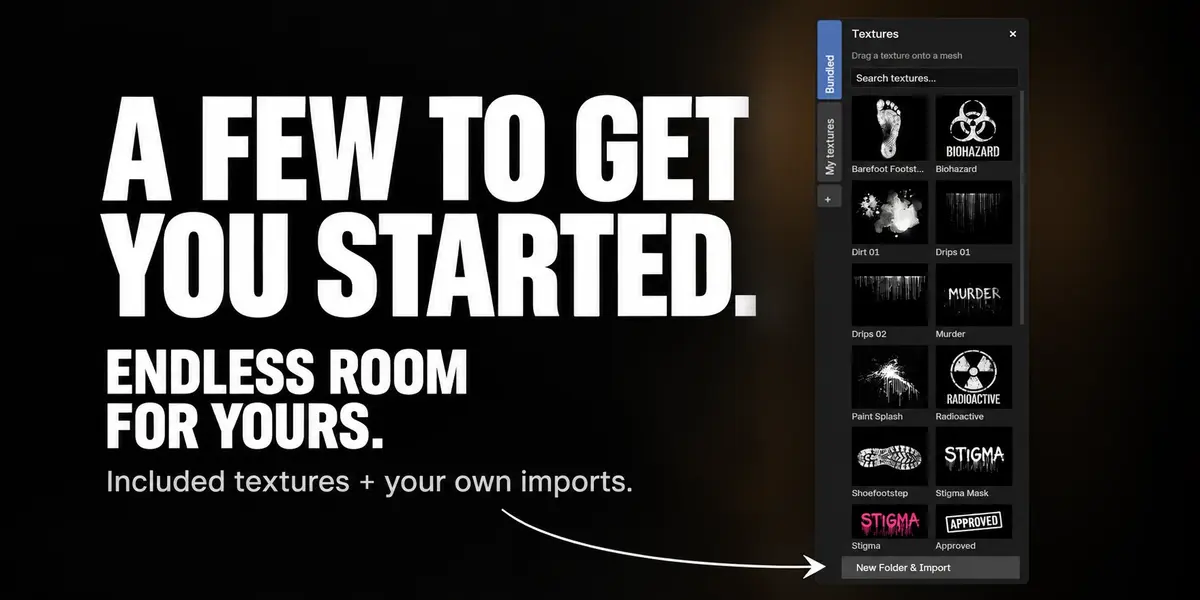


- The Bundled library now includes 30 textures, adding blue-gray, brown, green and violet irises with their original color and transparency.
- Create Stigma now separates shared UV materials when a baked receiver was duplicated, preserving the existing bake, retained layers and material edits while adding the new group.
- Restoring or deleting a baked UV result protects edits to ColorRamp, curve, RGB and Value nodes, including results saved by older versions. Bake batches detect these material changes and require a new plan before continuing.
- Choosing a library texture after enabling Cylinder's one-axis periodic wrapping uses the original image, preserving its dimensions and appearance.
- Unpin preserves placements or explains when their sheared transform cannot be represented without an Anchor. Changing to another Anchor preserves shear, and a failed change leaves the entire group intact.
- Repeating a placement resolves its source again after growing the collection, preventing an invalid-reference crash during duplication.
- The website illustrates cylindrical projection and Tapered Tube with a real viewport recording and shows the Stigma Tools bake menu. The guide explains texture captures, deforming UV layers, independent copies, batches, shared atlases and prepared UDIM outputs.
- Adjust tapered tubes directly with reference-radius handles
- Tapered Tube adds four diameter handles at the reference radius. Dragging either side adjusts Reference Radius and scales both end radii proportionally, preserving the tube's center, height, taper proportions and reflections.
- Bake imperfect UVs, clean deleted Stigmas and manage custom textures
- Zero-area UV triangles no longer block baking the rest of a receiver. A warning reports the skipped triangles; valid portions of a face still bake, and the original mesh and UV maps stay editable. Empty UDIM tiles are omitted. A completely collapsed UV map still needs a valid unwrap.
- Cancelling the bake dialog before starting a capture no longer raises an error.
- Deleting placements with Blender now removes their empty layers and groups automatically, with Undo/Redo restoring them in the same action. Deleted receivers and inherited memberships from Split/Separate are cleaned up while surviving placements, piece materials and editable UV bake sources remain. Delete Group also accepts references to members that were already deleted.
- Hover a custom texture in the library and press Delete to remove it after confirmation. If it is assigned, the dialog warns you and affected layers use the default Stigma image. Placements and artistic settings stay intact; original imported files and packed images are kept. Bundled is protected.
- Move Stigma with Auto Keying enabled or existing placement animation using Blender's native G, Ctrl+G and Move controls. Keying preferences, snapping and Undo stay in Blender; Stigma's custom Ctrl surface projection remains available for placements without animation when Auto Keying is off.
- Optional Tapered Tube adds independent start/end radii and pattern-size compensation for narrowing forms. It is off by default; the usual Cylinder behavior is preserved. Full-turn patterns may have a seam with compensation.
- Switching to Cylinder now handles shared materials automatically. Only the group's Manual receivers get the cylindrical decal; materials and meshes stay shared, and returning to Plane restores the remembered box dimensions.
- Cylinder keeps filtered sampling across angular seams and repeated tiles, including mixed periodic/nonperiodic axes. Refresh Image updates the viewport after pixel edits; render and bake refresh automatically. Source images stay editable and unchanged.
- Facing now preserves surface orientation when viewed from the back, matching the baked result. UV restoration no longer mistakes reordered connections for artist edits; genuine edits and older saved files remain protected.
- Cylinder sampling follows the current image dimensions after resizing or reloading; Cylinder bake detects source image edits before delivering a result. Checked in Blender 4.2, 4.5 and 5.2 alongside UV, UDIM and atlas output.
- Switching to Cylinder automatically makes a rectangular projector circular. Each mode remembers its dimensions: returning to Plane restores the previous box while keeping the current position and orientation. Checked in Blender 4.2, 4.5 and 5.2. Other activation problems show their reason by the selector.
- Choose Plane or Cylinder per placement. Wrap one image through a sector or a full turn, with radius, height, aspect, radial band, fades and radial Facing. Cylinder uses explicit Manual receivers and projects the current pose.
- Cylinder has independent copy counts, image-envelope clipping and periodic sampling per axis. Face attributes and Cylinder UV/consolidated/independent bake are available without an environment opt-in. Phase 19.2 is complete in Blender 4.2, 4.5 and 5.2; final normals remain a separate experimental feature.
- Experimental final-normal capture can reconstruct a limited Normal Map/Bump material in destination UV tangents. It requires an explicit environment opt-in and triangulated geometry; validation is pending. This adds no decal normal, Height or displacement channel.
- Bake to UDIM destinations with complete packed tile sets or named external files. Update UV layers and create independent copies while retaining the previous result if a later tile fails or capture is cancelled.
- Give output copies a new UV layout: repack existing islands or use Smart unwrap, with controlled relative density and padding. Share a complete atlas across copies while preserving original UVs, objects and material slots.
- Plan and run batches of independent copies with separate maps per receiver. Cancel while keeping completed copies, inspect the saved report and retry unfinished units after validating their sources.
- Create an independent static copy with packed textures, its own mesh and materials, while keeping the editable original. Unsupported material effects are diagnosed before capture; the copy opens without Stigma.
- Capture the current pose as a static copy from Armature, shape keys, Bend/Twist, Triangulate and verified Subdivision. Render geometry is checked before delivery; unsupported modifiers and instances receive a diagnosis.
- Capture Metallic, Roughness, Specular IOR Level and maximum Stigma Coverage alongside Base Color. Receive the whole verified set with its channel index; data maps preserve their values without color conversion.
- Capture a tattoo in the chosen pose, then let its UV layer follow Armature and shape keys. Create a dedicated Stigma UV map while preserving the base texture mapping; shared meshes can explicitly be made local first.
- Consolidate a contiguous block of Mix layers and groups into receiver UVs, with Topmost or Blend placements and partial material finish. Preserve the live base material, public Coverage and editable sources. Update, restore or remove the result without affecting other material users.
- Capture complete Base Color, including all applied Stigmas, to a new packed image or external PNG 16-bit / EXR 32-bit. The original receiver and materials remain editable. Choose unique UVs and cancel a bake with Escape.
- Bounding outlines now default to orange at 5 px for selected placements, blue at 2 px for unselected placements in the active group and magenta at 2 px for other groups. Existing custom preferences are preserved; Reset to Defaults applies the new appearance.
- The projection arrow has a shaft one quarter of its previous length and its tip sits at the center of the bounding volume.
- The Bundled library now includes 30 textures, adding blue-gray, brown, green and violet irises with their original color and transparency.
- Create Stigma now separates shared UV materials when a baked receiver was duplicated, preserving the existing bake, retained layers and material edits while adding the new group.
- Restoring or deleting a baked UV result protects edits to ColorRamp, curve, RGB and Value nodes, including results saved by older versions. Bake batches detect these material changes and require a new plan before continuing.
- Choosing a library texture after enabling Cylinder's one-axis periodic wrapping uses the original image, preserving its dimensions and appearance.
- Unpin preserves placements or explains when their sheared transform cannot be represented without an Anchor. Changing to another Anchor preserves shear, and a failed change leaves the entire group intact.
- Repeating a placement resolves its source again after growing the collection, preventing an invalid-reference crash during duplication.
- The website illustrates cylindrical projection and Tapered Tube with a real viewport recording and shows the Stigma Tools bake menu. The guide explains texture captures, deforming UV layers, independent copies, batches, shared atlases and prepared UDIM outputs.
- Adjust tapered tubes directly with reference-radius handles
- Tapered Tube adds four diameter handles at the reference radius. Dragging either side adjusts Reference Radius and scales both end radii proportionally, preserving the tube's center, height, taper proportions and reflections.
- Bake imperfect UVs, clean deleted Stigmas and manage custom textures
- Zero-area UV triangles no longer block baking the rest of a receiver. A warning reports the skipped triangles; valid portions of a face still bake, and the original mesh and UV maps stay editable. Empty UDIM tiles are omitted. A completely collapsed UV map still needs a valid unwrap.
- Cancelling the bake dialog before starting a capture no longer raises an error.
- Deleting placements with Blender now removes their empty layers and groups automatically, with Undo/Redo restoring them in the same action. Deleted receivers and inherited memberships from Split/Separate are cleaned up while surviving placements, piece materials and editable UV bake sources remain. Delete Group also accepts references to members that were already deleted.
- Hover a custom texture in the library and press Delete to remove it after confirmation. If it is assigned, the dialog warns you and affected layers use the default Stigma image. Placements and artistic settings stay intact; original imported files and packed images are kept. Bundled is protected.
- Move Stigma with Auto Keying enabled or existing placement animation using Blender's native G, Ctrl+G and Move controls. Keying preferences, snapping and Undo stay in Blender; Stigma's custom Ctrl surface projection remains available for placements without animation when Auto Keying is off.
- Optional Tapered Tube adds independent start/end radii and pattern-size compensation for narrowing forms. It is off by default; the usual Cylinder behavior is preserved. Full-turn patterns may have a seam with compensation.
- Switching to Cylinder now handles shared materials automatically. Only the group's Manual receivers get the cylindrical decal; materials and meshes stay shared, and returning to Plane restores the remembered box dimensions.
- Cylinder keeps filtered sampling across angular seams and repeated tiles, including mixed periodic/nonperiodic axes. Refresh Image updates the viewport after pixel edits; render and bake refresh automatically. Source images stay editable and unchanged.
- Facing now preserves surface orientation when viewed from the back, matching the baked result. UV restoration no longer mistakes reordered connections for artist edits; genuine edits and older saved files remain protected.
- Cylinder sampling follows the current image dimensions after resizing or reloading; Cylinder bake detects source image edits before delivering a result. Checked in Blender 4.2, 4.5 and 5.2 alongside UV, UDIM and atlas output.
- Switching to Cylinder automatically makes a rectangular projector circular. Each mode remembers its dimensions: returning to Plane restores the previous box while keeping the current position and orientation. Checked in Blender 4.2, 4.5 and 5.2. Other activation problems show their reason by the selector.
- Choose Plane or Cylinder per placement. Wrap one image through a sector or a full turn, with radius, height, aspect, radial band, fades and radial Facing. Cylinder uses explicit Manual receivers and projects the current pose.
- Cylinder has independent copy counts, image-envelope clipping and periodic sampling per axis. Face attributes and Cylinder UV/consolidated/independent bake are available without an environment opt-in. Phase 19.2 is complete in Blender 4.2, 4.5 and 5.2; final normals remain a separate experimental feature.
- Experimental final-normal capture can reconstruct a limited Normal Map/Bump material in destination UV tangents. It requires an explicit environment opt-in and triangulated geometry; validation is pending. This adds no decal normal, Height or displacement channel.
- Bake to UDIM destinations with complete packed tile sets or named external files. Update UV layers and create independent copies while retaining the previous result if a later tile fails or capture is cancelled.
- Give output copies a new UV layout: repack existing islands or use Smart unwrap, with controlled relative density and padding. Share a complete atlas across copies while preserving original UVs, objects and material slots.
- Plan and run batches of independent copies with separate maps per receiver. Cancel while keeping completed copies, inspect the saved report and retry unfinished units after validating their sources.
- Create an independent static copy with packed textures, its own mesh and materials, while keeping the editable original. Unsupported material effects are diagnosed before capture; the copy opens without Stigma.
- Capture the current pose as a static copy from Armature, shape keys, Bend/Twist, Triangulate and verified Subdivision. Render geometry is checked before delivery; unsupported modifiers and instances receive a diagnosis.
- Capture Metallic, Roughness, Specular IOR Level and maximum Stigma Coverage alongside Base Color. Receive the whole verified set with its channel index; data maps preserve their values without color conversion.
- Capture a tattoo in the chosen pose, then let its UV layer follow Armature and shape keys. Create a dedicated Stigma UV map while preserving the base texture mapping; shared meshes can explicitly be made local first.
- Consolidate a contiguous block of Mix layers and groups into receiver UVs, with Topmost or Blend placements and partial material finish. Preserve the live base material, public Coverage and editable sources. Update, restore or remove the result without affecting other material users.
- Capture complete Base Color, including all applied Stigmas, to a new packed image or external PNG 16-bit / EXR 32-bit. The original receiver and materials remain editable. Choose unique UVs and cancel a bake with Escape.
- Bounding outlines now default to orange at 5 px for selected placements, blue at 2 px for unselected placements in the active group and magenta at 2 px for other groups. Existing custom preferences are preserved; Reset to Defaults applies the new appearance.
- The projection arrow has a shaft one quarter of its previous length and its tip sits at the center of the bounding volume.
 Included
Includes 12 months of
- Support from Outlier Labs
- Product updates
Extend this product’s Support Period +12 months: 50% of product price
Have questions before purchasing?
Login to message
| Dev Fund Contributor | |
| Published | about 2 months ago |
| Blender Version | 4.2 - 5.2 |
| Extension Type | N/A |
| Render Engine Used | Cycles, Eevee |
| License | GPL |