Substance Painter Bridge
 Tachyon Studio
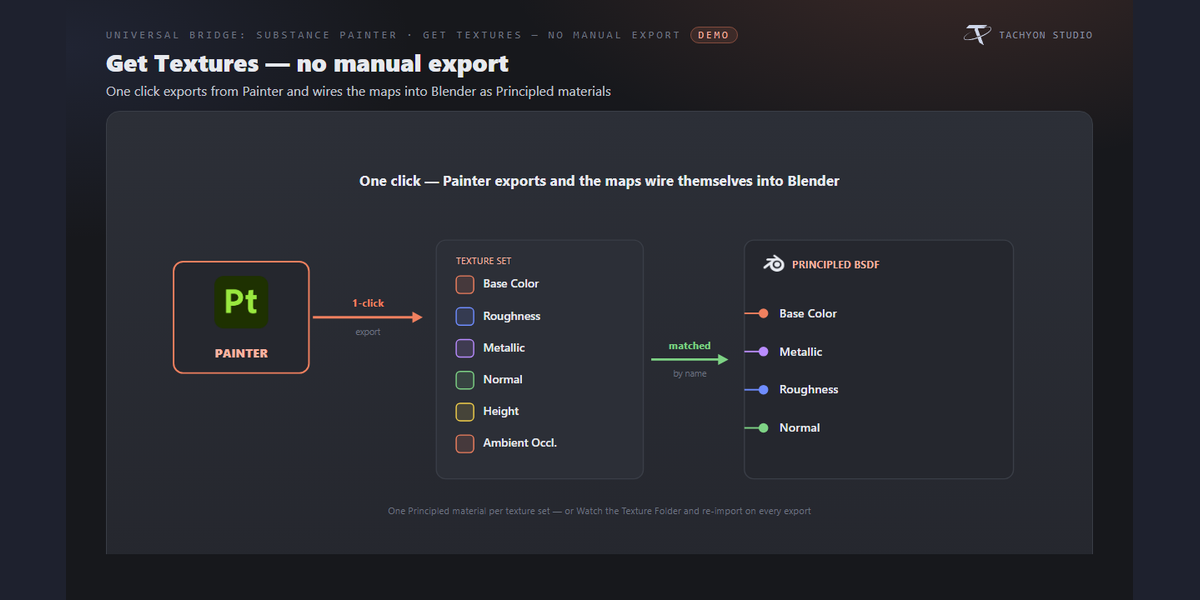
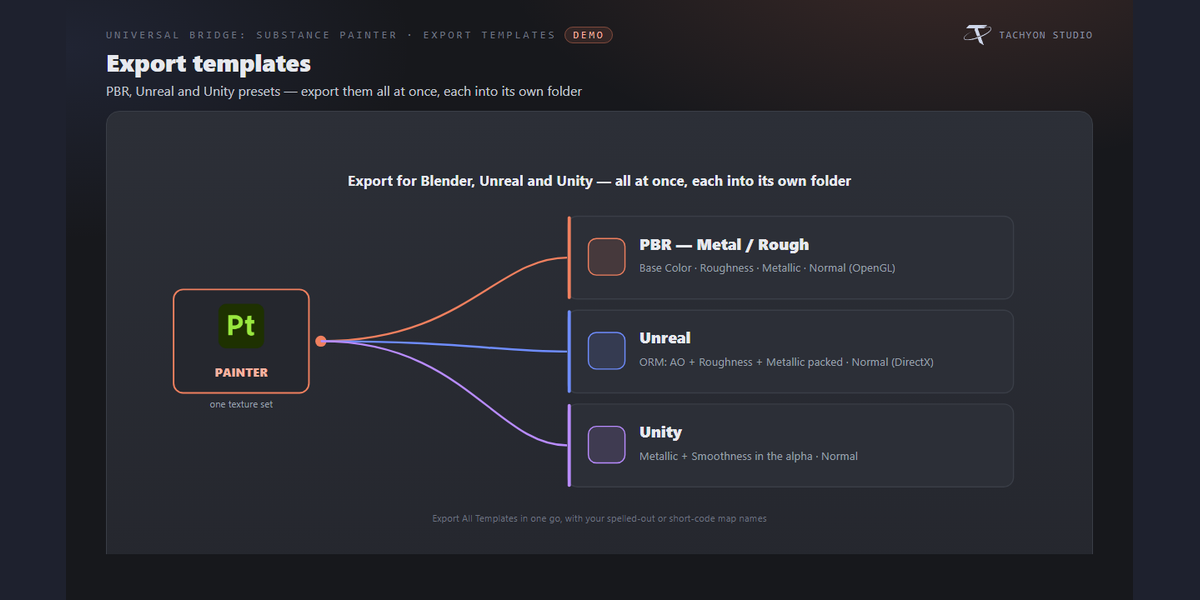
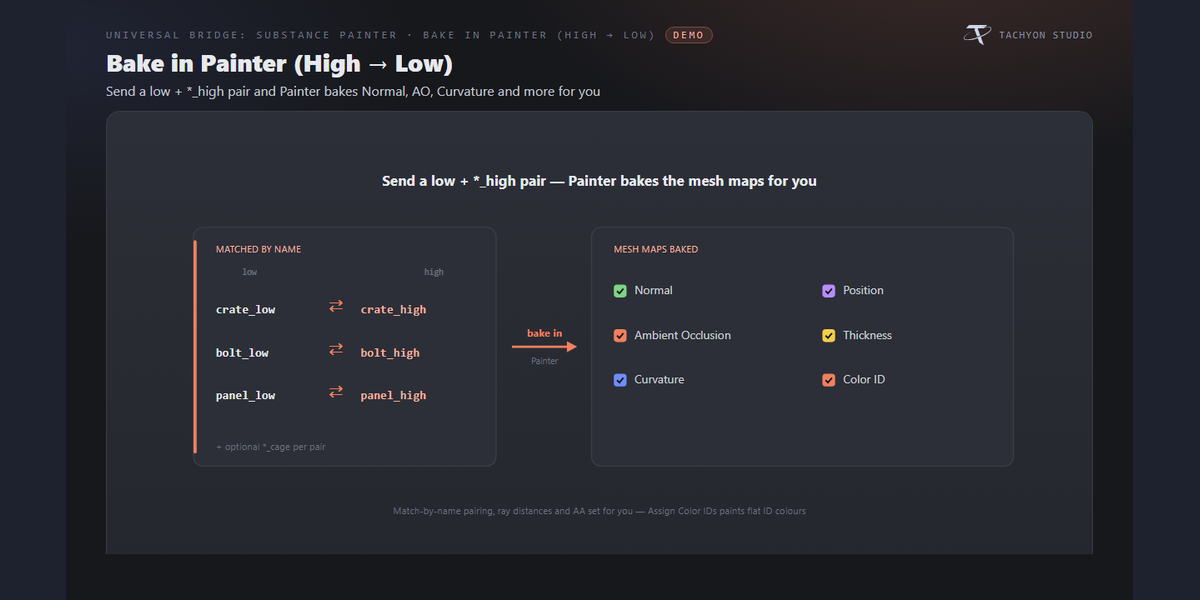
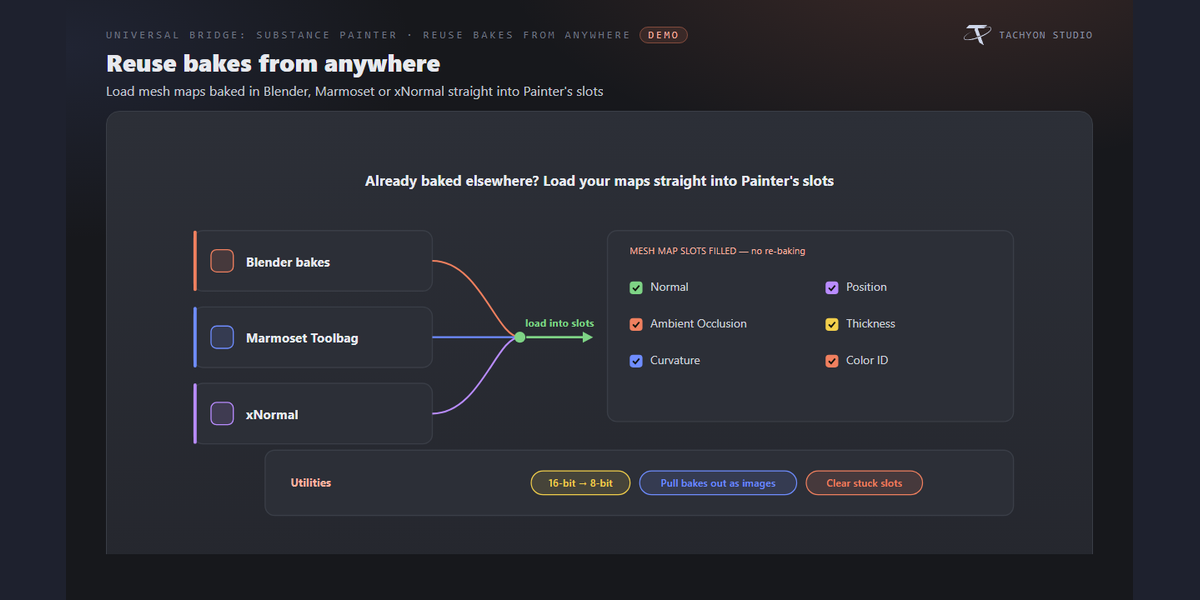
3.0.0
-------------------------------------------------------------------------------
FIXED
- The "reinstall the plugin" warning compared the plugin running inside
Painter against the ADD-ON's version number. With this bridge on its own
line those two numbers differ on purpose, so the warning would have shown
a red error nobody could clear - reinstalling installs the very plugin it
was complaining about.
It now compares the plugin Painter is running against the plugin this
add-on ships, which is what it was always trying to ask:
"Painter is running plugin 2.25.27; this add-on ships 2.25.28."
-------------------------------------------------------------------------------
2.25.27
-------------------------------------------------------------------------------
CHANGED
- Getting Started walks the whole round trip. It was three steps - pick
Painter, install the plugin, send a mesh - and then it stopped, which is
exactly where it was needed: this bridge is a round trip, and the textures
coming back were never mentioned.
It is now eight, in the order of the job:
1. Pick Painter \
2. Install the plugin | the bridge itself
3. Select a mesh to send \
4. Set up what you send | the send
5. Send a mesh /
6. Set up the textures \ the way back
7. Get textures from Painter/
8. Try Live Sync the version that needs no buttons
Each step ticks for its own reason. The settings steps tick once you have
opened that folder, by hand or with "show me", which opens it for you.
"Get textures" ticks when you press Get, and also when Painter reports an
export of its own that produced files. Live Sync ticks when you switch it
on, or when you have simply looked at it - so the tour can be finished by
someone who does not want live sync.
Before you open them, the settings steps say what is inside ("maps,
format, reload"). What you have seen is remembered between sessions.
-------------------------------------------------------------------------------
2.25.26
-------------------------------------------------------------------------------
CHANGED
- The Live Textures switch moved up, into the row of buttons under Send and
Get, on the viewport card and in the sidebar panel. It is the switch that
makes saving in Painter update Blender, and it was three folders down.
Its settings - the Live folder, the minimum gap between exports, and the
push options - stay in the Live Sync folder. Only the switch moved.
-------------------------------------------------------------------------------
2.25.25
-------------------------------------------------------------------------------
FIXED
- Live Textures failed on every save, which is the one moment it exists for.
The bridge reported:
"live failed - export refused the configuration - The project is locked."
Painter locks the project while it saves, and announces the save before it
releases the lock. The bridge heard the announcement and exported straight
away, so Painter refused - and the wording sent people off to check their
export preset, which was never the problem.
The export now waits for Painter to finish: it holds off while Painter
reports itself busy, and a lock that outlives that is retried for six
seconds before anything is called a failure. If a project really does stay
locked that long, the message says so ("a save or a bake was still
running") instead of blaming the configuration.
A hand-pressed Export still answers at once - you are waiting for it, so it
does not sit in a retry loop.
This fix is in the Painter-side plugin. Reinstall the plugin to get it.
-------------------------------------------------------------------------------
2.25.24
-------------------------------------------------------------------------------
FIXED
- "Get Textures from Painter" did nothing, whatever you set. Not sometimes:
always. Blender gives one class to one operator, and "Export This Template"
was built on top of Get Textures to share its code, which left Get Textures
without a class of its own - so Blender could never ask whether it was
ready, assumed it was not, and greyed the button out or refused with
"context is incorrect". Nothing in the settings could fix it.
Both buttons now work.
ADDED
- Get can make the folder for you. Painter has to export somewhere, and until
now that meant finding the Textures folder setting and picking one before
anything could happen. Press Get with no folder set and it asks whether to
use a temporary one; Yes makes a folder named after your .blend, exports
into it, and imports the maps back from it.
It says plainly that the folder is temporary and that the system clears it
in time, so set a folder of your own for work you are keeping. "Export This
Template" asks the same question.
-------------------------------------------------------------------------------
2.25.22
-------------------------------------------------------------------------------
CHANGED
- Texture Watch starts once, and stays off when you stop it. A Send or a Get
starts it only while you have not switched it off yourself; stopping it by
hand is remembered in the .blend file, and only turning it on by hand
starts it again.
- A running Texture Watch is lit on the viewport card, so a glance tells you
it is on.
-------------------------------------------------------------------------------
2.25.21
-------------------------------------------------------------------------------
CHANGED
- Texture Watch moved to where you can see it: directly under Send and Get,
instead of inside the Textures Back folder where it read as an
afterthought. It is what brings Painter's exports back by itself.
-------------------------------------------------------------------------------
2.25.19
-------------------------------------------------------------------------------
ADDED
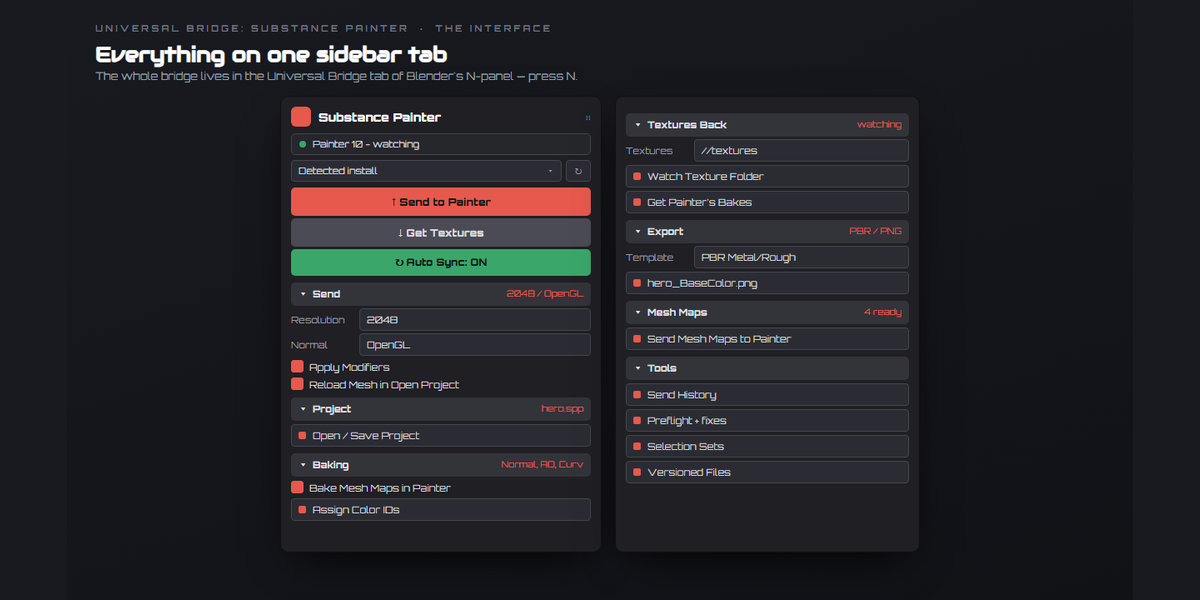
- The viewport card. The bridge can draw itself as a card in the 3D viewport
instead of a panel in the sidebar: the same buttons and settings, with
search, favourites you pin yourself, a getting-started tour, and
explanations attached to each control. The way back to the panel is the
button at the card's top right.
-------------------------------------------------------------------------------
2.25.7
-------------------------------------------------------------------------------
FIXED
- The Painter plugin reports the same version as the add-on again. 2.25.6
left it a version behind, which made the bridge ask for a reinstall that
was not needed.
3.0.0
-------------------------------------------------------------------------------
FIXED
- The "reinstall the plugin" warning compared the plugin running inside
Painter against the ADD-ON's version number. With this bridge on its own
line those two numbers differ on purpose, so the warning would have shown
a red error nobody could clear - reinstalling installs the very plugin it
was complaining about.
It now compares the plugin Painter is running against the plugin this
add-on ships, which is what it was always trying to ask:
"Painter is running plugin 2.25.27; this add-on ships 2.25.28."
-------------------------------------------------------------------------------
2.25.27
-------------------------------------------------------------------------------
CHANGED
- Getting Started walks the whole round trip. It was three steps - pick
Painter, install the plugin, send a mesh - and then it stopped, which is
exactly where it was needed: this bridge is a round trip, and the textures
coming back were never mentioned.
It is now eight, in the order of the job:
1. Pick Painter \
2. Install the plugin | the bridge itself
3. Select a mesh to send \
4. Set up what you send | the send
5. Send a mesh /
6. Set up the textures \ the way back
7. Get textures from Painter/
8. Try Live Sync the version that needs no buttons
Each step ticks for its own reason. The settings steps tick once you have
opened that folder, by hand or with "show me", which opens it for you.
"Get textures" ticks when you press Get, and also when Painter reports an
export of its own that produced files. Live Sync ticks when you switch it
on, or when you have simply looked at it - so the tour can be finished by
someone who does not want live sync.
Before you open them, the settings steps say what is inside ("maps,
format, reload"). What you have seen is remembered between sessions.
-------------------------------------------------------------------------------
2.25.26
-------------------------------------------------------------------------------
CHANGED
- The Live Textures switch moved up, into the row of buttons under Send and
Get, on the viewport card and in the sidebar panel. It is the switch that
makes saving in Painter update Blender, and it was three folders down.
Its settings - the Live folder, the minimum gap between exports, and the
push options - stay in the Live Sync folder. Only the switch moved.
-------------------------------------------------------------------------------
2.25.25
-------------------------------------------------------------------------------
FIXED
- Live Textures failed on every save, which is the one moment it exists for.
The bridge reported:
"live failed - export refused the configuration - The project is locked."
Painter locks the project while it saves, and announces the save before it
releases the lock. The bridge heard the announcement and exported straight
away, so Painter refused - and the wording sent people off to check their
export preset, which was never the problem.
The export now waits for Painter to finish: it holds off while Painter
reports itself busy, and a lock that outlives that is retried for six
seconds before anything is called a failure. If a project really does stay
locked that long, the message says so ("a save or a bake was still
running") instead of blaming the configuration.
A hand-pressed Export still answers at once - you are waiting for it, so it
does not sit in a retry loop.
This fix is in the Painter-side plugin. Reinstall the plugin to get it.
-------------------------------------------------------------------------------
2.25.24
-------------------------------------------------------------------------------
FIXED
- "Get Textures from Painter" did nothing, whatever you set. Not sometimes:
always. Blender gives one class to one operator, and "Export This Template"
was built on top of Get Textures to share its code, which left Get Textures
without a class of its own - so Blender could never ask whether it was
ready, assumed it was not, and greyed the button out or refused with
"context is incorrect". Nothing in the settings could fix it.
Both buttons now work.
ADDED
- Get can make the folder for you. Painter has to export somewhere, and until
now that meant finding the Textures folder setting and picking one before
anything could happen. Press Get with no folder set and it asks whether to
use a temporary one; Yes makes a folder named after your .blend, exports
into it, and imports the maps back from it.
It says plainly that the folder is temporary and that the system clears it
in time, so set a folder of your own for work you are keeping. "Export This
Template" asks the same question.
-------------------------------------------------------------------------------
2.25.22
-------------------------------------------------------------------------------
CHANGED
- Texture Watch starts once, and stays off when you stop it. A Send or a Get
starts it only while you have not switched it off yourself; stopping it by
hand is remembered in the .blend file, and only turning it on by hand
starts it again.
- A running Texture Watch is lit on the viewport card, so a glance tells you
it is on.
-------------------------------------------------------------------------------
2.25.21
-------------------------------------------------------------------------------
CHANGED
- Texture Watch moved to where you can see it: directly under Send and Get,
instead of inside the Textures Back folder where it read as an
afterthought. It is what brings Painter's exports back by itself.
-------------------------------------------------------------------------------
2.25.19
-------------------------------------------------------------------------------
ADDED
- The viewport card. The bridge can draw itself as a card in the 3D viewport
instead of a panel in the sidebar: the same buttons and settings, with
search, favourites you pin yourself, a getting-started tour, and
explanations attached to each control. The way back to the panel is the
button at the card's top right.
-------------------------------------------------------------------------------
2.25.7
-------------------------------------------------------------------------------
FIXED
- The Painter plugin reports the same version as the add-on again. 2.25.6
left it a version behind, which made the bridge ask for a reinstall that
was not needed.
-
$5.99 $7.99
One-person license for hobby and professional work.
-
$11.99 $15.99
The complete add-on with a business license for up to five members of one studio or production team.
Have questions about this product?
Login to message
| Blender Extension Compatible | Yes |
| Published | 6 days ago |
| Blender Version | 3.3 - 5.2 |
| Extension Type | Add-on |
| Render Engine Used | Cycles |
| License | GPL |
Discover more products like this
live reload unreal mesh maps Texturing unity PBR baking texture export Substance painter bridge pipeline materials