 Achat
Achat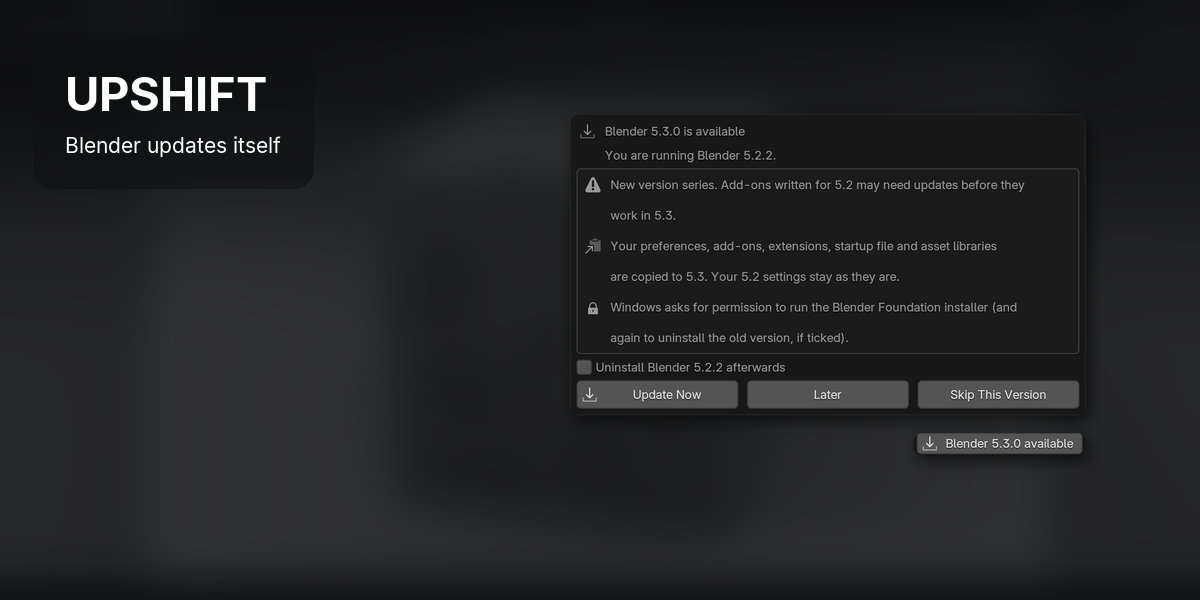






INSTALLATION
Edit > Preferences > Get Extensions > drop-down (top right) > Install from Disk, and pick the downloaded .zip (or drag it into Blender). Settings are in Preferences > Add-ons > Upshift. Upshift needs Preferences > System > Network > Allow Online Access.
QUICK START
- Install the .zip: Edit > Preferences > Get Extensions > Install from Disk.
- Make sure Preferences > System > Network > Allow Online Access is on.
- Restart Blender: Upshift checks for a new release on startup.

- Click the status bar indicator at any time to see what is going on.
WHAT HAPPENS
- Bug-fix release (5.2.2 to 5.2.3): downloads in the background and installs when you close Blender. Settings are shared, so there is nothing to copy.
- New version (5.2 to 5.3): asks first, Update Now, Later or Skip This Version. Your 5.2 settings folder is copied to 5.3, and 5.2 stays as it was.
- Install and Restart, or Install When Blender Closes. Blender asks you to save first as usual.
- Skip This Version: that version is not offered again. Newer versions still are.
PREFERENCES
- Check on Startup: on by default.
- Install Bug-Fix Releases Automatically: on by default. Off, bug-fix releases ask first.
- Offer New Versions, Show Pop-ups, Remove Old Version by Default.
- Check Now, Open Logs, Clear Skipped.
FEATURES
1A NEW VERSION ASKS FIRST
When a new version comes out, a pop-up offers Update Now, Later or Skip This Version, with a note that add-ons written for the old version may need updates.
2BUG FIXES INSTALL WHEN YOU CLOSE BLENDER
A bug-fix release downloads in the background, is checked, and installs when you close Blender. Nothing else to do, or Install and Restart Now.
3YOUR SETTINGS COME ALONG
Preferences, add-ons, extensions, startup file and asset libraries are copied to the new version, and the old settings stay as they are. Tick Uninstall to remove the old version afterwards.
4ALWAYS IN THE STATUS BAR
The status bar shows a new version, the download, or that it installs on close. Click it at any time. After an update a pop-up tells you how it went, and a log is kept.
GOOD TO KNOW
- Windows only for now: macOS and Linux are not supported yet.
- Blender from the Microsoft Store or Steam updates itself, so Upshift leaves it alone.
- Only official releases are tracked, no alpha, beta or daily builds.
- It needs Preferences > System > Network > Allow Online Access, and does nothing online while that is off.
- Windows asks for permission to run the Blender Foundation installer, and again to uninstall the old version if you ticked that.
FILES
%LOCALAPPDATA%\Achat\Upshift\ holds downloads, logs and a small state file with skipped versions and scheduled installs. An installer is deleted after it has installed.
SUPPORT
Email [email protected].
Have questions about this product?
Login to message
| Blender Extension Compatible | Yes |
| Published | 4 days ago |
| Blender Version | 4.2 - 5.2 |
| Extension Type | Add-on |
| License | GPL |
Discover more products like this
pipeline windows update Workflow preferences installer settings updater productivity utility