 kleinARt






|
Procedural, without the node spaghetti
Blender has modifiers, and it has Geometry Nodes. MAXStack gives you the power of the second with the ease of the first: pick a modifier, drag its gizmo, point it at a selection. Every value stays editable, every step stays in the stack.
|
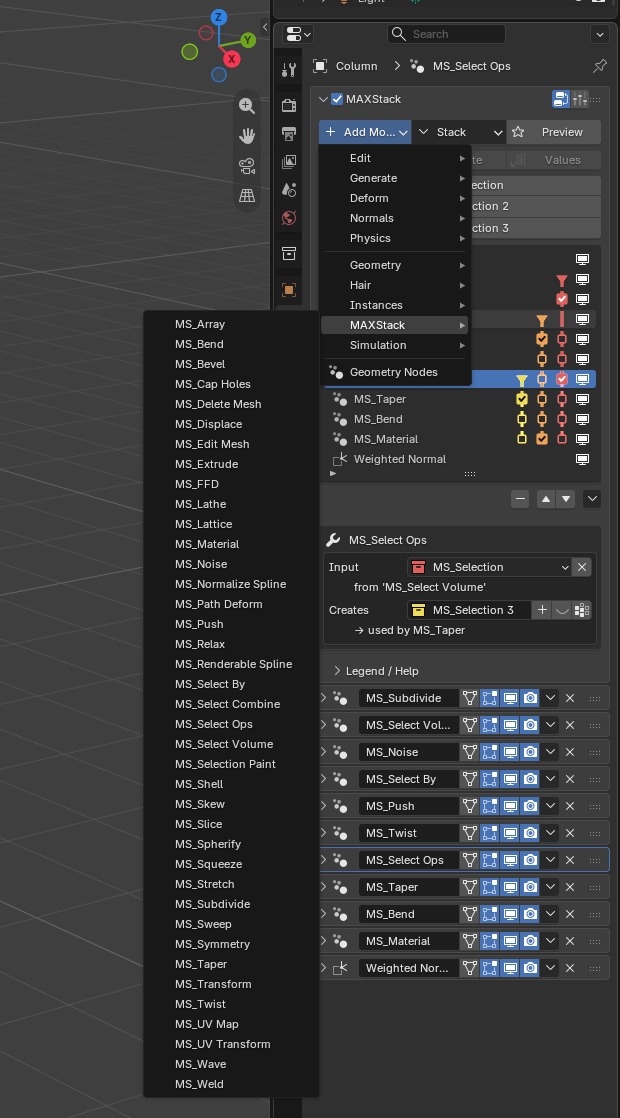
01 MAXStack has its own category in Add Modifier, right next to Blender's. |
02 Gizmos on the object for every spatial modifier, backed by exact values you can type and animate. |
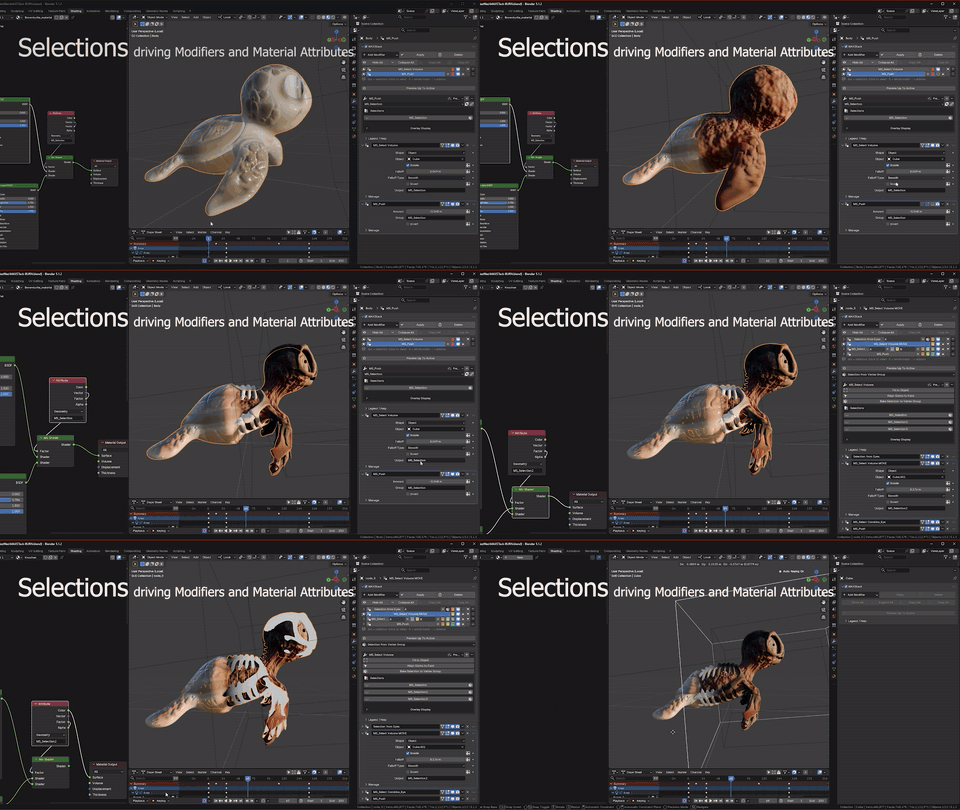
03 Select by angle, grow it, and let Bend, Push and Array share that one mask. Change the selection — everything below follows. |
Jobs plain Blender makes hard
Real tasks, side by side with Blender's own modifiers.
| The job | MAXStack | Plain Blender |
|---|---|---|
| Bend just the tip of a pipe 90 degrees | Angle, upper/lower limits, fixed anchor and a cage that bends with the mesh | Simple Deform bends the whole object, with no limits and no anchor |
| Push only the faces steeper than 30 degrees | Select By angle feeds Push a live mask | No procedural selection-by-angle mask on the normal stack |
| Reuse one live mask in three different modifiers | One selection masks any number of modifiers — edit the selection, every one updates | Not possible on the stack without building Geometry Nodes setups yourself |
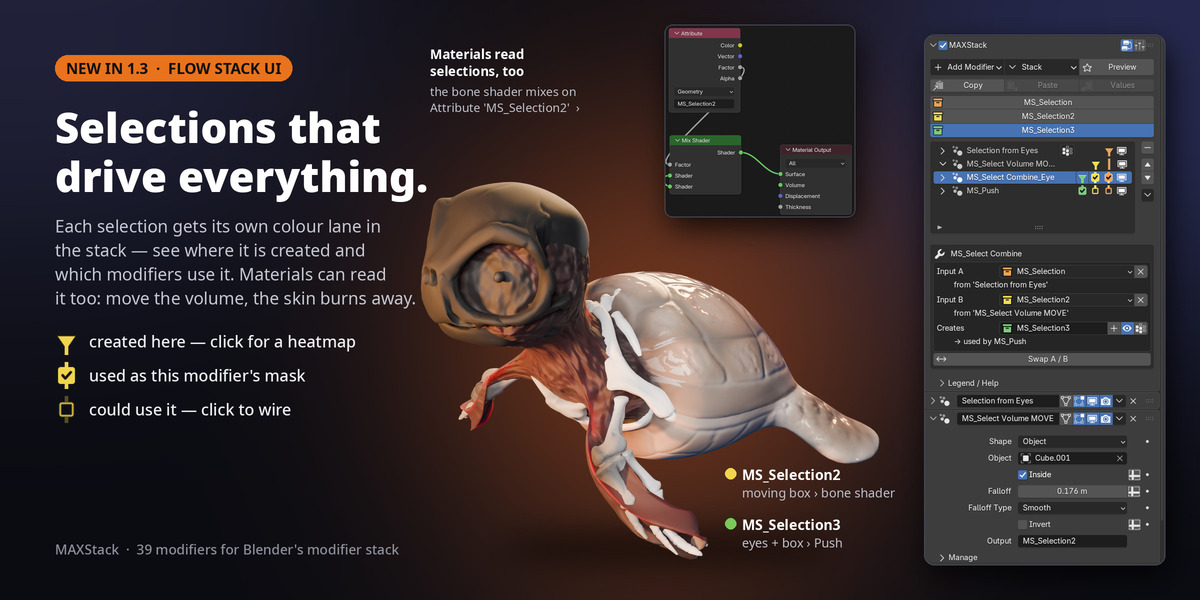
| Drive a material from a live selection | Every selection is a mesh attribute the shader Attribute node reads — select by angle, grow, paint: the material follows live | Color attributes work in shaders, but the mask is static data — no procedural stack selection driving it |
| Tweak vertices after a Bend and keep the Bend adjustable | Edit Mesh below the Bend: press Tab, move the vertices, the Bend stays live | Edit mode only edits the base mesh, so modeling on a modifier result means applying it and losing the stack |
| Reshape a model with a lattice | FFD right in the stack: Tab into the control points, edit with Blender's own tools, mask it with a selection | The Lattice modifier needs a separate lattice object to create, place and keep track of |
| Sweep an I-beam, channel or angle along a path | Sweep with ten built-in sections, mitred corners and pivot alignment | Model the profile curve yourself and wire it up as a bevel object |
| Revolve a profile into a vase or a column | Lathe with degrees, align min / center / max and the axis drawn in the viewport | Screw modifier works, but axis placement and merging are set up by hand |
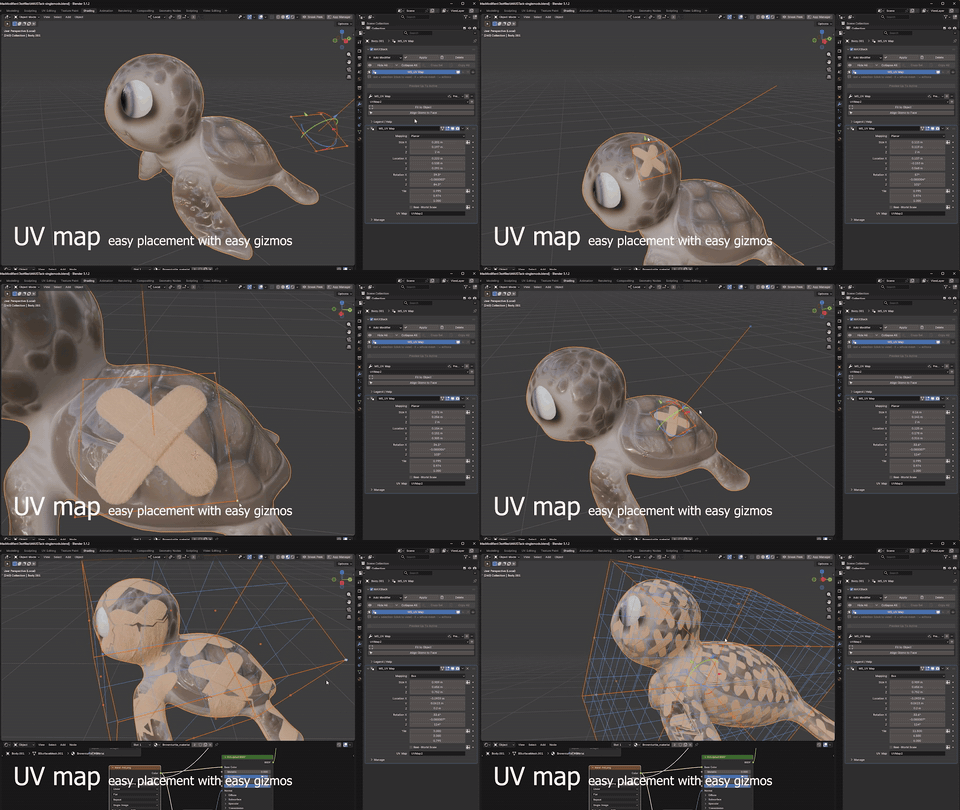
| Box or cylindrical UV projection | UV Map gizmo with Planar, Box, Cylindrical and Spherical modes | No native box-projection UV modifier workflow |
| Fit a mesh along a curve | Path Deform with stretch-to-fit, offset, twist, axis and lateral controls | Curve modifier is more limited and axis-driven |
| Inspect one modifier without the rest below it | Preview Up To Active shows the stack up to the modifier you click | Toggle every downstream viewport switch manually |
Comparison is against stock Blender modifiers, not any specific add-on.
Why Blender users choose MAXStack
|
|
|
|
|
|
|
|
Renders without the add-on Placed modifiers are saved inside your .blend. Teammates and render farms open, edit and render the scene without installing MAXStack. |
No node wiring Every MAXStack modifier is a finished tool with labelled settings and a gizmo. Geometry Nodes knowledge is optional — not required. |
A real UV Map modifier Planar, Box, Cylindrical and Spherical UV mapping with a real viewport gizmo. Move, rotate and scale the projection like a modifier instead of fighting a static unwrap — and point it at a selection to remap only those faces, region by region. |
What you get
Every tool below plugs into the same selection and gizmo system — one selection can drive any of them.
|
Deform Bend, Twist, Taper, Skew, Stretch, Squeeze, Wave, Displace, Spherify, Path Deform, Transform, Push, Noise, FFD, Relax |
Modeling Edit Mesh, Array, Symmetry, Slice, Weld, Subdivide, Shell, Cap Holes, Lattice, Delete Mesh |
Splines Lathe, Sweep, Bevel, Extrude, Renderable Spline, Normalize Spline |
|
Selection Selection Paint, Select By, Select Combine, Select Ops, Select Volume |
UV & material UV Map, UV Transform, Material |
Stack tools Preview Up To Active, Copy / Paste modifiers, Copy to Selected, Apply All, Delete All |
The full list with a short description of every modifier is further down.
Stack productivity tools
quality-of-life controls for daily modifier work
- Preview Up To Active: the 3ds Max "Show End Result" toggle. Hide everything below the active modifier to see exactly what it does — it follows as you click through the stack, then restore everything in one click.
- Apply All / Delete All: collapse or clear the stack when a model is ready to hand off — tucked into the Stack menu, safe from stray clicks.
- Copy to Selected / Copy All: push one modifier or the full stack onto every selected object.
- Copy / Paste / Paste Values: the 3ds Max stack clipboard. Copy any single modifier — MAXStack or native — and paste it on any object with all settings and selection wiring intact, or overwrite a same-type modifier's settings with Paste Values.
- Reorder, toggle and route: move modifiers, show or hide them, and wire masks to the right selection — all from one list.
|
WHY IT EXISTS Built by a 3ds Max user of 25 years who moved to Blender. Blender won me over — but I kept missing the stack: a Bend with limits, an FFD that lives on the object, Edit Poly in the middle of the stack, a selection I build once and reuse everywhere, UVs I can box-map and still move. After five years in Blender I built that stack, for Blender's own modifier panel. MAXStack is the toolset I wanted on day one. |
Who it is for
| 3ds Max switchers: familiar stack behavior, modifier names, Edit Poly-style editing and viewport-driven placement inside Blender. | Hard-surface and product artists: controlled bends, Max-style bevels, lathes and sweeps of standard profiles, shells, symmetry, UV projection and editable procedural masks. |
| Motion designers: stackable path deform, twist, noise, FFD lattices and gizmo-driven transforms that remain animatable. | Blender modelers: limits on every deformer, live masks and box UVs — without building node trees. |
All 39 modifiers at a glance
Every deformer except Path Deform can be limited to a selection or a vertex group.
| DEFORM · 15 | |
| Bend | Bend around any axis with upper / lower limits, a fixed anchor and a cage that bends with the mesh |
| Twist | Twist around an axis with bias and limits; the cage twists along |
| Taper | Taper along an axis with amount and curve, optionally limited to a range |
| Skew | Shear the mesh along an axis, with limits and a gizmo |
| Stretch | Squash and stretch along an axis with a volume-preserving bulge |
| Squeeze | Pinch or bulge along an axis, radial and axial |
| Wave | Wave or ripple deformer with wavelength, phase and decay, animated on its own |
| Displace | Displace along the normals by an image, projected by a gizmo box or your UVs |
| Spherify | Morph toward a sphere, or an ellipsoid by scaling the gizmo |
| Path Deform | Fit the mesh along a curve with stretch-to-fit, offset, twist and axis controls |
| Transform | Move, rotate and scale the mesh at this point in the stack with a cage gizmo |
| Push | Push surfaces along their normals to inflate or shrink them |
| Noise | 3D noise distortion with a gizmo, detail, roughness, seed and built-in animation |
| FFD | 3ds Max FFD lattice in a gizmo box, 2 to 10 control points per axis; Tab edits the points with Blender's own tools |
| Relax | Smooth the surface toward its neighbours, with Keep Boundary and Keep Volume (no shrinking) |
| MODELING · 10 | |
| Edit Mesh | Edit the mesh anywhere in the stack with Blender's own edit tools (Tab), independent of the base mesh |
| Array | Clone array inside a draggable box, by count or spacing, with per-clone random position, rotation and scale |
| Symmetry | Mirror across a draggable plane, with slice and weld |
| Slice | Cut with a plane gizmo: keep one side, or turn a side into a selection |
| Weld | Merge by distance, all or connected only, respecting and keeping normals |
| Subdivide | Subdivide down to a target edge length for even density before deforming |
| Cap Holes | Close open holes with clean caps, with cap material and UV options |
| Shell | Give a surface thickness: inner and outer amount, rim segments, even thickness, rim and inner material slots |
| Lattice | Turn edges into struts and vertices into geodesic joints, with material slots per part |
| Delete Mesh | Delete the incoming selection, as faces or vertices |
| SPLINES · 6 | |
| Lathe | Revolve a profile around an axis with degrees, segments, align, weld core and caps; the axis is drawn in the viewport |
| Sweep | Sweep a built-in section (angle, bar, channel, cylinder, half / quarter round, pipe, tee, tube, wide flange) or your own along a spline, with mitred corners |
| Bevel | 3ds Max-style Bevel: turn an outline into a solid with up to three height / outline levels, rounded edges and caps |
| Extrude | Extrude splines into capped solids, or extrude selected faces with inset |
| Renderable Spline | Render splines or edge paths as round or rectangular tubes with auto smooth |
| Normalize Spline | Re-space spline points evenly by segment length or count |
| SELECTION · 5 | |
| Selection Paint | Brush a vertex selection right on the mesh (mouse wheel = size, Ctrl = subtract) |
| Select By | Select by normal direction, sharp edges, random patches or proximity, with falloff |
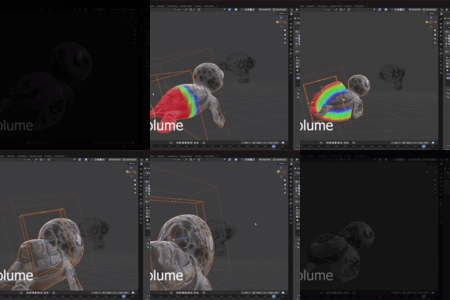
| Select Volume | Select inside a point, line, cube, cylinder, sphere or helper object, with falloff |
| Select Combine | Union, intersect, subtract or exclude two selections |
| Select Ops | Grow, shrink, invert and soften a selection |
| UV & MATERIAL · 3 | |
| UV Map | Planar, Box, Cylindrical or Spherical projection with a real viewport gizmo |
| UV Transform | Tile, offset, rotate and flip existing UVs around a pivot |
| Material | Set a material slot on the masked faces, fixed or random per element / per face |
Good to know
- MAXStack is built from Geometry Nodes node groups delivered as assets, so the modifiers appear in Add Modifier and on the modifier stack like native entries.
- Renders and shares without the add-on: placed modifiers are saved inside your .blend. Teammates and render farms can open, edit and render the scene without installing MAXStack. The add-on is needed to add new MAXStack modifiers and use the custom gizmos and panel.
- Requires Blender 4.3 or newer. Because it is pure Python and Geometry Nodes, it runs on Windows, Linux and macOS.
- Selections are mesh attributes that flow between MAXStack modifiers — and straight into your materials: read any selection with the shader editor's Attribute node to mix shaders or drive values. Bake to a real vertex group when a native modifier needs one.
- The spline modifiers (Lathe, Sweep, Bevel, Extrude, Renderable Spline, Normalize Spline) take a curve object or edges drawn inside a mesh, and keep the object's materials.
- Updating the add-on can auto-upgrade MAXStack modifiers already placed in your scenes, carrying values across by socket name.
- The MAXStack list and tools sit above the modifier stack by default, or move to the viewport sidebar from the add-on preferences if another modifier add-on shares the top of the stack.
What's new
|
1.3 October 2026 |
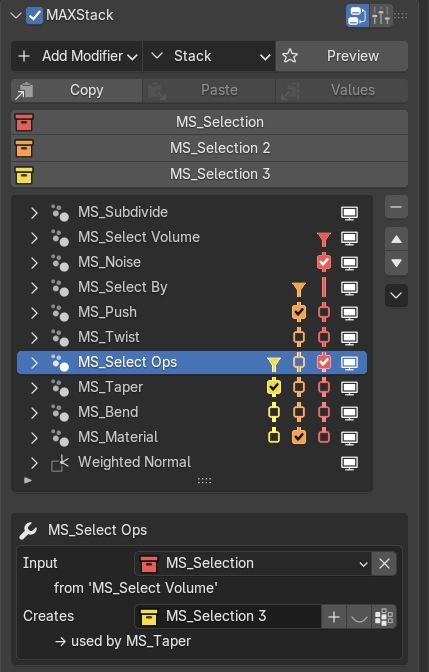
10 new modifiers — 39 in total. New stack UI: every selection gets its own colour lane down the stack list — ▼ where it is created, ☑ where a modifier uses it as its mask, ☐ click to use it there. The active modifier says in plain words where its mask comes from and who uses its selection, and flags a mask that can't work in red. New selections number themselves (MS_Selection 2, 3 …), so nothing gets silently replaced. The classic UI stays one click away. FFD: the 3ds Max lattice deformer inside the stack; Tab edits the control points with Blender's own tools. Shell: give surfaces thickness with rim segments and material slots. Spline pack: Lathe (with a viewport axis), Sweep (ten built-in sections), Renderable Spline, Normalize Spline and Lattice (struts and joints). Also new: Relax, Delete Mesh and Material. Spline Resolution right on every spline modifier, with the curve's own Resolution mirrored in the MAXStack panel. |
|
1.2 October 2026 |
New: Edit Mesh. Edit the mesh anywhere in the stack with Blender's own edit tools (Tab), while the modifiers below stay live. Delta mode keeps the modifiers above adjustable; Replace mode for topology, UV and material edits. Blender 5.2 LTS support. |
|
1.1 September 2026 |
New: Bevel. The 3ds Max Bevel: turn a closed outline (a curve, or a mesh's edges) into a solid with up to three height / outline levels, rounded or filleted edges and caps. Outlines always grow outward and holes shrink, however the spline was drawn. |
|
One install. The modifier system Blender was missing. 39 non-destructive modifiers, Edit Poly-style mesh editing, FFD lattices, spline modeling, real viewport gizmos and a live selection flow — one integrated stack for Blender 4.3+ on Windows, Linux and macOS. |
3ds Max and Autodesk are trademarks of Autodesk, Inc. MAXStack is an independent product and is not affiliated with, sponsored by, or endorsed by Autodesk. "3ds Max" is used only to describe a comparable workflow.
