 Guillaume Hervy


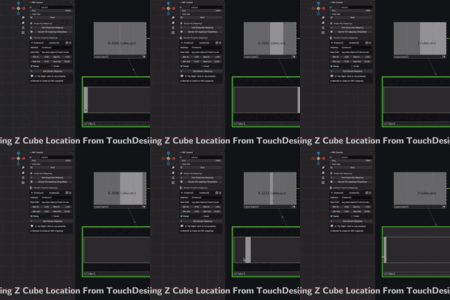
OSC Controller for Blender lets you drive Blender in real time using the Open Sound Control (OSC) protocol. Control shape keys, bones, cameras, lights, geometry nodes and almost any property from tools like TouchDesigner, Pure Data, Max and other OSC-capable applications. Record your live performance straight into Blender's timeline with Auto Key.
Key Features
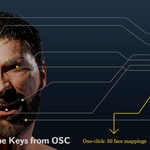
- Shape Key Control — Drive facial expressions and other shape keys from OSC messages. A one-click operator creates a mapping for each of the 52 standard ARKit facial shape keys found on a chosen mesh, or right-click any shape key value and choose "Create OSC Mapping".
- Bone Rotation Control — Map OSC values to pose bone rotations in Euler or Quaternion mode. Configure axis, input/output ranges, clamping and inversion per mapping.
- Generic Property Mappings — Map any OSC address to almost any Blender property: object transforms, camera focal length, light intensity, materials, shader and node inputs, modifier parameters, Geometry Nodes inputs.
- Create mappings with a right-click — Right-click any property and choose "Create OSC Mapping" to generate a mapping with a valid data path and a default 0–1 range. Vectors and colors get one mapping per axis.
- Presets — Save all or selected mappings under a name, reload them in any file (add to the existing ones or replace them), and export or import presets as .json files.
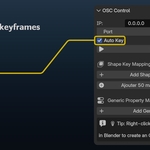
- Automatic Keyframing (Auto Key) — Insert keyframes whenever OSC data changes a property. Ideal for facial capture, audio-driven animation and live performances.
- Built for live use — A background thread and message queue receive OSC; a Blender timer applies updates in batches on the main thread. Unchanged values are not re-written, so a sender streaming constants costs nothing.
- Bundled OSC library — A pure-Python OSC library ships inside the add-on. No external installation or pip setup.
- Easy debugging — A "Print messages to console" option shows every received message (launch Blender from a terminal).
Typical Use Cases
- Facial Animation & Avatars — Connect face-tracking or mocap apps and drive facial shape keys in real time. Set up a full facial rig with the bulk ARKit operator.
- Live Performance & VJing — Control camera moves, lighting, shader parameters, geometry nodes and more from TouchDesigner, Pure Data, Max, MIDI-to-OSC bridges, etc. Combine with Auto Key to record your performance for later rendering.
- Technical & Experimental Workflows — Prototype data-driven rigs, research setups and interactive installations where Blender reacts to external OSC streams.
Requirements & Compatibility
- Blender 4.2 or newer (tested on 4.5 and 5.2)
- Windows, macOS, Linux (anything supported by Blender)
- Ability to receive UDP OSC messages on the configured IP and port
Installation
- Download the ZIP file from Superhive.
- In Blender, go to Edit → Preferences → Add-ons (or Extensions), and choose Install from Disk. You can also drag and drop the ZIP into Blender.
- Enable "OSC Controller for Blender".
- Open the 3D View, press N, and switch to the OSC tab.
Quick Start
- Open the OSC tab in the 3D View N-panel.
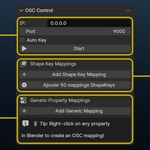
- Set the IP (for example 0.0.0.0 to listen on all interfaces) and the Port (default 9000, must match your sender).
- Optionally enable Auto Key.
- Click Start. The panel shows the address Blender is listening on.
- From your external app, send OSC messages to IP:Port with addresses that match your mappings (e.g. /mouthSmileLeft).
Creating mappings
- Shape keys: in Generic Property Mappings, click "Add ARKit 52 Shape Keys" and pick your mesh, or right-click a shape key value → Create OSC Mapping.
- Bones: in Bone Rotation Mappings, click "Add Bone Mapping", pick the armature and bone, the axis and Euler or Quaternion. Euler values are in radians.
- Anything else: right-click the property → Create OSC Mapping. The mapping contains a valid data path, a generated OSC address and a default 0–1 output range.
Auto Key — When enabled, changes driven by OSC insert keyframes on shape keys (value), bones (rotation_euler or rotation_quaternion), node inputs and sockets (default_value) and other animatable properties resolved through generic mappings.
Documentation & Support
- The Documentation tab covers installation, the panel, creating mappings, Auto Key and troubleshooting.
- Support is provided through Superhive messaging and the product's Q&A. Include your Blender version, your OS and a screenshot of the mapping.
License & Third-Party Libraries
- The add-on code is licensed under GPL-3.0-or-later.
- A pure-Python OSC library (python-osc, Unlicense) is bundled inside the add-on in its own namespace, with its license file.
You are free to study, modify and redistribute this add-on under the terms of the GPL, including in commercial contexts, as long as the GPL conditions are respected.