Osc Controller for Blender - Real-Time Animation Over Osc
 Guillaume Hervy


Blender 4.2 and newer. It is tested on 4.5 and 5.2, including Geometry Nodes inputs, which changed in Blender 5.0.
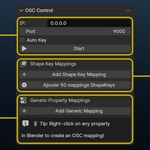
Open the 3D View, press N, and go to the OSC tab. Set IP to 0.0.0.0 (listen on all interfaces) and a port, then click Start. In your sender, use the IP of the computer running Blender and the same port. If sender and Blender are on the same machine, use 127.0.0.1.
- The server is started in the OSC panel (it shows the address it is listening on).
- The port matches on both sides and nothing else is using it.
- The OSC address in your sender matches the mapping's address exactly, including the leading /.
- On another machine, the firewall allows incoming UDP on that port.
- The mapping range suits your values. If you send 0–1, keep Min In 0 and Max In 1.
- Tick "Print messages to console" in the OSC panel to see every message Blender receives. Blender must be launched from a terminal to show them (Windows: Window → Toggle System Console).
Shape keys, bone rotations (Euler or Quaternion), and almost any other property: object transforms, materials, shader nodes, lights, cameras, scene settings and Geometry Nodes modifier inputs.
No. Right-click any property in Blender and choose Create OSC Mapping. For vectors and colors you get one mapping per axis (/x /y /z, /r /g /b /a). The second menu entry creates a single mapping that drives all components with one value.
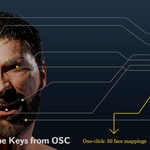
Yes. On a character with the ARKit shape keys, click Add ARKit 52 Shape Keys, pick the mesh, and one mapping is created for each ARKit name found on it. To control a single shape key, right-click its value and choose Create OSC Mapping.
Incoming values are normalized from Min In–Max In and mapped to Min Out–Max Out. You can clamp, invert, or turn remapping off per mapping or globally to pass the raw value through.
Yes. Mappings are stored in the scene, so they are saved with your .blend. For reuse in other files, use Presets: save all or selected mappings under a name, then load them anywhere (add to the existing mappings, or replace them). Presets survive add-on reinstalls, and can be exported and imported as .json files to share between machines.
The OSC server runs in its own thread, and updates are applied in batches on Blender's main thread. Unchanged values are not re-written, so a sender streaming constants costs nothing. The remaining cost is Blender evaluating your rig each time a value changes: heavy modifiers and hair particle systems are the usual culprits, so disabling them in the viewport helps a lot. Keep "Print messages to console" off during performance, and avoid sending far more messages than you need.
Have questions about this product?
Login to message
| Blender Extension Compatible | Yes |
| Sales | 20+ |
| Published | 10 months ago |
| Blender Version | 4.2 - 5.2 |
| Extension Type | Add-on |
| Render Engine Used | Arnold, Blender-Internal, Blender-Game-Engine, Cycles, Eevee, Freestyle, Luxrender, Mental-Ray, Octane, Vray, Yafaray |
| License | GPL |
Discover more products like this
motioncapture animation 52 blendshapes live live control Facial Animation realtime osc touchdesigner shapekey