
PaletteGrid

SavedPixel in Modeling


Item Rating

This item has an average rating of 4 from 7 ratings by the community.

72%
0%
29%
0%
0%

Purchase this item to leave a review!

  • SignalM3
    3 months ago

    Been using this for a little while now and it's honestly become a staple in my workflow. I've ended up using every feature. It saves a ton of time, makes experimenting easy and enjoyable (gradients are not fun without this tool I will die on this hill), and it's one of those things that deserves to be in everyone's toolkit. Super solid tool and definitely beyond worth picking up! Bonus points for the Dev being awesome, highly recommend joining the discord :)

  • Kade Markoux
    5 months ago

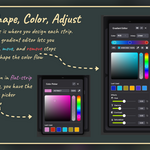
    I was looking for something in the superhive market with blender when I stumbled upon Palette Grid and right away it was an obvious insta-buy! Why? Because making colorful grids by hand in gimp or photoshop is overly tiresome. This Addon on other than simplifies the entire process allowing you to focus on quickly making grids and colors that can be mapped easily to your model but it doesn't stop there, it also lets you go much further by adjusting the levels such as with creating your own gradients with controllable colors and even allows you to change how they're projected onto your models giving you superior control over the final look of your model or character. Additionally, the Developer has also been extremely helpful when issues or questions arise and that truly means a lot.

  • Alaa
    5 months ago

    I purchased the addon and I’m using Blender 5.0 on a Mac Studio. I installed it correctly, and the addon appears under Edit > Preferences > Add-ons, but I can’t find it in the right-side sidebar when I press the N key.

    • RAYEN BAHRI

      5 months ago

      Thanks for your trust and for your feedback!

      You’ll find it in the N panel of the **UV Editor** specifically, not globally.
      Also, please check the documentation (savedpixel.com/docs), it’s very detailed and should help you get everything set up quickly.

      If you still can’t find it or need any help, feel free to contact me anytime, I’ll be happy to assist

  • Klo Works
    6 months ago

    The add-on works great and is well written for documents.
    I hope this add-on continues to add new features and improvements.
    @Andrii mentioned some great points, which I 100% agree with.
    One point: the price with a discount is perfect, but without it, it may make it hard for people to purchase.

    • RAYEN BAHRI

      6 months ago

      Thank you for the kind words and the 5 stars, really appreciate it!

      Lots more features and improvements are coming, so stay tuned. And if you ever have suggestions, feel free to reach out anytime!

  • Andrii
    6 months ago

    Not a bad add-on, but for the price, the functionality is currently quite limited. However, it will definitely save hours of alt-tabbing and re-exporting textures back into Blender. Still, $40 is a bit steep for such a small feature set for the same price, there are add-ons that overhaul half of Blender's functionality, but that's beside the point.

    I'd like to suggest a few improvements for future updates. If you manage to implement them, it would massively increase the value of this add-on:

    - First of all, the ability to call the pie menu directly in the 3D viewport, along with other shortcuts. Having to go back to the UV editor to press the pie menu after every vertex selection, and then sometimes switching back to the 3D viewport, is a bit of a tedious process. Having a shortcut right in the 3D view would be much more convenient, so you'd only need to return to the UV editor when you actually need to interact with a new color.

    - It really lacks the ability to work with a canvas that isn't a "full gradient". What I mean is, with this texturing method, I often make the gradient palette small and place it off to the side, while using the majority of the texture space for hand-painted textures (similar to Synty Studios' textures). It would be awesome if the gradient field could be scaled into a corner of the UV map using a transform tool, while still being able to edit the gradients just as easily, leaving room for an image with manual textures next to it. This probably requires some kind of layering system like in Photoshop, but it would be an absolute game-changer.

    - Following up on the point above, another highly convenient feature would be: when scaling the gradient palette window into the corner of the texture, it would be great if the UV islands already assigned to those gradients scaled proportionally along with it. Of course, you can manually adjust this by scaling those UV islands overall, but an automated feature doing it simultaneously would be incredibly handy. And generally speaking, having some kind of mapping recalculation for these UV islands in case the mapping somehow gets messed up would be great.

    These are just the first suggestions that came to mind. If you managed to implement them, it would make the workflow insanely convenient

    • RAYEN BAHRI

      6 months ago

      Andrii, thank you so much for the detailed feedback and the review

      Love your suggestions, the pie menu in the 3D viewport and auto UV adjust on palette resize are both coming in the next few updates!

      Your ideas are really interesting, would love to chat more about them, feel free to reach out via inbox, [email protected] or on Discord!

      On the price, pricing tiers and a demo version are both in the works, more on that soon!

  • Kaitlyn
    4 months ago

    I really love the concept of this add-on. It simplifies everything I'm already doing and I can forsee using this often. Unfortunately, it crashes a lot. I've had multiple crashes from normal use, like when deleting or adding to the number of colours on a gradient, which has caused me to lose work... so I want to recommend this add on, but be aware to up your autosaves/back ups.

    I bought this as part of the Super Add-Ons Bundle, which states that there are no future updates available to me for this addon, so it doesn't seem like I will be able to benefit from future bug fixes. So, great add-on but watch out!

  • Gawriljuk
    6 months ago

    It does exactly what it promises—and does it very well, too. Nevertheless, in my opinion, it doesn't quite justify the price tag. I really hope many more updates are still to come so that this can be viewed as a worthwhile investment; I would love to see this add-on receive a little more love. One improvement I’d wish for is for the gradient to function more like a separate layer, allowing users to hand-paint directly onto the model; currently, anything I try to draw on top of it simply disappears—which, for me, is a major drawback.

    • RAYEN BAHRI

      6 months ago

      Thanks for the kind words and honest feedback!

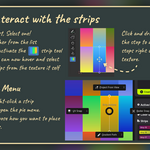
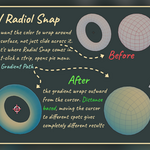
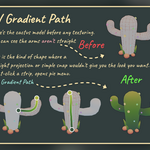
      Just to clarify the drawing point, if you want to paint over the texture, the workflow is UV Snap rather than the gradient tool. UV Snap places your UVs onto a flat color strip, giving you a clean mapped surface you can then paint over freely. The gradient and radial tools work differently, they map your geometry along the strip automatically as a 1D gradient as documented, so painting on top of that isn't the intended flow.
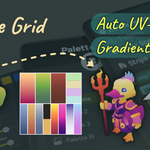
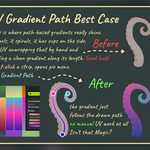
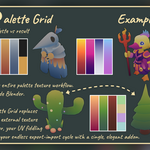
      Palette Grid is built specifically for stylized gradient game assets, the kind of pipeline where one palette texture and one shared material colors your entire asset library. What's already in v1, UV Snap, gradient and radial tools, live color editing, and path-based gradients, covers the full stylized game asset pipeline end to end. That said, UV Snap gives you the flexibility to mix gradient strips with hand-painted details when you need it.

      On the price, you raise a fair point. Right now it's a flat price for everyone, whether you're a solo hobbyist or a studio, which isn't ideal. We're actively working on introducing proper pricing tiers so individuals and students can get in at a more accessible price point, and a demo version is also in the works so people can play around before committing.

      On features, a lot is coming. AO-based falloff, auto edge stylization, and a strong focus on making the workflow even more game production friendly are all in the pipeline. v2 is going to take things significantly further than where we are today.

      If you have feature suggestions, we'd love to hear them, drop us a message at [email protected] or come find us on Discord. Every bit of feedback shapes where this goes next.

      Appreciate you taking the time, hope this helps!

  • Displaying 7 ratings
  • Perfect for solo creators and freelancers. Includes a single-user license with lifetime updates.

    $25
  • Designed for small teams. Covers up to 5 users with full access and lifetime updates.

    $60
  • Built for growing teams and studios. Supports up to 15 users - starting at just $9.30/seat. Includes lifetime updates.

    $140
  • For larger teams and organizations. Please contact [email protected] before purchasing to confirm your setup.

    $500
$25

Have questions about this product?
Login to message

Details
Blender Extension Compatible Yes
Sales 1100+
Rating
7 ratings
Published 6 months ago
Blender Version 4.2 - 5.2
Extension Type Add-on
Render Engine Used Arnold, Blender-Internal, Blender-Game-Engine, Cycles, Eevee, Freestyle, Luxrender, Mental-Ray, Octane, Vray, Yafaray
License GPL