 HR
HR




STEP Importer 3.0
Bring complex CAD assemblies into Blender with the fidelity, structure, and control needed for production work.
For Blender 4.5 through 5.2 on Windows 10/11 64-bit.
STEP Importer is more than a file converter. It creates a linked Blender workflow around the original CAD source, so you can keep large assemblies organized, preserve their visual fidelity, and refine only the parts that need more detail.
Why STEP Importer 3.0
- Preserve CAD intent. Keep assembly hierarchy, part names, transforms, units, colors, per-face materials, repeated components, and CAD surface shading.
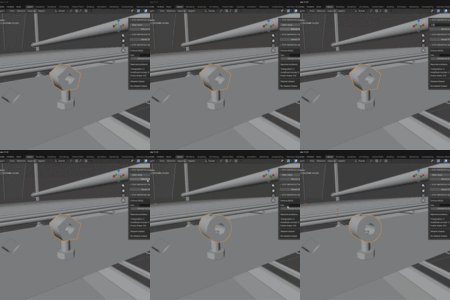
- Refine only what matters. Change mesh quality and rebuild selected parts without importing the complete assembly again.
- Stay efficient during repeated work. Shared parts remain linked, while a quality-independent background cache can accelerate future rebuilds even after reopening Blender.
- Choose the right level of control. Use one clear Mesh detail value or switch to separate linear and angular tessellation settings.
- Work directly in Blender. No separate CAD converter, Python, pythonOCC, or Open CASCADE installation is required.
The result: organized, production-ready CAD scenes that remain adjustable after import instead of becoming a one-time, disconnected mesh conversion.
What is new in version 3.0
- New native StepCore import pipeline powered by Open CASCADE.
- One Blender Extension package for Blender 4.5 through 5.2.
- Preserved CAD hierarchy, transforms, units, colors, and material assignments.
- Repeated CAD parts remain linked through shared Blender mesh data.
- CAD surface normals by default for faithful mechanical shading.
- Rebuild selected parts after saving, closing, and reopening the Blender file.
- Quality-independent background cache for faster future rebuilds.
- Improved multi-material rebuilds, relinking, cache management, and selection tools.
Mesh quality controls
Choose the control style that fits your workflow:
- Simplified provides one Mesh detail value. Increase it for smoother curved surfaces and close-up renders, or reduce it for lighter scenes.
- Detailed exposes linear and angular deflection separately for precise CAD tessellation control.
Both modes control the same CAD tessellator. Switching between them does not modify the model by itself, and the original STEP file is never changed.
CAD fidelity
- CAD assembly hierarchy and part names.
- Original placement, transforms, scale, and units.
- Repeated and mirrored components.
- STEP colors and Blender material assignments.
- Per-face materials on supported multi-material parts.
- CAD surface normals for smooth curved surfaces and controlled hard edges.
- Y-up or Z-up scene orientation.
Advanced viewport-normal options include CAD surface normals as the quality-preserving default, CAD seam correction for selected shallow or tangent seams, and Blender angle normals as a faster alternative. These options change shading normals, not the original CAD geometry.
Linked STEP workflow
Imported objects retain a reference to their source STEP file. You can:
- Change mesh quality after import.
- Rebuild only selected parts.
- Rebuild the complete linked model when required.
- Restore the link after reopening a Blender file.
- Relink the model if the source STEP file is moved.
When a rebuilt object represents a repeated CAD part, matching instances are relinked to the updated mesh automatically.
Fast future rebuilds
With Fast future rebuilds enabled, STEP Importer prepares one quality-independent CAD cache in the background. It stores a reusable CAD document and part map instead of a separate full mesh for every quality test.
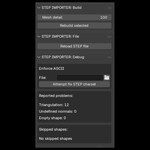
Once prepared, the cache can substantially reduce the time needed to rebuild individual parts, including after Blender has been closed and reopened. Cache entries are managed automatically and can be inspected or cleared from the STEP Importer N-panel.
Scene organization
- Flat object layout for lightweight organization.
- Nested collections following CAD groups without parent Empty objects.
- Parented CAD hierarchy for easier subassembly selection and transforms.
CAD hierarchy and Y-up orientation are the default settings.
Advanced and troubleshooting options
- Disable CAD color import when a material-free scene is preferred.
- Keep empty CAD placeholders for hierarchy inspection.
- Use Clean planar triangles to remove unnecessary coplanar triangulation from selected parts or a complete linked model.
- Use Skip faulty solids only as a recovery option when invalid solids prevent an import from completing.
Clean planar triangles is optional and disabled by default. It changes Blender mesh topology, can make import or rebuild slower, and does not modify the source STEP file. Skip faulty solids can produce an incomplete model because invalid geometry is intentionally omitted.
Compatibility
- Blender 4.5, 5.0, 5.1, and 5.2.
- Windows 10 and Windows 11, 64-bit only.
- STEP and STP files.
- Microsoft Visual C++ Redistributable 2015-2022, x64.
The Extension includes its own Python and Open CASCADE runtime. A separate Python, pythonOCC, or Open CASCADE installation is not required.
Installation
- Download STEP_IMPORTER_3.0.0_Blender_4.5_to_5.2_Windows_x64.zip from your Superhive library.
- In Blender, open Edit > Preferences > Get Extensions.
- Open the menu in the upper-right corner and choose Install from Disk.
- Select the downloaded ZIP without extracting it.
- Enable STEP Importer if Blender does not enable it automatically.
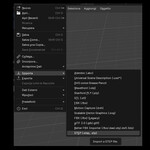
- Use File > Import > STEP Importer 3.0 (.step, .stp).
Updating from STEP Importer 2.x
Version 3.0 is distributed as a Blender Extension. Install the new package from disk and use the new STEP Importer 3.0 entry in Blender's File > Import menu. The previous 2.0 packages remain available as a legacy version in your Superhive library.
When a newer 3.x package is installed over version 3.0, the managed conversion cache is preserved. Manual removal of the previous 3.x release is not normally required.
Known limitations
- Version 3.0 is currently available for Windows 64-bit only.
- The main cold import is synchronous, so Blender can remain busy while a heavy STEP file is converted.
- Background cache preparation starts after import and can use CPU and disk resources while running.
- Heavy CAD prototypes can still require long first-import times.
- Corrupt or unusual STEP exports can require Skip faulty solids or file-specific investigation.
Credits and license
STEP Importer is distributed under the GPL. It includes code derived from the upstream STEPper Blender add-on and introduces a new StepCore helper pipeline built around Open CASCADE. Source notices and third-party license information are included in the package.
Related CAD workflow tools
Hole Remover detects and removes circular through-holes in imported CAD meshes.
Duplicate Finder and Remover helps review and remove duplicate or overlapping mesh objects.
General Blender Add-ons
Multi-Camera Preview turns Blender cameras into a visual board for comparing, organizing, and refining shots at a glance.

